
Getting a realistic sound from programmed drums takes a strategic approach, not just random timing offsets. This article explains specific techniques: keeping the kick on beat 1 exactly on the grid while pushing the snare on beats 2 and 4 slightly late to create a laid-back feel, using the swing function to make eighth- and sixteenth-note patterns bounce, and applying randomize to hi-hats and ghost notes. By using your DAW's functions to reproduce the human groove seen in a real drummer's waveforms, you can create a convincing drum track with a tension that subconsciously draws the listener in.
Why Adjust Note Timing
Naturally, real drums are played by a human,
so not every note lands exactly on the beat.
To reproduce that human quality, shift the notes slightly earlier or later to create a groove.
Tips for Adjusting Timing When Programming Drums
Just shifting notes at random is no good. It takes you further and further from the ideal drums.
You may even end up finding that exact timing was better after all (lol).
To keep that from happening, remember the tips introduced below.
Program the Kick on Beat 1 Exactly on the Grid
If you look at the waveforms of a top drummer's playing, they are frighteningly accurate.
Beat 1 in particular is the axis of the rhythm.
"The tempo and groove are determined by the relative timing between beat 1 and the next note."
So leave the axis, beat 1, untouched and exactly on the grid,
and create variation with the timing of the next note.
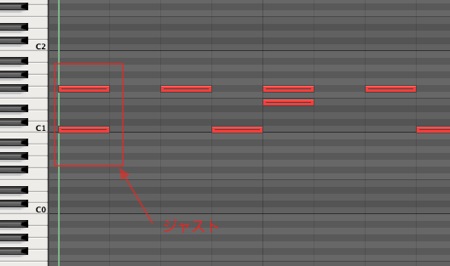
Timing of the Snare on Beats 2 and 4
The timing of the snare on beats 2 and 4 can greatly change the rhythm.
Moving it earlier creates a pushing, driving feel,
while moving it later creates a laid-back feel that gives the rhythm tension.
Here we shifted it slightly later to create a laid-back feel. (Click the image to enlarge)

Add a Moderate Swing
Swing means the rhythm "bounces."
Every person has their own sense of time, and it shows most in eighth- and sixteenth-note patterns.
Swinging the hi-hats and snare ghost notes moderately creates a groove.
DAW software has a swing function, so make use of it.
Of course, you can also apply it to kick offbeats. (Click the image to enlarge)

Apply Randomize to Hi-Hats and Ghost Notes
Related to the above, when a human plays fine eighth or sixteenth notes,
no two land at exactly the same timing.
DAW software has a function called "randomize" to express that randomness.
The right amount is small enough that it makes no obvious audible difference.
Doing this creates a tension that subconsciously draws the listener in.
You can also use it in a special way: apply randomize with a large value to deliberately create sloppy drums.
Randomize/Humanize Explained
Checking the Results
Let's listen to the result of using the methods above.

↑ Before adjustment: exact timing and identical velocity.

↑ After adjustment: we adjusted velocity in addition to timing.
You should be able to hear that it now has much more dynamics and ebb and flow.
For this programming, we used the instrument software BFD2.
Frequently asked questions
Q1. What should I adjust first when programming drums?
Start by fixing the kick on beat 1 exactly on the grid. This becomes the axis of the rhythm and the reference point for adjusting the timing of other notes. Even top drummers are frighteningly accurate on beat 1.
Q2. When adjusting snare timing, what is the difference between moving it earlier or later?
Moving it earlier creates momentum and a forward-leaning feel, while moving it later creates a laid-back feel with tension. Choosing according to the song's groove and genre gives you more expressive drums.
Q3. How do swing and randomize differ?
Swing intentionally makes eighth- or sixteenth-note patterns bounce to create a groove. Randomize shifts those notes randomly by tiny amounts to reproduce the unpredictable variation of a human drummer. Combining the two produces more natural drums.
NEW ARTICLES
Latest English Articles











