To start making music in Logic Pro 11, you first need to install it from the Mac App Store and complete the initial setup. This article walks through the whole process after installation: choosing complete mode, setting up your audio output and input devices, downloading the Sound Library, and creating a new project. In particular, setting the sample rate to 48 kHz gives you a good balance between audio quality and computer load. You will learn everything needed to set up your environment when starting music production from scratch as a beginner.
Logic Pro 11 is a powerful music production application for Mac. This article explains the steps a beginner needs to get ready reliably, from installing it via the App Store through the initial settings. It covers configuring your audio devices, installing the Sound Library with its wide range of instrument sounds, and creating a new project. Once these settings are complete, you will have an environment where you can start making music right away, and a practical DTM setup that handles everything from recording vocals and guitar to editing.
Learning Logic Pro 11

Miyakawa
In this series, we create a song from scratch in Logic Pro and explain in detail the functions, operations and steps you need to take a song all the way to completion.
Even if you have bought Logic Pro but find it difficult to operate and cannot get as far as making a song, we will proceed in an easy-to-follow way, using as an example a pop song that combines a wide variety of sounds, from acoustic instruments such as acoustic piano and guitar to synthesizers.
We will also cover how to record vocals and guitar and how to edit the recorded data, so the series is useful not only for making songs but also for anyone who wants to use Logic Pro for recording and editing.
Installation and Initial Setup Video
Selected Questions and Answers from the YouTube Video

I'll be studying with this! My question: what should I do if I can't come up with melodies (I can't play the piano)?

With Logic Pro's Piano Roll, you can enter notes one at a time with the mouse. Start by making a short phrase of about four notes, then try lengthening the notes and changing their pitch little by little.
I started composing today. As someone else also wrote, splitting the loop at 20:18 doesn't respond and I can't do it. Is this a bug? Also, when joining split regions back together, what is the difference between regions that can be joined and those that can't? I'd appreciate your advice.
Control + L is not a "normal split." It converts the looped extension of a region into individual regions. If it does not respond, try running it from the menu via Edit > Convert > "Convert Loops to Regions." The key command may also be conflicting with another function, so please check the assignment for Control + L in the Key Commands settings as well. As for joining, ordinary MIDI and audio regions can be joined, but Apple Loops and pitch-shifted audio may not be joinable in some cases.
Sorry for the basic question. Under the option to choose a track type, there is no Session Player. What should I do?
Session Players are a feature of Logic Pro 11 and later, so they do not appear in Logic Pro 10.x or earlier. Check your version under Logic Pro > About Logic Pro, and if possible, update to Logic Pro 11 or later from the App Store.
Sorry to ask. At 2:56, I believe it says that downloading the entire Sound Library requires 85.75 GB, but in my case all available packs only came to 44.39 GB. I think my version is the latest, so why is that?
The size shown in the video reflects the environment at the time of recording, and it can vary depending on the Logic Pro version and the content already installed. Apple's official technical specifications state that installing the full Sound Library requires 72 GB of free storage space. For that reason, the size displayed may not match the video. Just to be sure, open "Logic Pro > Sound Library > Open Sound Library Manager" and check that no uninstalled items remain!
I always enjoy your videos. I recently made my Logic debut using this video as a reference, but there was no tutorial when I launched it. Do I need to download it separately? Thank you in advance.
Thank you for always watching our videos! The tutorials are not a separate download; they used to appear when creating a new project. However, they are not shown in the current version, so the specification may have changed.
At 1:58:09, reverb is being applied to the original backing track. What should I do?
If reverb is being applied to the backing track, check that you are not sending from the backing track to the same reverb. Also, if the dry vocal itself is getting heavily reverbed, check that you have not inserted the reverb as an insert effect, and also check whether the return side is set to 100% Wet.
I'd like to try making it myself, so could you tell me the lyrics of the song created in this video? Also, can I launch and use Hatsune Miku and similar software in Logic Pro?
The lyrics for the part used in the video are as follows (English translation of the Japanese lyrics). ------------------ But you know, I want to become it, I want to be needed. Falling and rising again, over and over, will I someday become it? So as not to stain the embers that remain, I put on a mask and play along. ------------------ As for singing voice software such as Hatsune Miku, some products can be used in Logic Pro, but conditions differ depending on the product and your Mac environment, so please check the official page before purchasing. Hatsune Miku NT official page: https://sonicwire.com/product/virtualsinger/special/mikunt
What should I do when there's no Sound Library Manager...? At 2:55, I do have Sound Library, but when I click it, it takes me to the additional packs screen...!!!
Are you using Logic Pro 12? If so, the way to open the Sound Library Manager has changed. It is introduced in the video below, so please use it as a reference! https://youtu.be/Er3n5s_GCPI?si=PqeoeorPQn8IGI0D&t=45
I can't split a region I extended with Control-L. What should I do?
Place the playhead where you want to split, select the region you want to split, and press "Command+T" to split it.
Please tell me how to add Auto-Tune in Logic Pro! I want to record hip-hop!
Logic Pro comes with a built-in Auto-Tune-like plug-in called "Pitch Correction." You can insert it from the Audio FX slot of the vocal track via "Pitch" → "Pitch Correction."
At 1:06:43, when I remove instruments, the fills disappear too 😢
If the "Fill Amount" value is turned down, fills will not be generated, so try moving the knob to raise the value.
When I connect my guitar, the sound distorts, and with clean tones or acoustic guitar almost nothing comes in. It sounds harsh and crackly and I can't record at all. What is the cause? It plays normally in GarageBand, so I don't think it's an equipment problem...
If it works normally in GarageBand, it is probably not a hardware problem, but just in case, please check the following: •Whether the sound is clipping at the "Gain" on the audio interface itself •In Logic Pro "Settings" → "Audio" → "Devices," raise the I/O Buffer Size to "128" or "256" •Check that the "Input Device" in Logic Pro "Settings" → "Audio" and the track's "input channel (Input 1, etc.)" are correct
When recording vocals, the waveform appears and I can hear my voice properly in my headphones, but there's no voice in what I recorded... why? (crying)
One possible cause is that the "I" (Input Monitoring) button on the recorded track is turned on. Try turning it off when playing back. If that does not solve it, please also check the following: •Whether another track is soloed (S button) •Whether the track in question is muted (M button) •Whether the track's volume fader is pulled all the way down
Sorry for the basic question. I'm a university student who bought the app yesterday. I want to remix a song, but how do I download the original source audio and paste it into Logic Pro?
On the Mac version, you can import audio by dragging and dropping it directly.
Thank you for your help. Can I set it up so that the playhead bar and ruler on the side of a plug-in I've opened (such as VoiSona or EZdrummer) also change the position in the project's ruler? Changing the playback position with the bar on the plug-in side is not reflected in the project.
EZdrummer is not an ARA plug-in, so ARA sync functions are not available. VoiSona is an ARA-compatible plug-in, but if your Mac uses Apple silicon, Logic Pro's ARA functionality is limited, and you will need to wait for an update from Apple that adds native ARA support.
Sorry for the long message. I'm thinking of starting to compose music. Is it better not to skimp on the MacBook and DAW software? My idea is to get by with something like an M3 MacBook Air and the DAW software that comes bundled when you buy an audio interface.
It depends on what you want to do, but as an introduction, an M3 MacBook Air and a bundled DAW are enough to get started. Try starting with that setup first, and when it starts to feel insufficient, consider upgrading your gear or software at that point!
Can I buy it on the Play Store too??
The product can only be purchased on the App Store.
I can't split the region at 20:18. Has the specification changed?
This operation applies to looped regions. It cannot be used to split ordinary regions. Could you confirm that this is the case?
At 9:22, if the velocity button doesn't exist, where do I display it?
If you hide the Library (shortcut key "Y") and the Inspector (shortcut key "I"), the editor area becomes wider and the velocity appears. Alternatively, you can show or add it with the ">" mark to the left of icons such as the snare. Please give it a try.
I can't do the "keep only the drum fills" step. What should I do? When I deselected all the instruments to include in the pattern, all the fills disappeared instead of remaining.
If the "Fill Amount" value is turned down, fills will not be generated, so please try moving the knob to raise the value.
Thank you for such an educational video 😊 I have a question. After running automatic mastering, I tried to adjust the level a little myself by lowering the AutoEQ bar, but the bar automatically goes back and I can't change it. What am I doing wrong in this case...😢 Sorry for the trouble, but I'd be grateful for a reply.
A possible cause is that you touched Auto EQ while the automation mode of the Stereo Out channel was set to a "writing mode" such as Touch. We recommend checking whether anything has been written to the automation.
I'm having trouble entering a five-note piano arpeggio. What should I do?
I think this method is the best. https://www.dropbox.com/scl/fi/xxonpcb2ahwucbea7n7te/IMG_0451.MOV?rlkey=ajyuvlbavkjve19ymdty7b140&st=jbvrrjxo&dl=0
Is a microphone essential for composing?
No. You need one when recording vocals and the like, but it is not essential.
I can't loop a region all the way to the end. What could be causing this? I'm stuck with the L key not responding (crying).
If enabling the setting shown in the image in the Inspector applies the loop, a different shortcut may have been assigned. https://www.dropbox.com/scl/fi/q2a6c86434pejhcqk8l0u/Loop.jpg?rlkey=84if7ywwyjpg17j4nl0sfqkib&dl=0
Is cycle recording only possible with a MIDI keyboard?
Of course, audio recording is also possible.
Does Final Cut work the same way?
Final Cut is for video editing, so it works quite differently.
This is wonderfully in-depth and very helpful! I have only gone through it once from the beginning, so I may have missed it, but there is one thing I would like you to add: the project save settings. There is a row of checkboxes for package, folder, audio files and so on, and I thought it would be great if you could add your recommended project save settings. I'd be grateful if you could tell me.
Thank you for watching the video. Our recommended setting is to save as a package with all items checked. That way, all the materials used in Logic are included in the project file, which makes handling and managing it easier.
?si=QuPgxSQg7clvRNYS&t=75
How to Install Logic Pro

First, we will start by explaining how to install Logic.
Install "Logic Pro" from the App Store in the Mac menu.
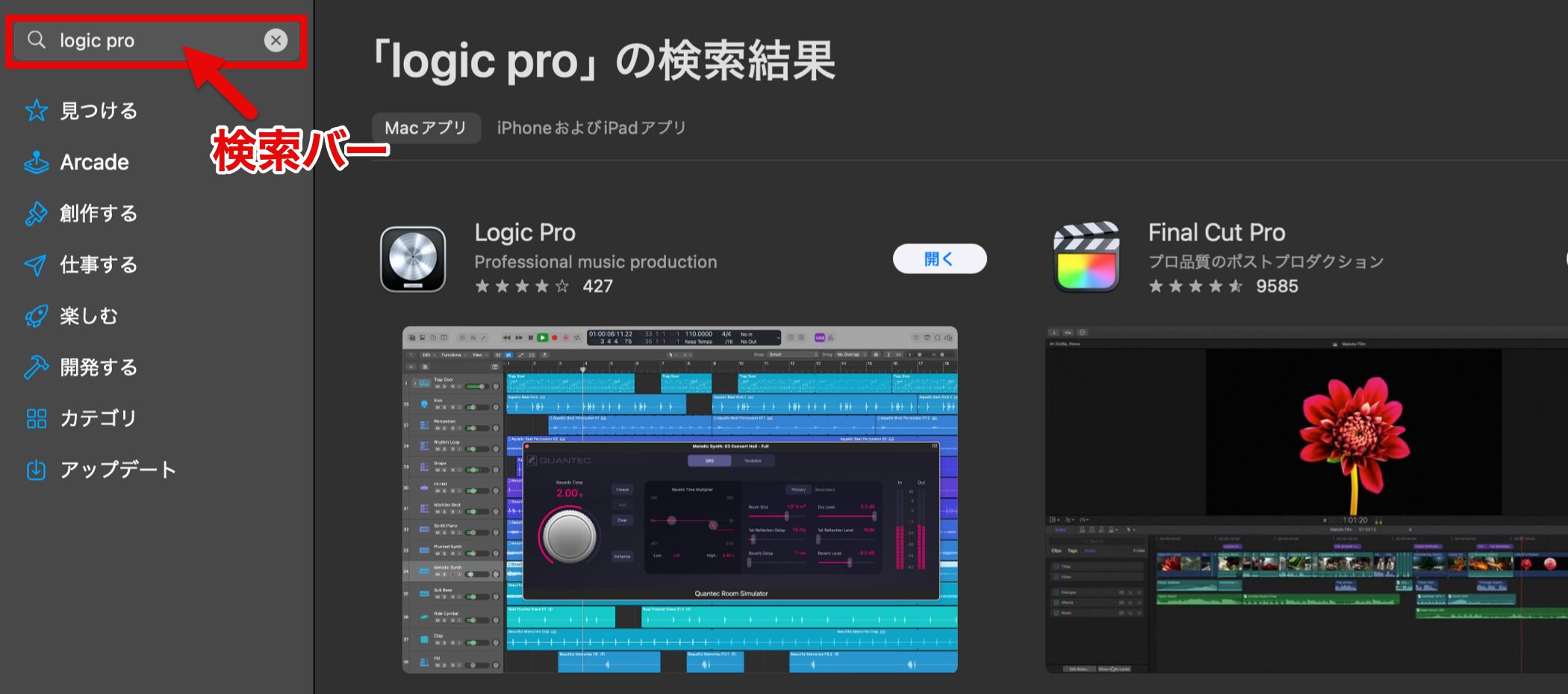
Type "Logic Pro" in the App Store search bar to display the product, then complete the purchase and download it.
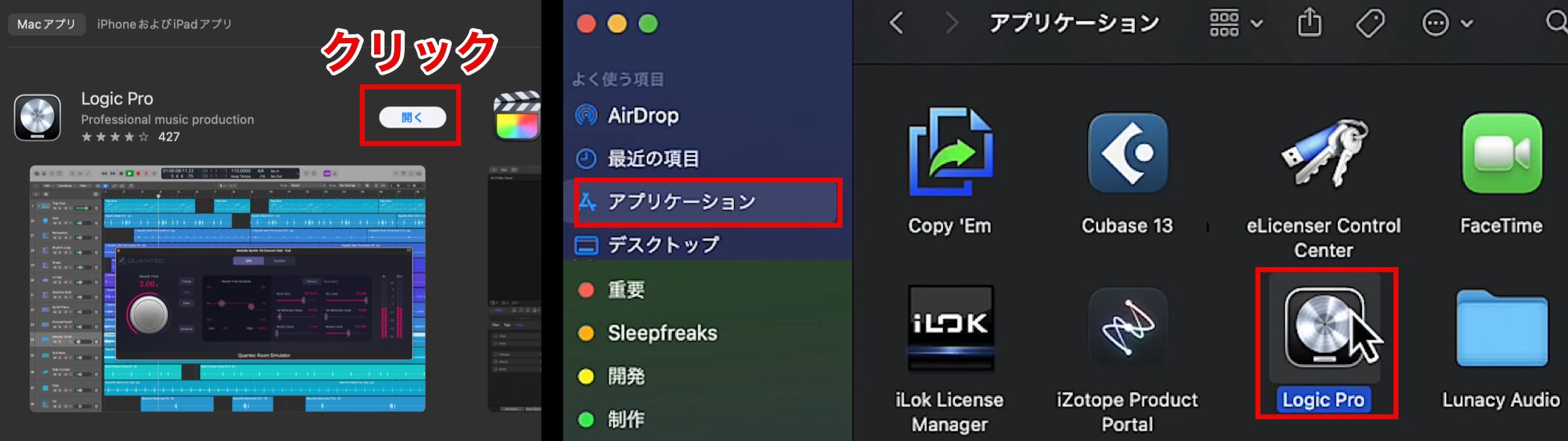
Once the installation is complete, open the app.
Click "Open" on the app screen, or from the second time onward you can open it from the Applications folder.

The screen above appears the first time you launch it.
Here, we recommend selecting "complete mode," which lets you use all of the features.
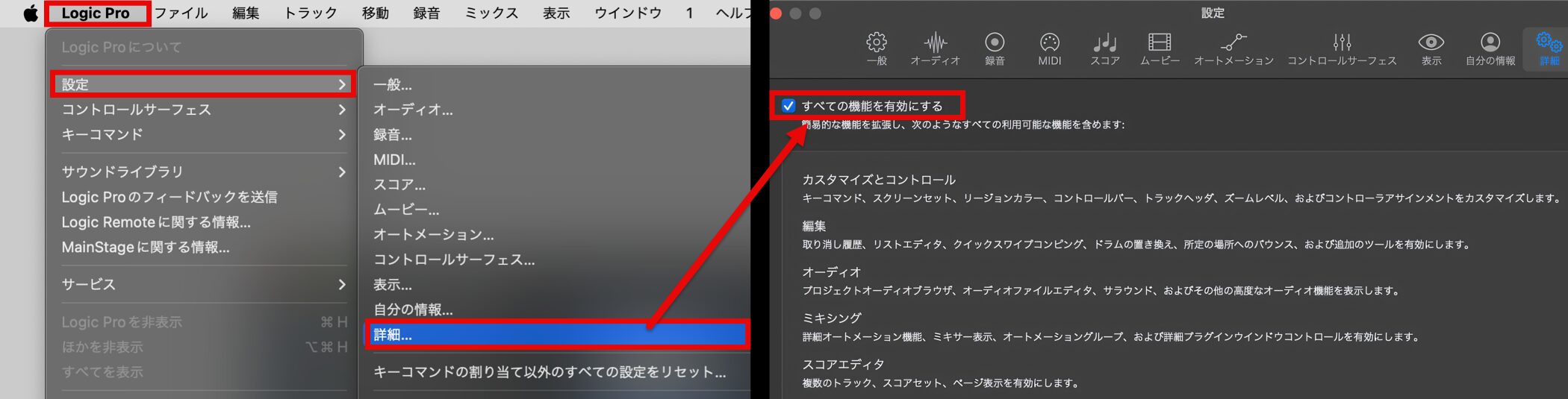
Even if you choose "simplified mode" by mistake, you can change it from the "Logic Pro" menu via "Settings" → "Advanced" → "Enable Complete Features."
A Tip If You Use Logic Pro Often
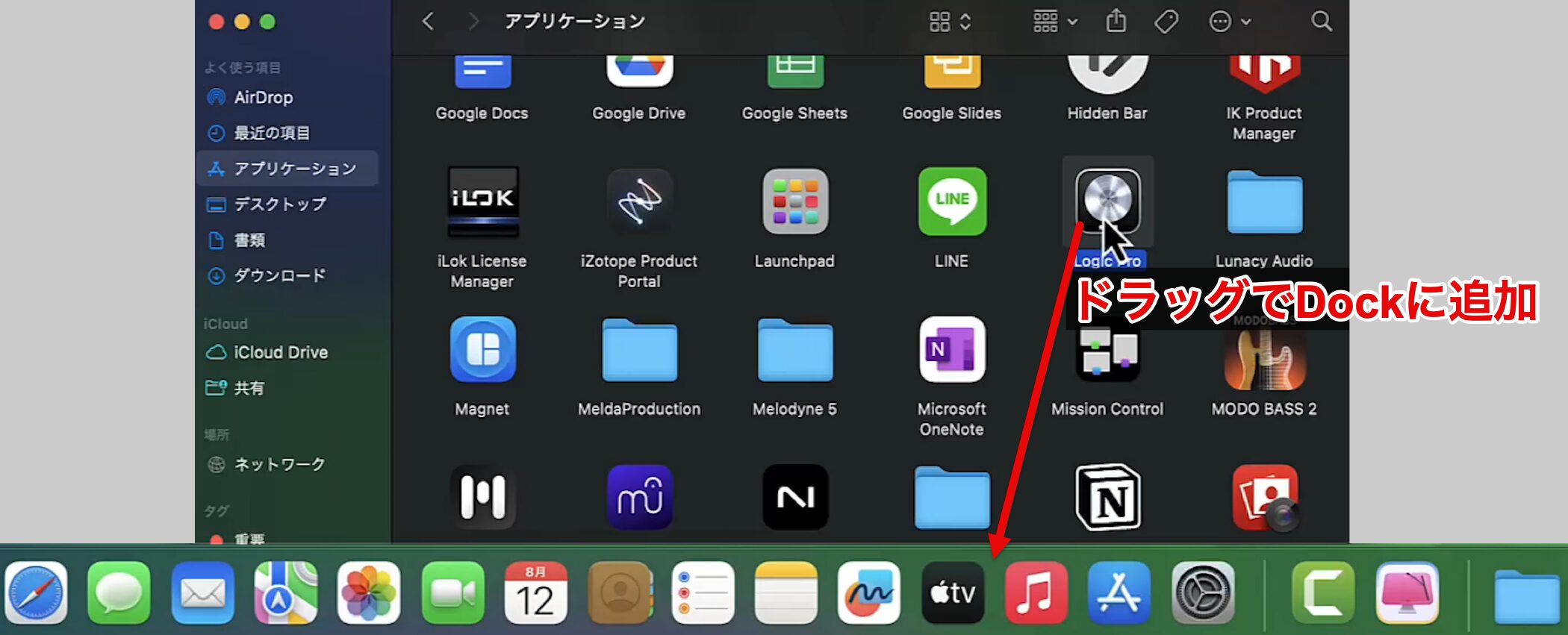
If you use Logic Pro often, it is convenient to drag the Logic Pro icon from the Applications folder and add it to the Dock.
Audio Settings
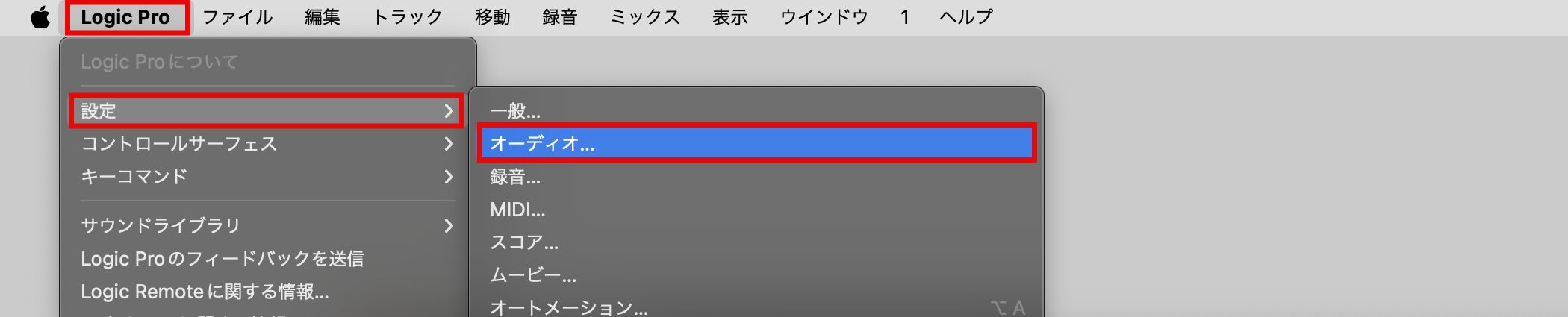
After launching, configure the audio settings so that sound plays correctly.
If you are already using Logic Pro and "the sound has stopped working," these settings may also solve the problem.
From the "Logic Pro" menu, select "Settings" → "Audio."
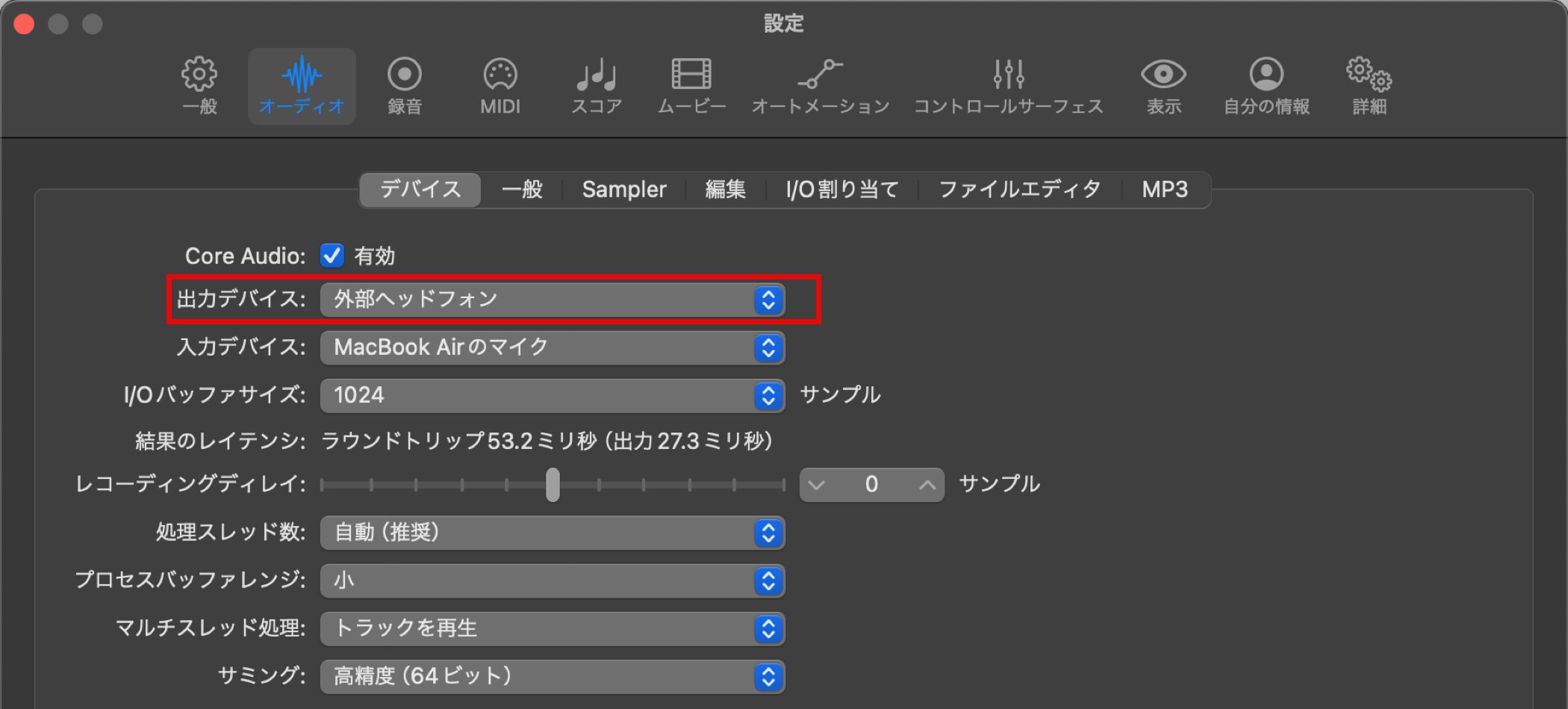
Use "Output Device" to set where audio is output.
For example, select the output device you want to use, such as your Mac's built-in speakers, an audio interface or earphones.
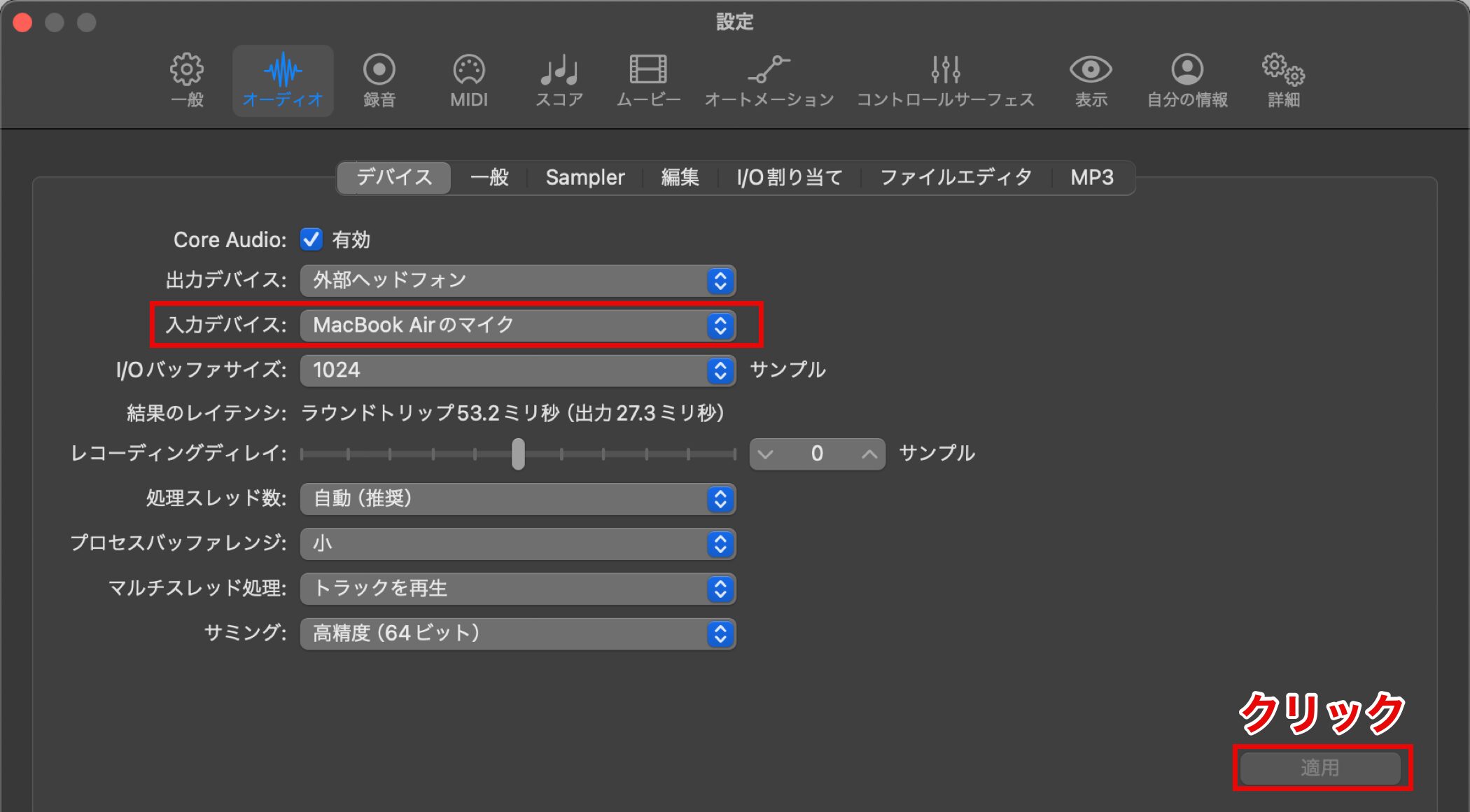
When recording with a microphone or instrument, set the input device in the same way.
We will explain the details later, so for now just apply the default settings as they are.
When the settings are complete, click "Apply."
Downloading and Installing the Sound Library
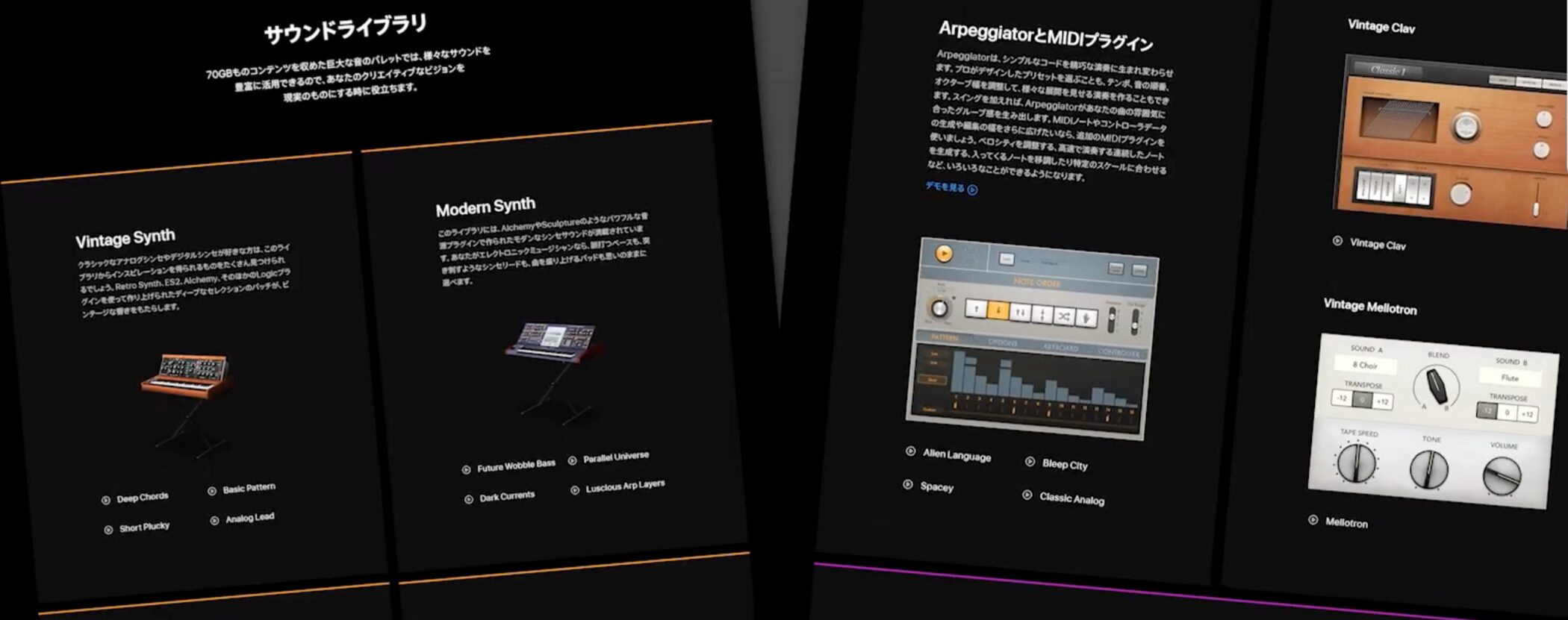
Next, install the Sound Library.
The Sound Library contains a wide variety of instrument sounds and sound effects, and installing it increases the number of sounds available for music production.
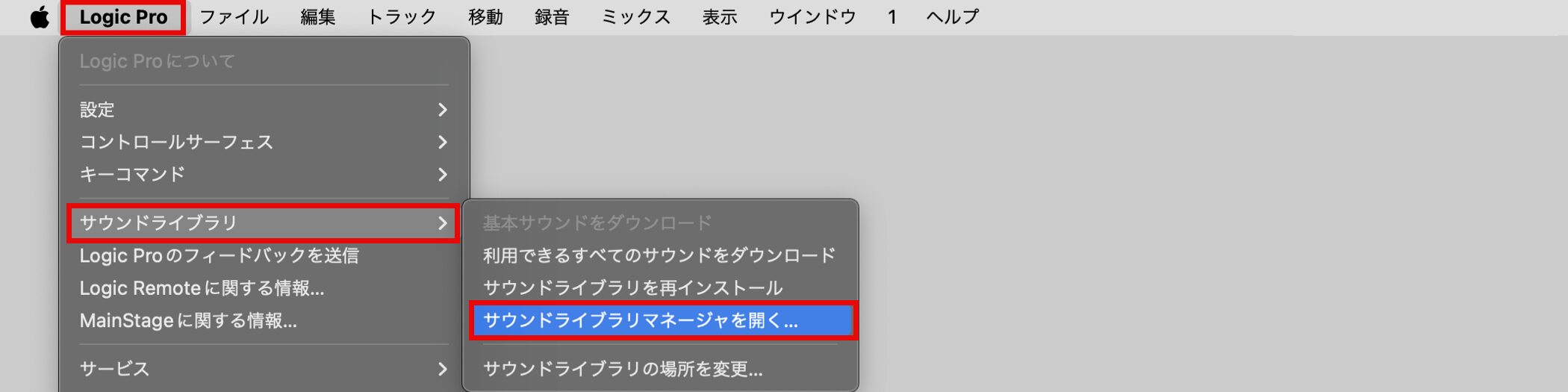
From the "Logic Pro" menu, open "Sound Library" → "Sound Library Manager."
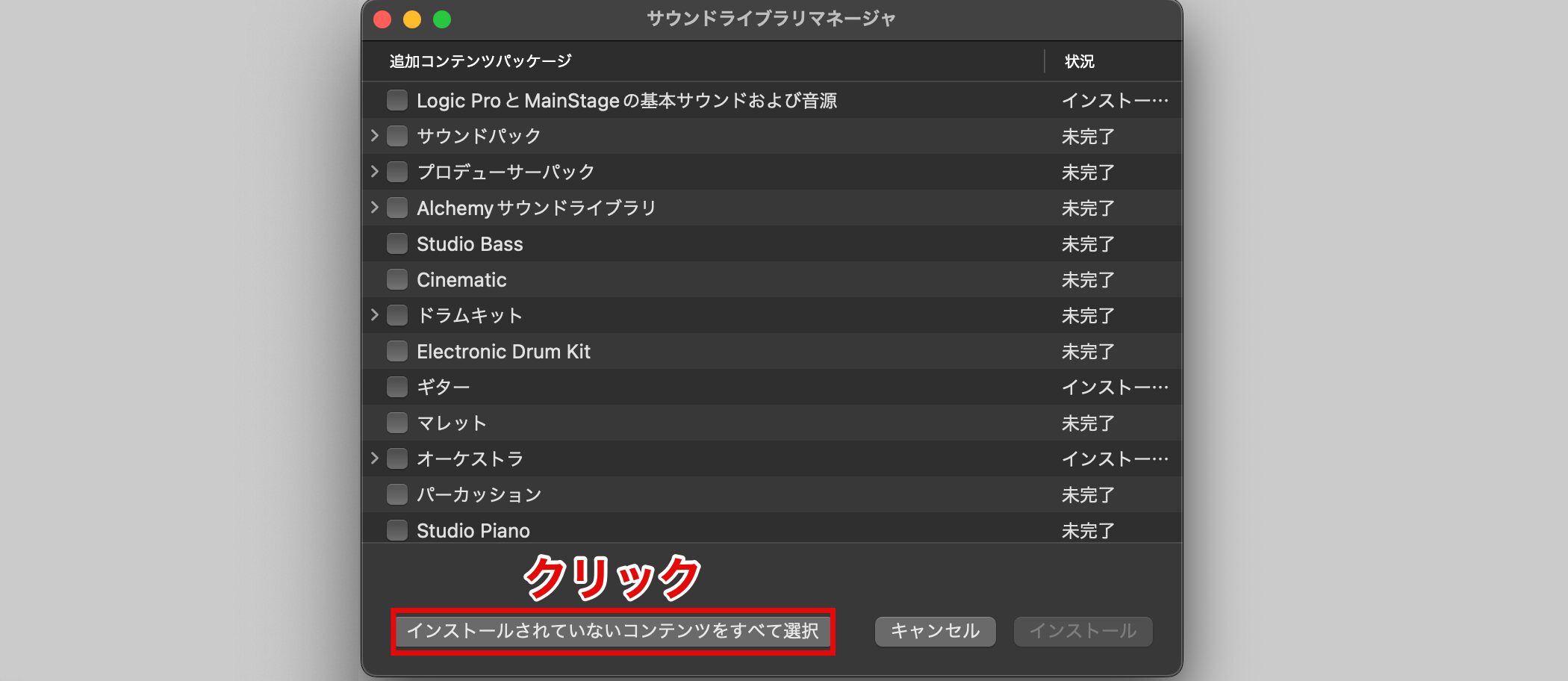
Click "Select All Uninstalled."
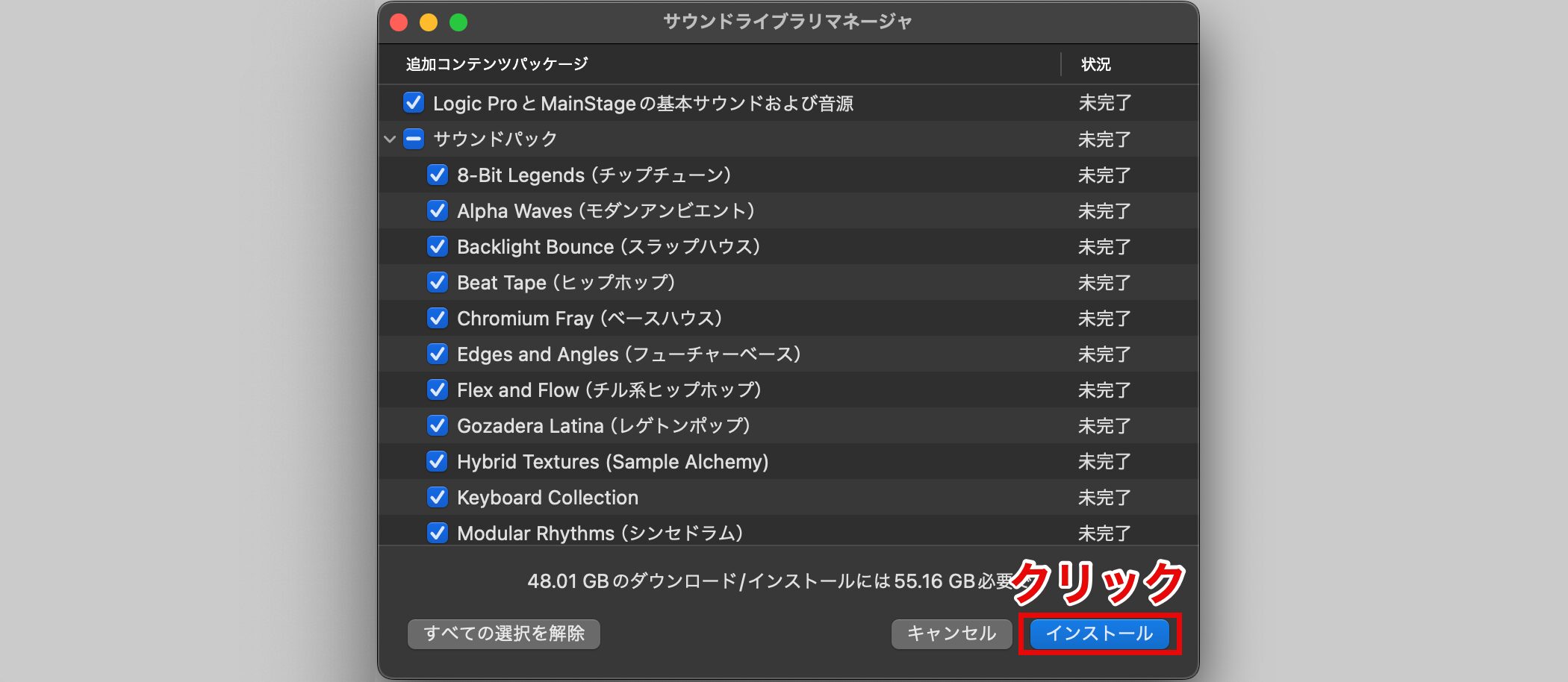
Click "Install" on the next screen, and all of the content will be downloaded automatically.
This Sound Library is very large, so depending on your environment, installation may take some time.
Creating a Project
Once the Sound Library installation is complete, create a new project.
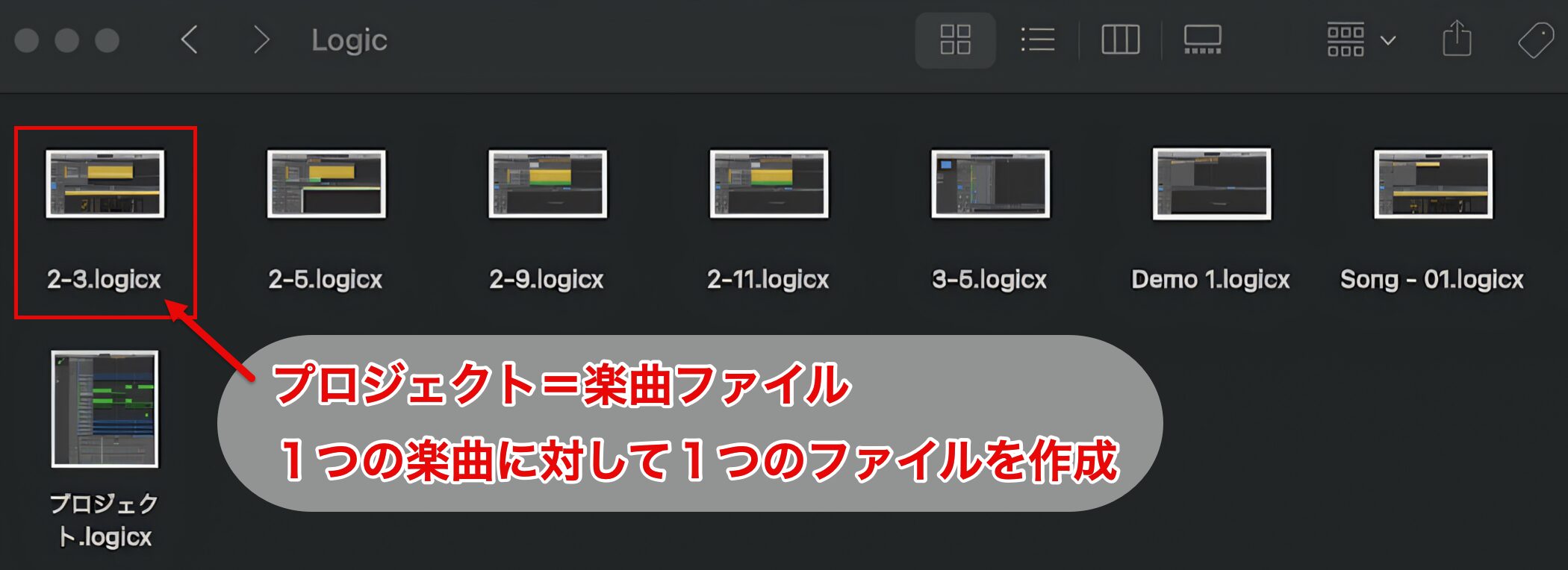
A project is a song file, and you create one file for each song.
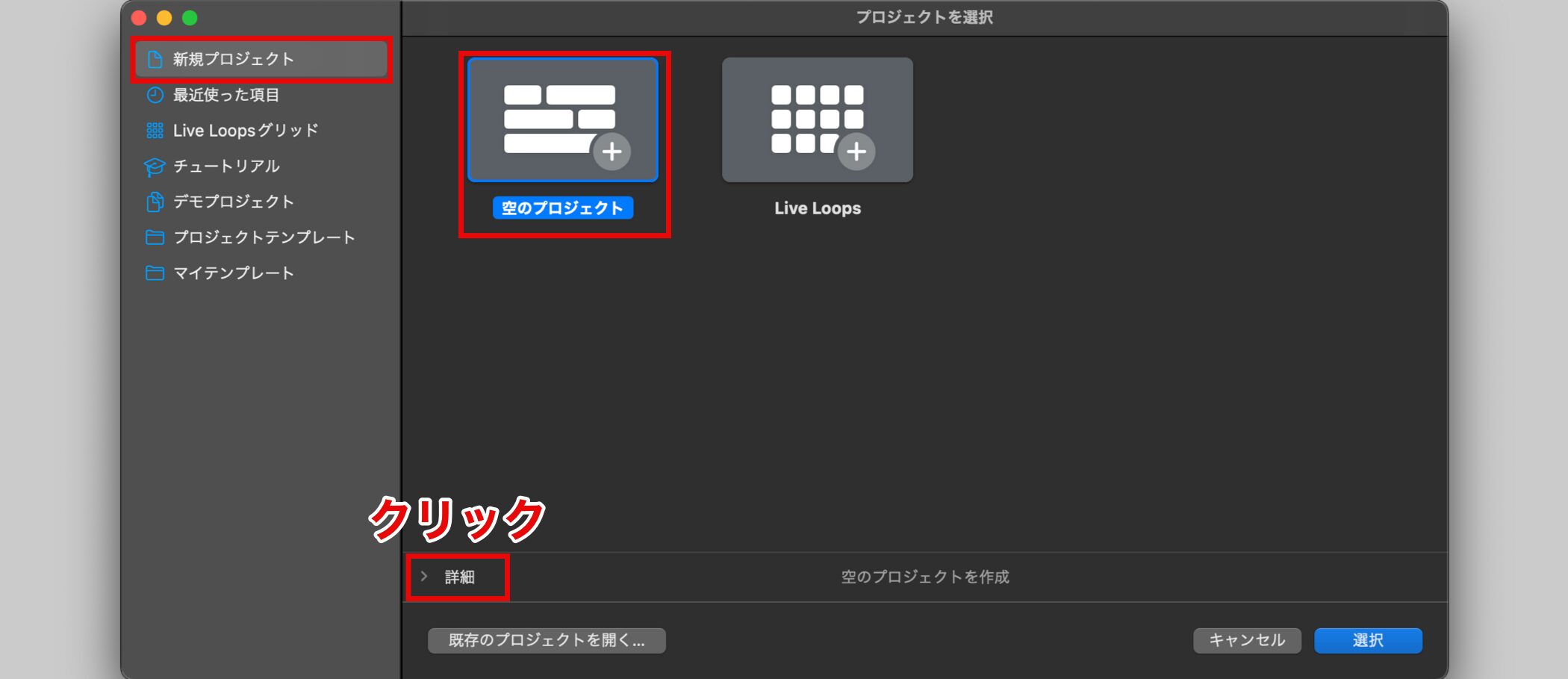
The project selection screen shows tutorials and templates, but to begin, choose "Empty Project" under "New Project."
Click the "Details" button to display various setting items.
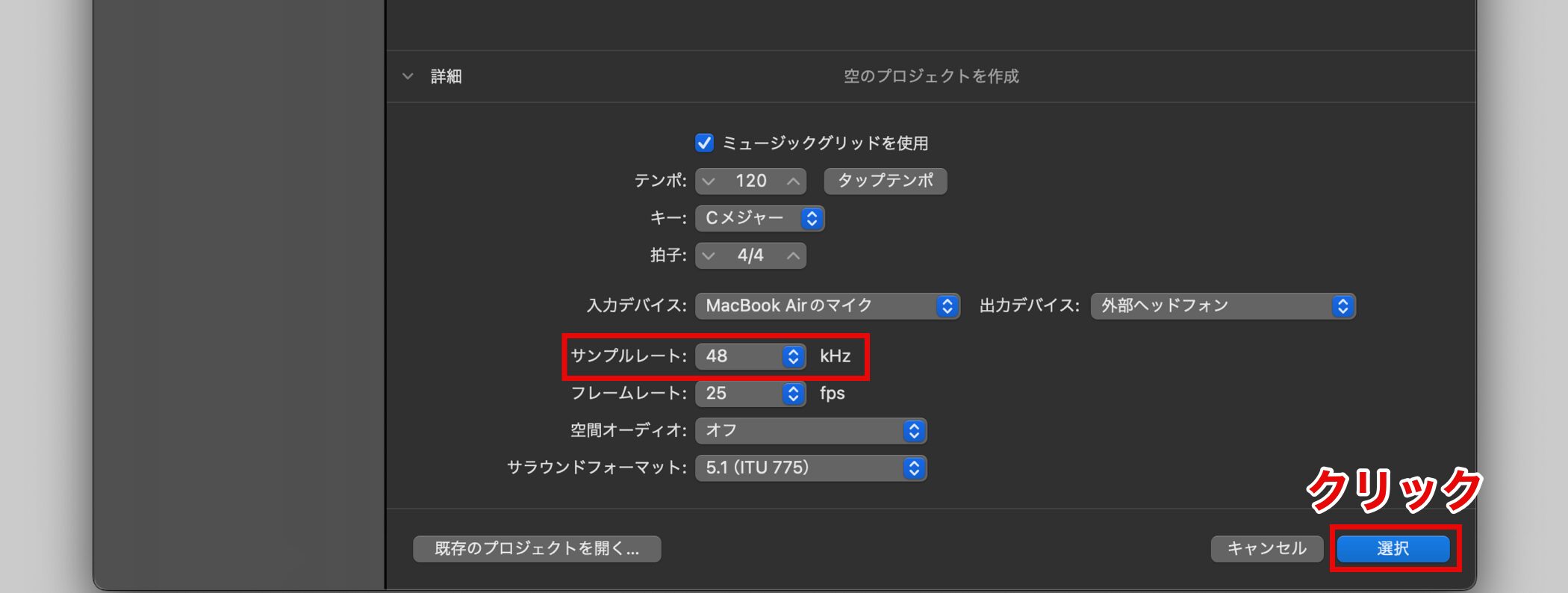
These settings can be changed later, but we recommend deciding the "Sample Rate" in the initial settings.
Higher values give higher audio quality, but values higher than necessary make your computer sluggish, so here we set it to 48 kHz, which is commonly used in music production.
When the settings are complete, click "Choose."
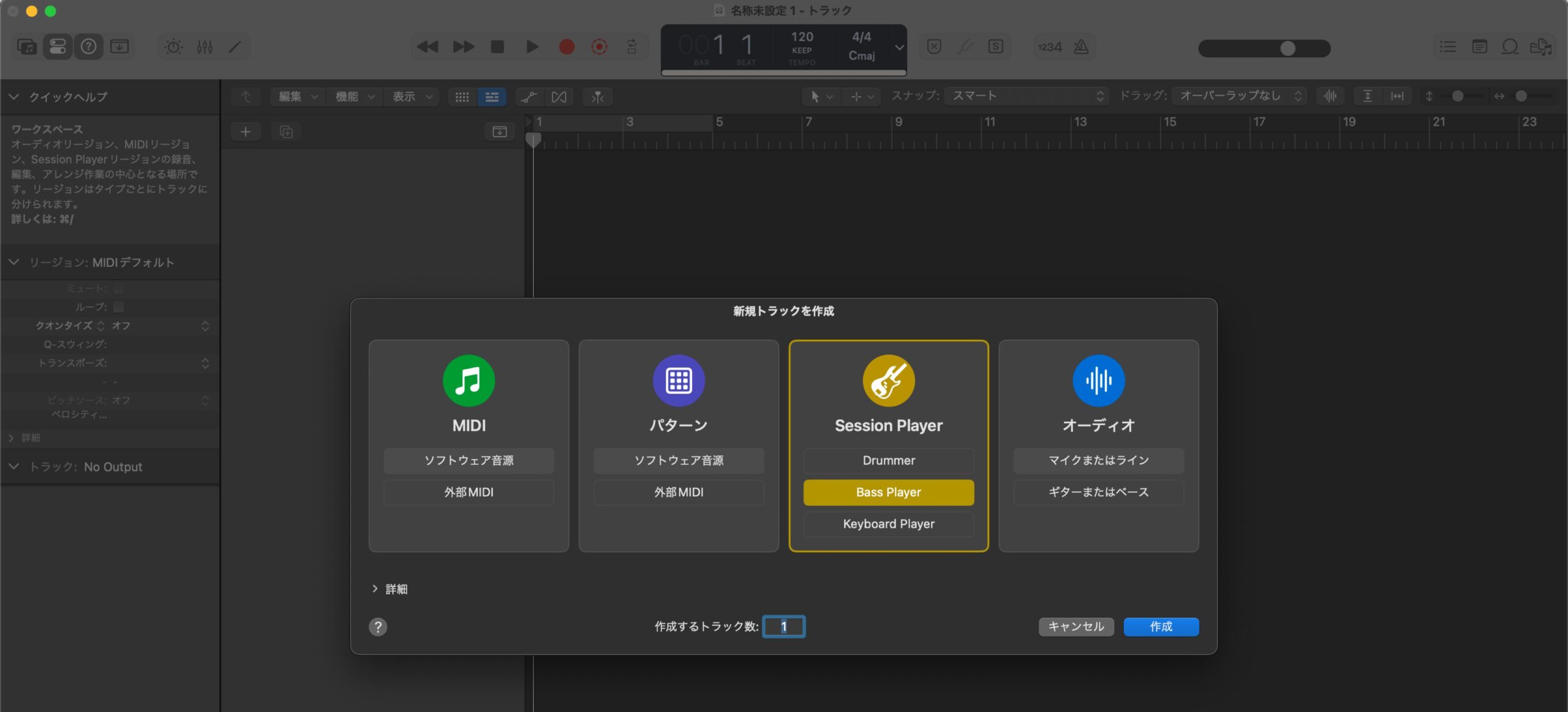
The screen above opens.
The basic Logic Pro settings and preparation for creating a project are now complete.
From the next installment, we will start making a song.
Frequently Asked Questions
Q1. What should I do if there is no sound after installing Logic Pro 11?
Open "Settings" → "Audio" from the "Logic Pro" menu and select the correct speakers or earphones under "Output Device." Check that the device is recognized correctly, then click "Apply" to complete the setting.
Q2. I chose "simplified mode" on first launch. Can I change it?
Yes, you can. Switch to complete mode from the "Logic Pro" menu via "Settings" → "Advanced" → "Enable Complete Features."
Q3. How long does it take to install the Sound Library?
The Sound Library is very large, so the time varies with your internet speed and computer specifications, and in some environments it can take a long time. We recommend running it on a stable connection.
Q4. Can I change the sample rate set when creating a project later?
Yes, it can be changed later, but it is recommended to decide it in the initial settings. In typical music production, 48 kHz is standard and offers a good balance between computer load and audio quality.
NEW ARTICLES
Latest English Articles