
Studio One's FX Chain feature lets you save the effect settings and combinations you use often and recall them instantly on other tracks or in other songs. Just load the effects you like, set them up, and save them with a name, and you greatly reduce the effort of setting up the same thing manually every time. It lets you achieve consistent sound design across multiple projects and dramatically improves the efficiency of your music production.
Instantly Recall Effect Settings and Combinations
As you produce songs,
the effects and settings you use often become fixed.
Setting them up every time is quite a chore.
The FX Chain feature eliminates that effort.
You can use the settings and combinations you use often on other tracks or in other songs.
How to Create an FX Chain in Studio One
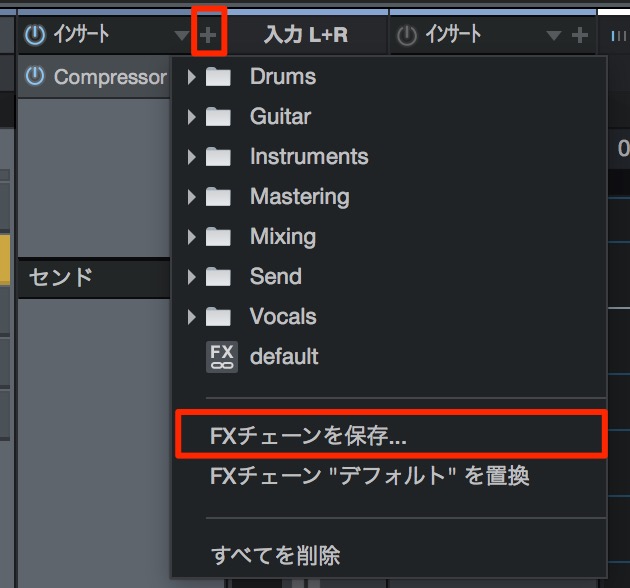
↑ Load the effects you like.
If you also want to save the settings, set them the way you want.
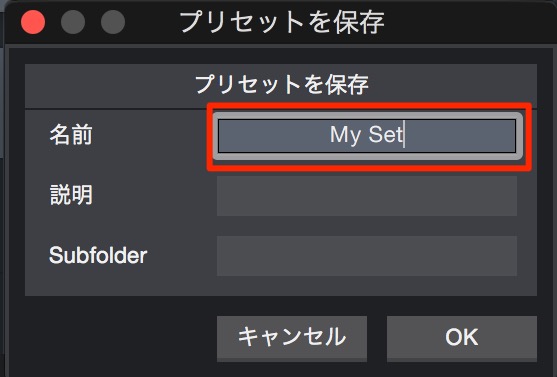
↑ Enter any name and click "OK."
That completes the setup.
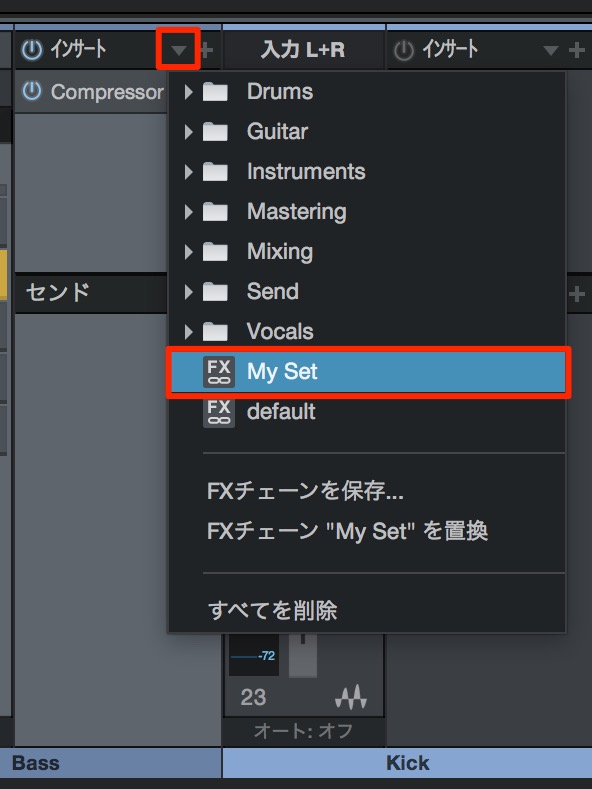
↑ Click the inverted triangle on the track where you want to recall the effects,
and the FX Chain you saved appears.
Just click it to apply the settings and combination.

Frequently asked questions
Q1. What is Studio One's FX Chain feature?
The FX Chain feature saves multiple effects and their settings together so you can apply them all at once on other tracks or in other songs. It saves you from loading your usual settings over and over.
Q2. How do I save an FX Chain?
Load the effects, set them up the way you like, then just save them with any name. After that, clicking the inverted triangle on a track shows the FX Chain you saved.
Q3. Can I reuse a saved FX Chain in multiple songs?
Yes. A saved FX Chain can be recalled on other tracks and in other songs, so you can reuse the same settings across multiple music projects.
Q4. Does an FX Chain save only the effects?
No. It can also save the effects' settings, so you can save and use a complete sound design combination.
NEW ARTICLES
Latest English Articles











