
By using the articulation feature in Logic Pro X 10.4, you can manage key switches across multiple third-party instruments in a unified way. This article explains that even when different products such as Kontakt and Vienna Instruments each have different key switch settings, creating and customizing Articulation Sets in Logic Pro lets you switch playing techniques with the same unified notes. This greatly improves playing efficiency in DTM production and makes working with multiple instruments more intuitive.
Customizing key switches for AU instruments you've bought
In the previous article, we explained Studio Horns and the very handy articulation feature.
These articulation switches can also be applied to newly purchased third-party products.
Here we'll explain how to set this up in detail.
Articulation settings for Studio Strings and third-party instruments
Selected questions and answers from the YouTube video

Nice to meet you! How do you upload the Logic screen in such high quality like this? If you don't mind, please tell me.

We export the recorded video in 4K quality after editing and upload that file.
Sorry this isn't a question about this topic. I'm recording guitar with a Zoom R8. Is it possible to connect it to Logic Pro X and edit? For example, recording just guitar and bass on the MTR and then programming drums onto that data in Logic. Sorry for the long message. If possible, I'd appreciate a reply or an explanation in a video.
We haven't used the product, so we can't be certain, but we think it's possible. When recording on the MTR, make sure to play in time with the metronome. Then transfer the data to Logic. Page 102 of this manual seems to cover it. https://www.zoom.co.jp/sites/default/files/products/downloads/pdfs/J_R8.pdf
Setting up an Articulation Set
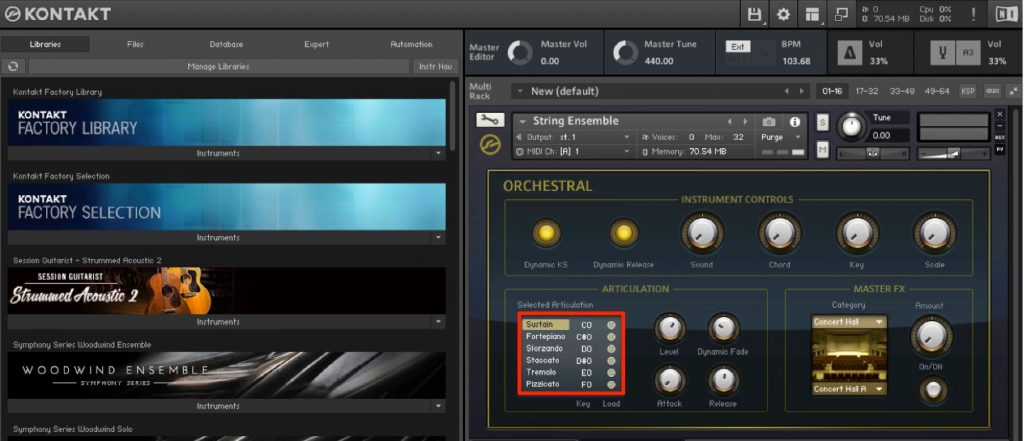
Here we'll use "Strings Ensemble," included in Kontakt, as an example.
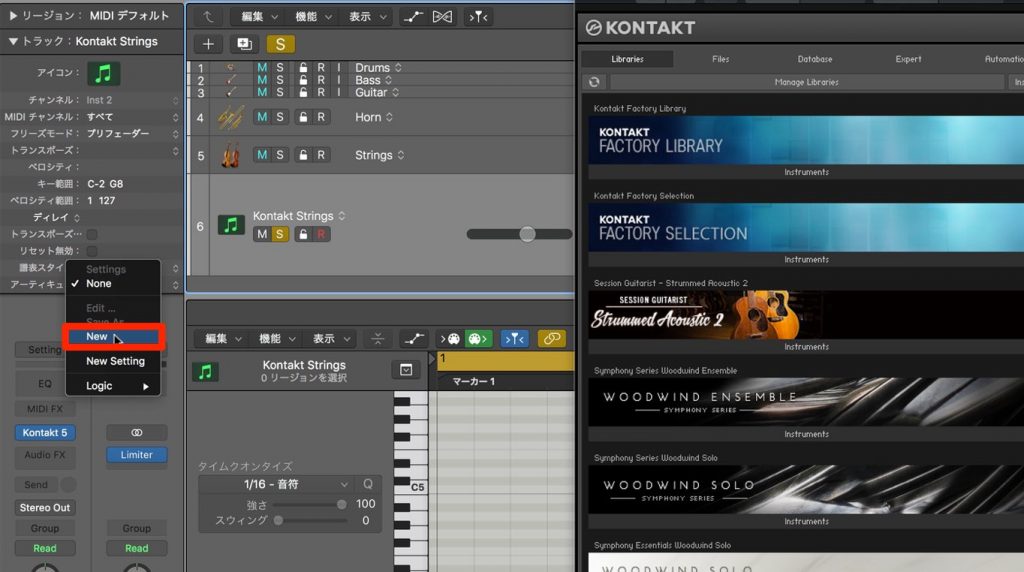
Launch the instrument and select "New" from the articulation section of the Inspector.

A window like this appears.
Define the playing techniques in "Articulations" in the center.
Use "+" to add as many playing techniques as there are articulations, and give each the name you want in "Name."
Here I registered two playing techniques: "Stac (staccato)" and "Trem (tremolo)."
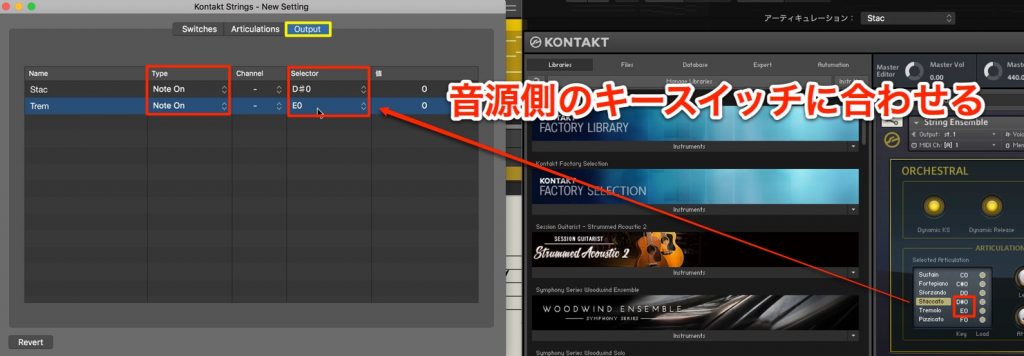
Next, select the "Output" tab.
The Articulations you registered are displayed, so set "Type" to "Note On."
In the "Selector" section, specify the note that switches the articulation.
That completes the setup.
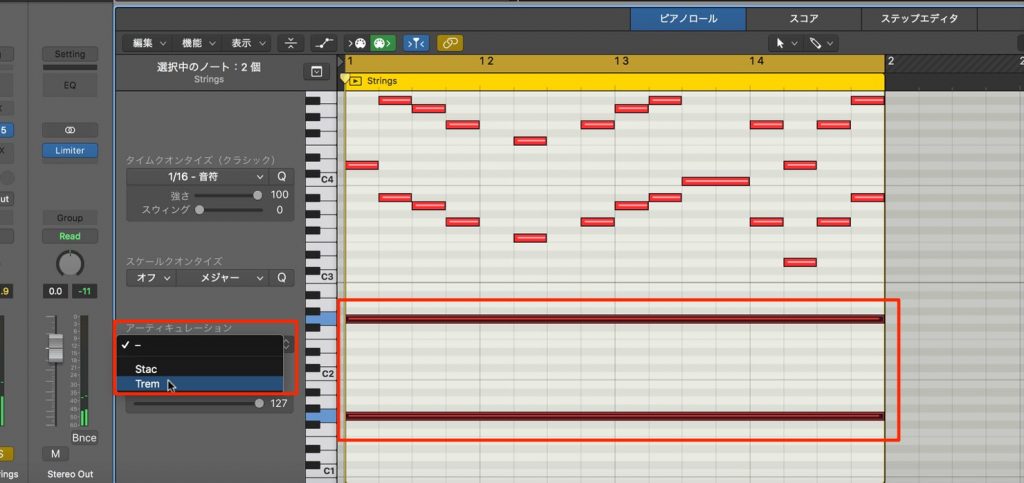
Specifying an articulation for a note changes the playing technique.
You can even assign different articulations to notes placed at the same point in time.
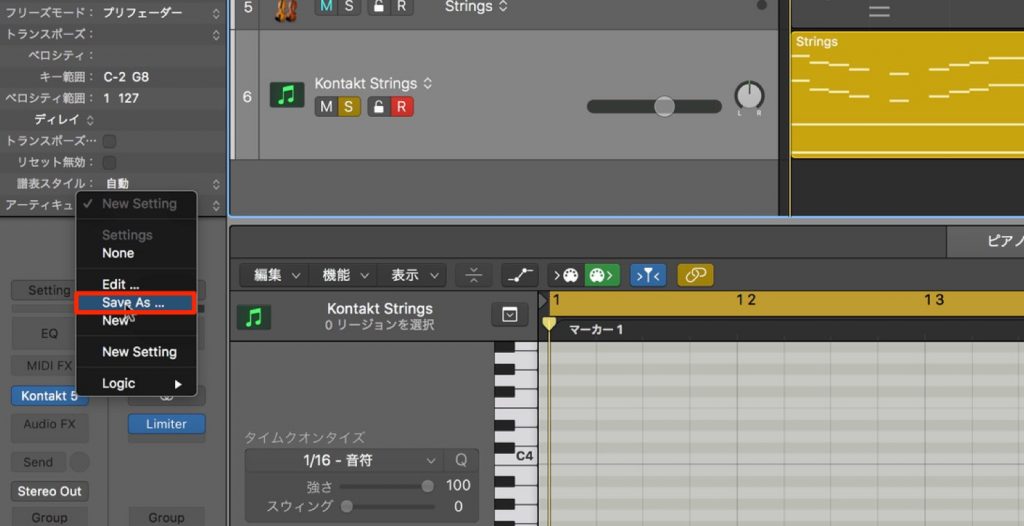
Select "Save As" and save it with a name, and you can recall and apply the Articulation Set in different projects and instruments.
Unifying key switches across different products
Depending on the product, the notes used to switch key switches may differ.
By using an Articulation Set, you can switch playing techniques with the same notes.
This works when playing the keyboard in real time.
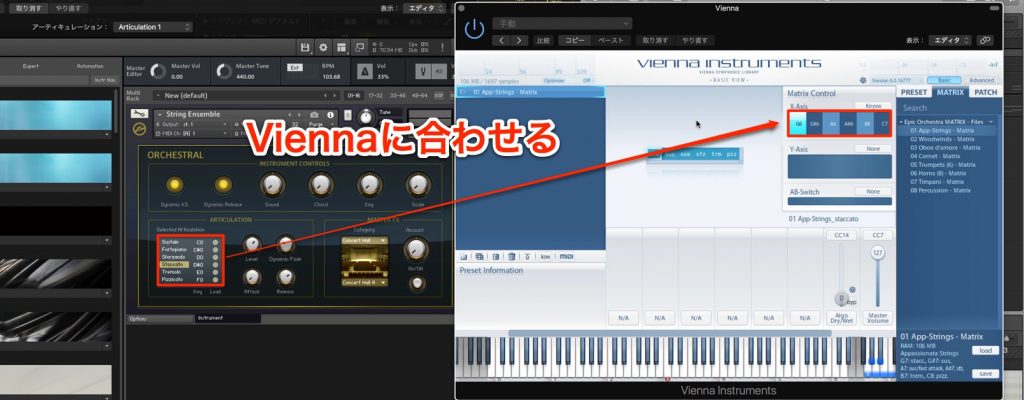
Here we'll adapt the Kontakt Articulation Set created above to the third-party product "Vienna Instruments."
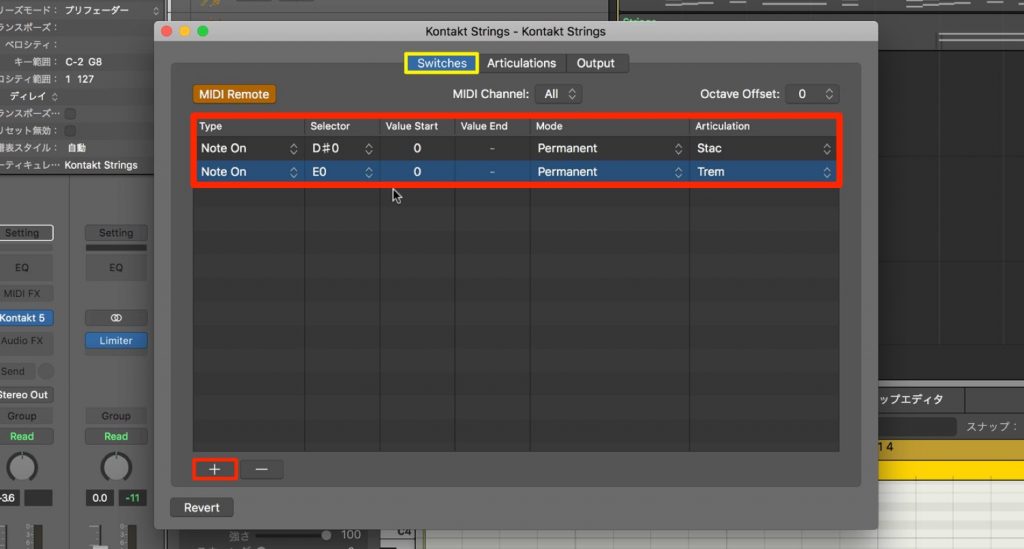
Set it up from the "Switch" tab of the Articulation Set.
Press the "+" button to display the key switches set in the "Articulations" tab.
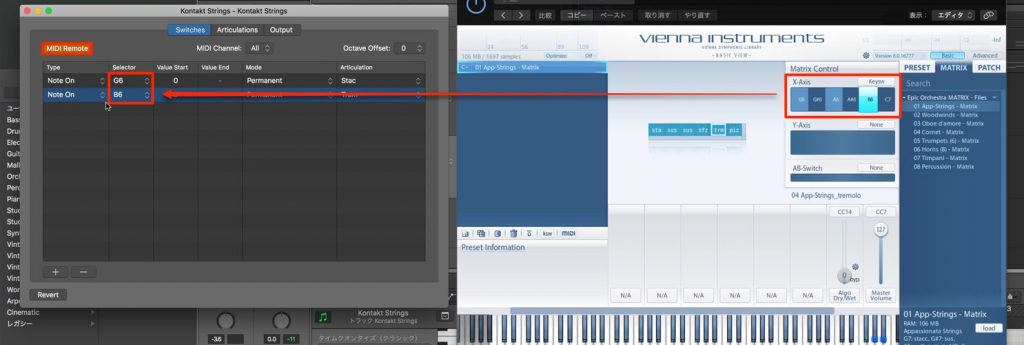
Assign "Selector" to the notes you'll play on your MIDI keyboard.
If "MIDI Remote" is off, click it to enable it.
That completes the setup.
When the specified note is pressed, the note is converted inside the Articulation Set, so you can unify the technique switching for all instruments to the same notes.
Frequently asked questions
Q1. What is an Articulation Set?
It's a feature newly added in Logic Pro X 10.4, a tool for managing the key switch settings of multiple third-party instruments in a unified way. It lets you switch playing techniques with the same notes even on instruments from different manufacturers.
Q2. Can I use it with instruments other than Kontakt's "Strings Ensemble"?
Yes. Articulation Sets are a general-purpose settings tool, so they can be applied to other AU instruments, starting with Vienna Instruments. You can handle each instrument by specifying its key switches in the "Output" tab.
Q3. Do Articulation Sets work when playing MIDI in real time?
Yes. As explained in the article, this articulation operation works during real-time keyboard playing, so you can switch playing techniques instantly.
Q4. Can I reuse an Articulation Set I've created in other projects?
Yes. By saving it with a name using "Save As," you can recall and apply the same Articulation Set in different projects and instruments.
NEW ARTICLES
Latest English Articles











