
This article explains how to control the panning of reverb in Logic Pro. Reverb used via a normal send/return comes from the center, so even if the original sound is panned, the reverb gathers in the middle and blurs the stereo image. This article shows that setting the send to "Post Pan" places the reverb at the same position as the original track, giving you a clear image and well-organized space. It is a spatial technique that dramatically improves your mix with a simple operation, useful for DTM beginners and advanced users alike.
Improve Quality by Controlling the Space
Reverb is an effect that expresses the space of a song,
and it is very important for improving a song's quality.
In a previous article, we introduced the classic technique of sharing one reverb across multiple tracks:
send/return.
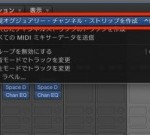
This time, we introduce a spatial technique that builds on it.
Normally, the reverb from a send/return comes from the center.
For example, even if you pan a guitar track hard right,
the guitar's reverb still comes from the center.
This causes problems such as:
- A blurry stereo image
- Reverb saturating in the center
These problems arise.
What solves them is
panning the reverb.
*In Logic X, the following setting is applied to tracks by default.
How to Control the Pan of Reverb in Logic
It is very simple.
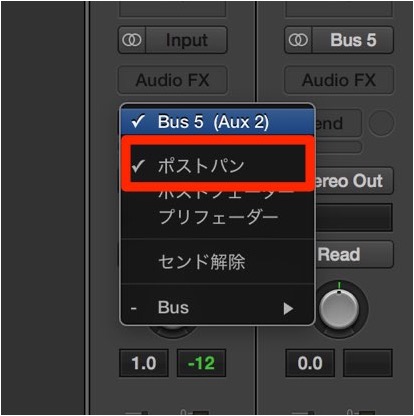
Click and hold the send.
From the menu that appears, select "Post Pan."
Let's check the sound.
The original guitar track is panned hard left.
- Before setting the pan (reverb panned center)
- After setting the pan (reverb panned left, the same as the original track)
It sounds much cleaner.
It is easy and very effective for tidying up the space in your song.
Be sure to try it.

Frequently asked questions
Q1. Why control the pan of reverb?
Reverb shared via send/return normally comes from the center and does not match the position of the panned original sound. This blurs the stereo image and saturates the reverb in the center. Setting the send to Post Pan aligns them, giving you a clear image and well-organized space.
Q2. Where is Post Pan on a send in Logic Pro?
Click and hold the send, and you can select "Post Pan" from the menu that appears. This setting lets the reverb follow the same position as the original track.
Q3. Can this method be used in every DAW?
This article is specific to Logic Pro. In other DAWs, you can get a similar effect with the send pan or stereo settings, but the operation differs, so refer to your DAW's manual.
NEW ARTICLES
Latest English Articles











