Logic Pro's noise gate is an effect that lets you cut unwanted sounds, such as ambient noise in vocals, guitar noise and drum bleed, by adjusting five parameters: Threshold, Reduction, Attack, Hold and Release, making your tracks clearer. Beyond simple noise removal, depending on your creativity you can achieve various sonic effects, such as controlling the tails of a drum loop to create groove. Understanding the role of each parameter enables professional audio processing.
Cut noise and shape rhythm!! Logic's Noise Gate
A "noise gate" is an effect that can cut sounds below a certain level (quiet sounds).
Here we explain using Logic's noise gate,
but the basic specifications are common to all "noise gates".
- Ambient noise picked up on a vocal track
- Electric guitar noise
- Bleed in a drum kit recorded with multiple mics
It is used for things like these, to make tracks sound clearer.
It can also be used for purposes other than noise removal,
such as controlling the tails of a drum loop to create groove.
Noise Gate video
Video point: Setting the Threshold
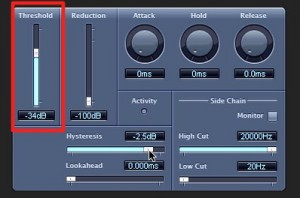
Above, we said it "cuts quiet sounds".
However,
the computer itself cannot judge "from what point a sound is loud" or "from what point it is quiet".
What specifies this is the "Threshold".
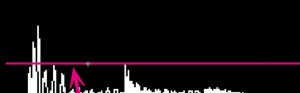
In this case,
anything below the pink line is judged to be a "quiet sound" and becomes a target for cutting.
Video point: Setting Reduction
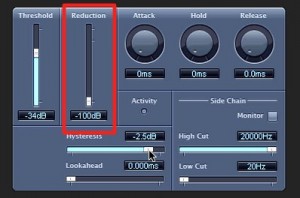
This decides how much to reduce sounds below the "Threshold" (the pink line above).
The unit is "dB (decibels)"; the larger the negative value, the more is cut.
If you want to cut the sound firmly, set the "Reduction value" low.
Video point: Setting the Attack
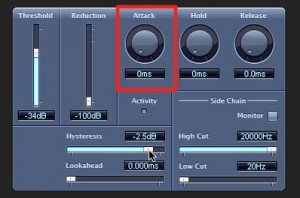
The attack decides,
once the level rises above the threshold,
how long it takes to open the gate (output the sound).
The unit is "ms (milliseconds)",
so you can set it in thousandths of a second.
- Smaller values output sounds that exceed the threshold immediately.
- Larger values output the sound over a longer time.
If the value is too large, the gate may not open in time and the result may be silence.
It can give the sound a soft effect like a fade-in.
Explanation of ms (milliseconds)
Video point: Setting Hold
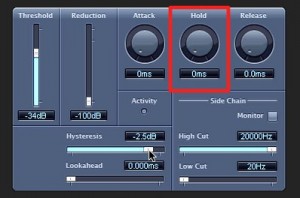
Hold decides
how long the gate stays open even after the sound falls below the threshold.
The unit is "ms (milliseconds)",
so you can set it in thousandths of a second.
This may seem a little complicated, so here is an example.
Some tracks alternate between "loud" and "quiet" sounds within a short time.
The gate reacts to this, but reacting too much makes the sound unnatural.
Even if the level falls below the threshold, for the time specified in "Hold"
the gate stays open (the sound plays), so you can prevent the situation described above.
Video point: Setting Release
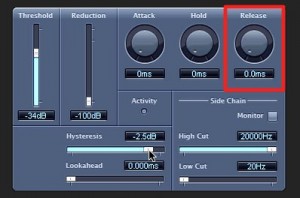
Release decides, for sounds that fall below the threshold,
how long it takes to cut them.
The unit is "ms (milliseconds)",
so you can set it in thousandths of a second.
- Smaller values cut the sound immediately.
- Larger values cut the sound over a longer time.
You can also deliberately create a chopped feel.
You can get a natural decay like a fade-out.
Frequently Asked Questions
Q1. What is the difference between a noise gate and other noise removal effects?
A noise gate is a simple mechanism that cuts all sound below a certain level, and its basic specification is common to every DAW. More advanced noise removal plug-ins, on the other hand, may let you adjust the amount of removal per frequency.
Q2. What happens if Attack is set too high?
The gate opens too slowly, so it may not open in time for the start of the sound after it exceeds the threshold, possibly resulting in silence.
Q3. Can a noise gate be used on things other than vocals?
Yes. It can be used in many ways, such as on electric guitar noise, multi-mic bleed in drum recordings and controlling the tails of drum loops. You can get creative depending on how you adjust the parameters.
NEW ARTICLES
Latest English Articles