
By setting up a soft synth with multiple outputs in Logic Pro, you can split a single drum instrument or multitimbral instrument across several Aux tracks, enabling independent effects processing and volume and pan control for each kit piece or instrument. Simply choose a synth that supports multiple outputs, assign the outputs and create the corresponding Aux tracks, and you can mix each element individually without using a mixer object, greatly increasing your freedom in sound design, especially with drum instruments.
Effective for multitimbral and drum instruments!!
In the previous section, "Using multiple sounds in one soft synth",
we showed how to assign MIDI channels to multiple instruments.
It is a very convenient method, but because multiple instruments use the same soft synth,
some drawbacks appear.
- Volume and pan control per instrument
- Insert and send effects per instrument
- Solo and mute per instrument
These are some examples.
Since the instruments are played by the same soft synth,
this may seem unavoidable.
However, there is a solution!!
It is a method called "multiple outputs"
Not only for each instrument loaded in the same soft synth,
but also for each kit piece of a drum instrument, such as the kick and snare,
you can set "volume", "pan", "inserts" and "sends",
greatly expanding your sound design.
- Logic X
- Logic 8/9
How to set up multiple outputs in Logic X
Here we use the included drum instrument "Ultrabeat" as an example.
*The same approach works with other soft synths.
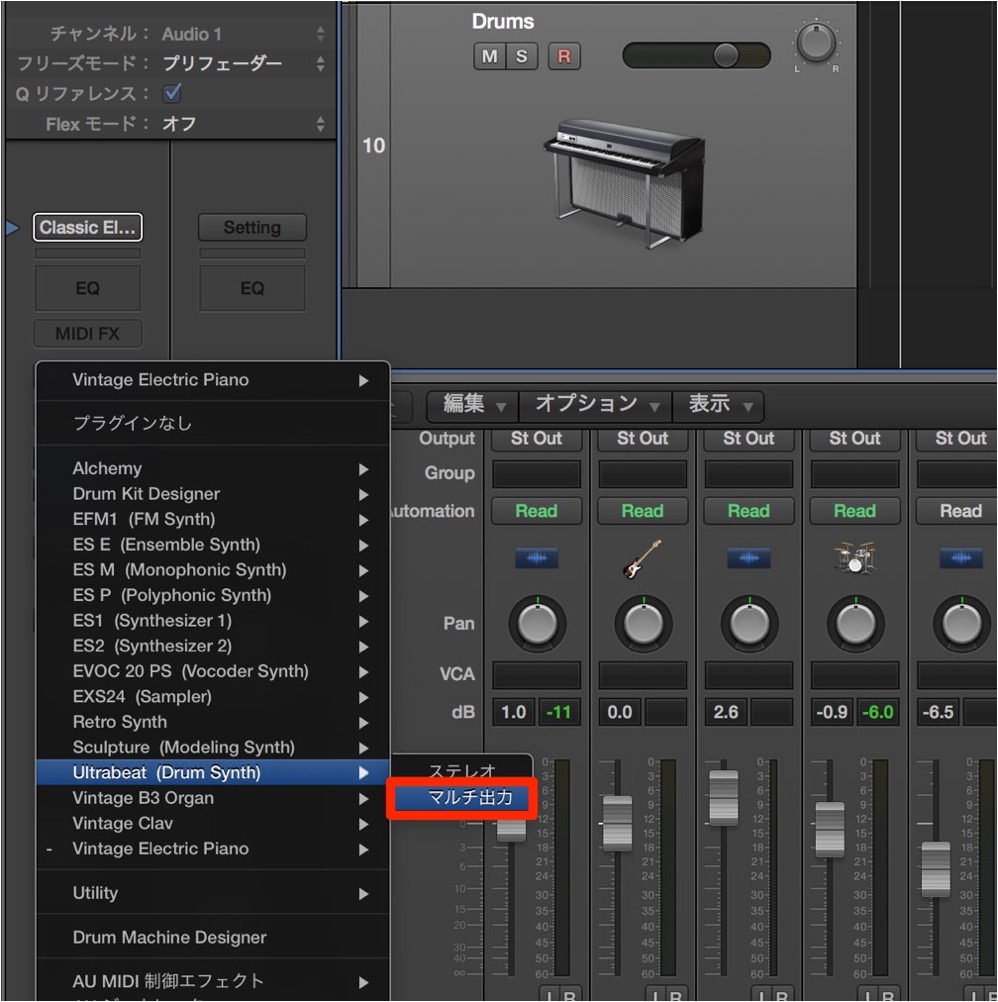
Load the "soft synth" on an "instrument track".
At this point, be sure to select the "Multi Output" version.
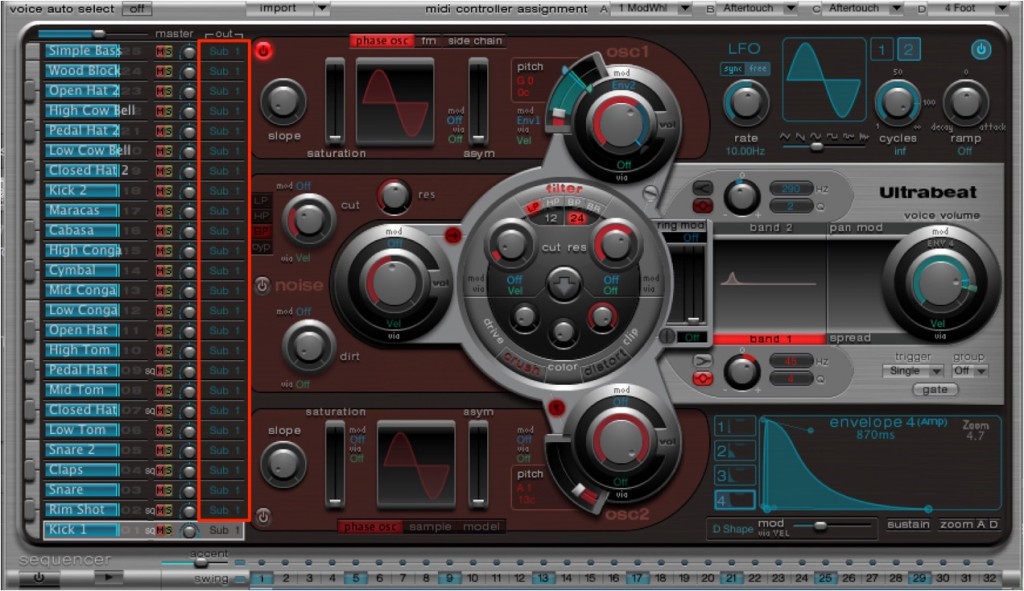
This is the "Ultrabeat" interface.
Choose the kit you like as usual.
Click "Out" in the area outlined in red.
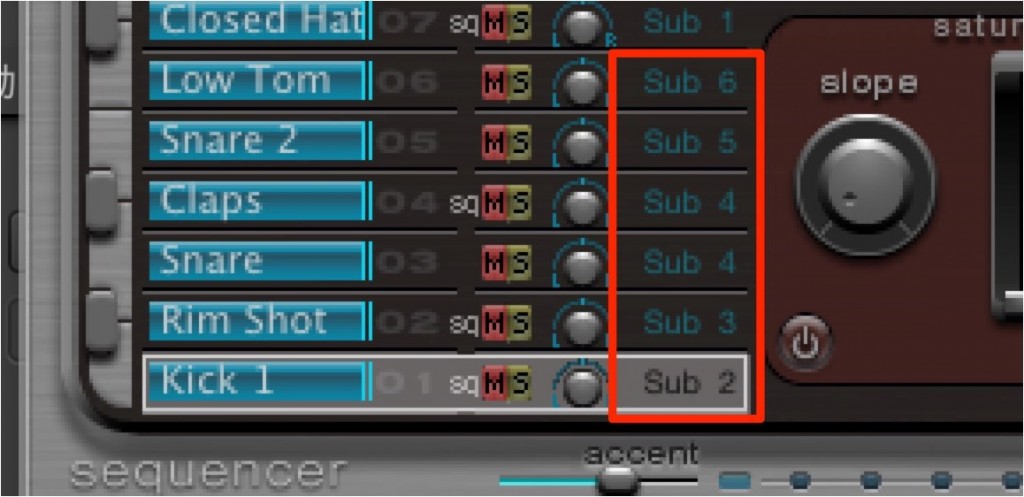
Assign a different output to each kit piece, such as the "kick", "snare" and "hi-hat".
That completes the soft synth settings.
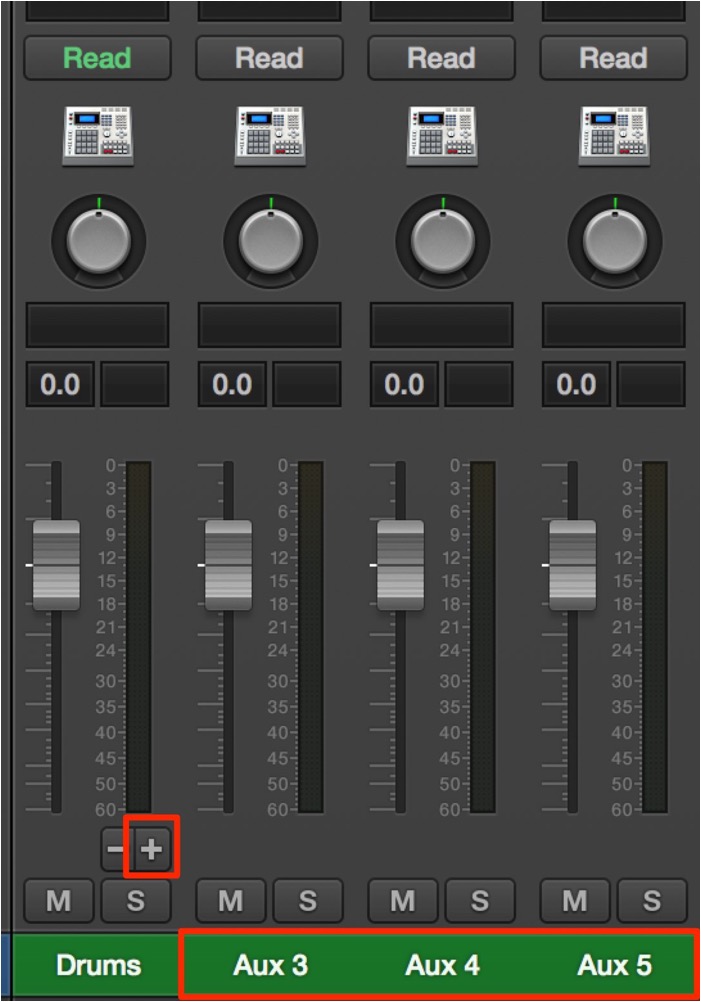
Open the Mixer window
and look at the track, and you will see a "+ button".
Click it as many times as the outputs you want to set up to add tracks.
In this example, "kick is 3/4", "snare is 5/6" and "hi-hat is 7/8".
Then just program as usual,
and each kit sound plays from its own Aux track that you set up.
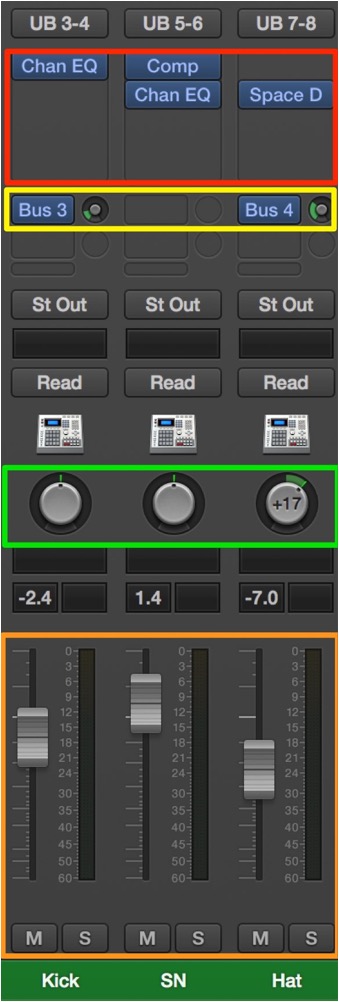
This lets you set "inserts", "sends", "volume", "pan" and so on for each kit piece,
even though you are using a single soft synth.
Naming them will make things easier to understand.
How to set up multiple outputs in Logic
Here we use the included drum instrument "Ultrabeat" as an example.
*The same approach applies to other soft synths.

↑ Load the "soft synth" on an "instrument track".
At this point, be sure to select the "Multi Output" version.

↑ This is the "Ultrabeat" interface.
Choose the kit you like as usual.
Click "Out" in the area outlined in red.
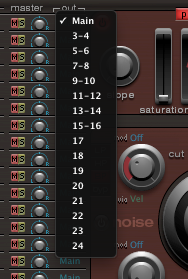
↑ A menu like this appears.
Assign a different output to each kit piece, such as the "kick", "snare" and "hi-hat".

↑ Here we assigned
"kick" → "3/4"
"snare" → "5/6"
"hi-hat" → "7/8".
That completes the soft synth settings.

↑ Next, create as many "Aux tracks" as the channels you assigned.
Here, that is three.

↑ Click the input of the "Aux track" you created.

↑ From the menu, select "Input" → "Inst1 (Ultrabeat)" → "channel".

↑ In this example, "kick is 3/4", "snare is 5/6" and "hi-hat is 7/8".
Then just program as usual,
and each kit sound plays from the "Aux track" you set up.
Now,

↑ even though you are using a single soft synth,
you can set "inserts", "sends", "volume", "pan" and so on for each kit piece.
- Logic X
- Logic 8/9

Frequently Asked Questions
Q1. What happens if I forget to select Multi Output when routing Ultrabeat to multiple outputs in Logic Pro?
If you do not select Multi Output, you cannot assign different outputs from the soft synth, and individual control of each kit piece is not possible. Be sure to select "Multi Output" when loading it on the instrument track.
Q2. What are the benefits of processing the kick, snare and hi-hat separately after setting up multiple outputs?
You can set different insert and send effects for each kit piece and optimize level and spatial effects piece by piece. This achieves a more three-dimensional and precise drum mix.
Q3. Can multiple outputs be set up with the same procedure in Logic 8/9?
Yes, it can be set up in Logic 8/9, but the procedure is partly different. After assigning outputs in the soft synth, create Aux tracks and assign the channels in the input settings. It is available as long as the soft synth supports multiple outputs.
NEW ARTICLES
Latest English Articles











