
OMF is an important format for sharing song data between DAWs in Logic Pro 9. Because the audio files in a session and their placement can be fully reproduced in other DAW software, collaboration and handing projects over become more efficient. This article explains the steps for exporting and importing OMF, setting precautions such as version selection and stereo conversion, and limitations such as no support in 64-bit mode and no MIDI support, so you can learn the practical knowledge needed to work with other DAWs.
Work with Songs Across Different DAWs
OMF lets you reproduce a session's audio files and their positions
in other DAW software.
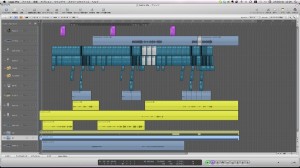
It is a very handy feature for collaboration.
OMF Explained
Logic: How to Export OMF
From the top menu, choose "File" → "Export" → "Project as OMF File."
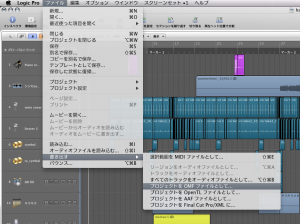
The dialog below appears.
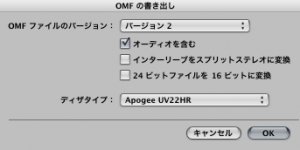
↑ Select "Version 2."
"Version 1" is for compatibility with older software; normally choose "Version 2."
Check "Include Audio Media."
If you check "Convert Interleaved to Split Stereo,"
stereo files are converted into two mono files (left and right), so normally leave it unchecked.
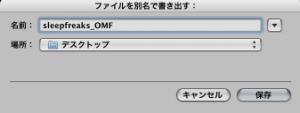
↑ You are asked where to save, so choose any location.

↑ The OMF file has been created in the specified location.
Import this file into the other DAW software.
How to Import OMF
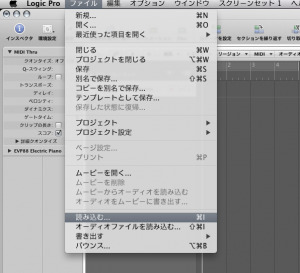
↑ From the top menu, choose File → Import and import the OMF file.
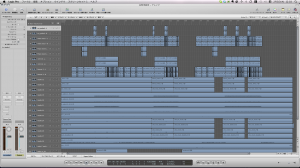
↑ The audio data and its placement are fully reproduced like this.
Notes on OMF
- The OMF function is not supported in 64-bit mode
- OMF handles audio files and cannot export MIDI files.
If your song uses both audio and MIDI,
you need to export SMF in addition to OMF.
"Exporting/Importing SMF"

Frequently asked questions
Q1. Should I choose version 1 or 2 when exporting OMF from Logic Pro?
Normally, select version 2. Version 1 is for maintaining compatibility with older software, and version 2 is the standard when sharing with current DAWs.
Q2. Why do I need to be careful with stereo audio in OMF files?
Checking "Convert Interleaved to Split Stereo" splits stereo files into two mono files (left and right). We recommend normally turning this setting off and keeping files in stereo.
Q3. What should I do to hand over a song containing MIDI tracks to another DAW?
OMF supports audio only, so MIDI data must be exported separately in SMF format. To share both audio and MIDI, you must output both formats.
NEW ARTICLES
Latest English Articles











