
Logic Pro's time stretch function lets you fit drum loops and other audio files imported into your DAW to the song's tempo. Just stretch or shrink a region with the Option key and a drag to fix tempo mismatches, and freely adjust the length of sound effects and drum patterns. This article explains in detail how to use time stretch in Logic X and Logic 8/9 and offers practical techniques for using audio files freely.
Fit Audio Files That Don't Match the Song's Tempo
For example, you find a cool one-bar drum loop and import it into your DAW,
but the loop's tempo does not match the song's, so they drift apart.
That is when the time stretch function comes in.
Arranging with Time Stretch
*The video uses Cubase, but the concept is exactly the same.
- Logic X
- Logic 8/9
Logic X: How to Use Time Stretch
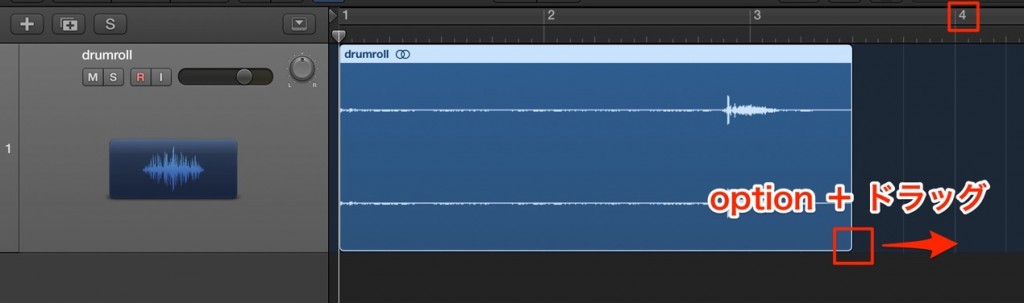
Option-drag the region to stretch or shrink it to the desired position.
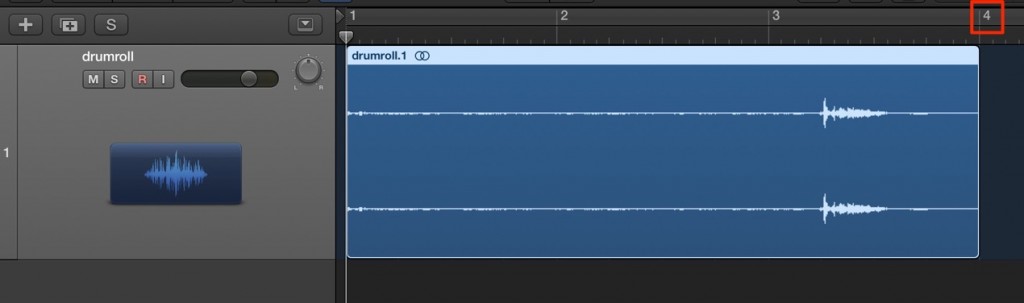
There you go. It fits the tempo perfectly.
This time we lengthened the audio to match the tempo, but you can of course shorten it too.
With this method, you can also change sound effects to the length you want.
There are many ways to use it, so use audio files freely.
Logic: How to Use Time Stretch

Option-drag the region to stretch or shrink it to the desired position.
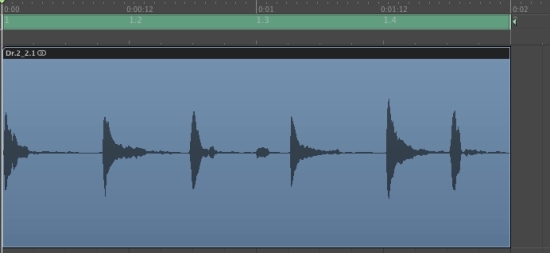
There you go. It fits the tempo perfectly.
This time we lengthened the audio to match the tempo, but you can of course shorten it too.
With this method, you can also change sound effects to the length you want.
There are many ways to use it, so use audio files freely.
- Logic X
- Logic 8/9

Frequently asked questions
Q1. Doesn't time stretch in Logic Pro degrade audio quality?
Time stretch uses a high-quality algorithm, so the effect on sound quality is minimal when used appropriately. However, extreme stretching can degrade the sound, so we recommend adjusting only as much as needed.
Q2. Is shortening a drum loop done the same way as lengthening it?
Yes, it is the same. Just drag while holding the Option key to stretch or shrink the region. Drag to the desired length, and it adapts to the tempo automatically.
Q3. Can I apply time stretch to sound effects?
Of course. You can change sound effects to the length you want in the same way. Time stretch is not limited to drum loops.
Q4. Is the procedure in Logic 8/9 different from Logic X?
The basic concept and operation are exactly the same. Stretching regions with the Option key and a drag is a function common to both versions.
NEW ARTICLES
Latest English Articles











