
Logic Pro's chord track is a feature available in versions 8 and 9 that lets you easily visualize the chord progression in a song. Just select Chord in the global tracks and analyze a MIDI region, and the chords are displayed instantly; Apple Loops also follow that chord progression automatically. Complex phrases produce too much detail, so we recommend analyzing a region of whole notes. Using this feature deepens your understanding of chord progressions and greatly improves your production efficiency.
Using the Chord Track in Logic: For Versions 8 and 9 Only
Using the chord track,
you can easily display the chord progression in a song.
And
Apple Loops follow that chord progression.
The method is very simple.
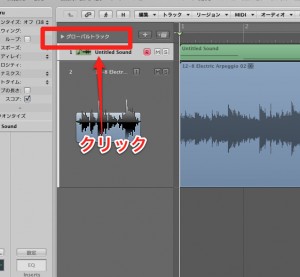
Click the global tracks.
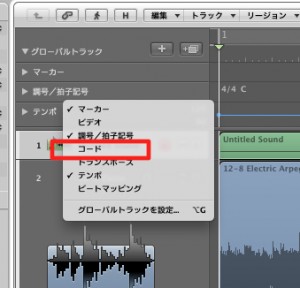
Select Chord from the menu.
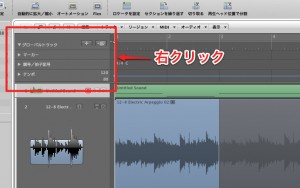
Right-click inside the global track that opens.
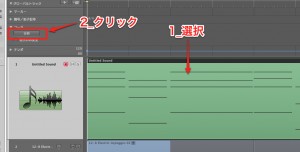
Select the MIDI region, then click "Analyze."
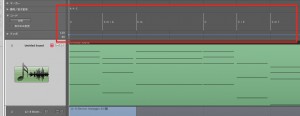
The chords are displayed instantly, like this.
*Note
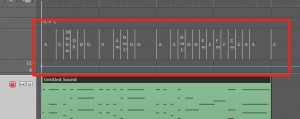
If you analyze a MIDI file containing phrases,
the chords are displayed in too much detail.
We recommend preparing a region of whole notes for analysis.
Frequently asked questions
Q1. Which versions of Logic Pro have the chord track?
The chord track described here applies only to Logic Pro versions 8 and 9. Later versions may have different features, so we recommend checking the specifications of the version you use.
Q2. What should I do if the chord analysis is too detailed?
MIDI files containing phrases are displayed in too much detail when analyzed. Preparing a MIDI region of whole notes only for analysis gives a simple, easy-to-read chord display.
Q3. Do Apple Loops follow the chord track automatically?
Yes. When you use the chord track, Apple Loops play back following the chord progression you set. This makes it easier to produce songs with different chord progressions.
NEW ARTICLES
Latest English Articles











