
Chord Trigger, part of Logic Pro's MIDI FX, is a powerful tool that lets even people without keyboard skills play chords easily. Entering a single note automatically sounds a chord, and you can choose from presets or register your own chords to suit the song. Two modes, Single and Multi, allow flexible settings, and combining it with other MIDI FX such as the Arpeggiator broadens your creative possibilities even further. It is an essential feature for producers who want to implement complex chord progressions easily.
Handles complex chord programming and performance
Introduced in Logic X, "MIDI FX"
are packed with powerful features that support all kinds of MIDI programming.

Here we explain "Chord Trigger", one of them.
By registering chord tones to each key, you can easily play a chord with a single key.
This should be a very useful feature for people who cannot play the keyboard.
Also, these "MIDI FX" can be combined.
Here we combine it with the "Arpeggiator" to show even more possibilities.
How to launch Chord Trigger

It works on "MIDI tracks" and "Software Instrument tracks".
Click the "MIDI FX" slot outlined in red on the track and select "Chord Trigger".

You can also launch multiple "MIDI FX", and their order is important.
Try out various combinations.
How to use Chord Trigger

It comes with presets that have many chords programmed in advance.
Click the "Default" field to load them.
- Single: the same chord type is assigned to every key.
- Multi: you can assign a different chord to each key.
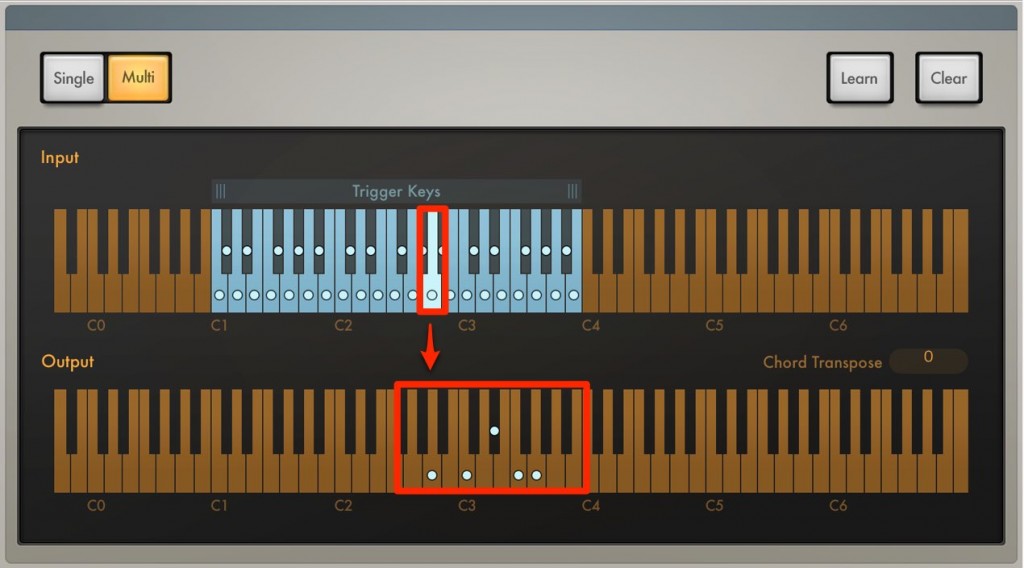
The top shows the keys you actually play, and the bottom shows the chord that sounds when that key is played.
This is how a chord sounds even when you program a single note.
How to register your own chords
Of course, you can register your own chords to suit the song.
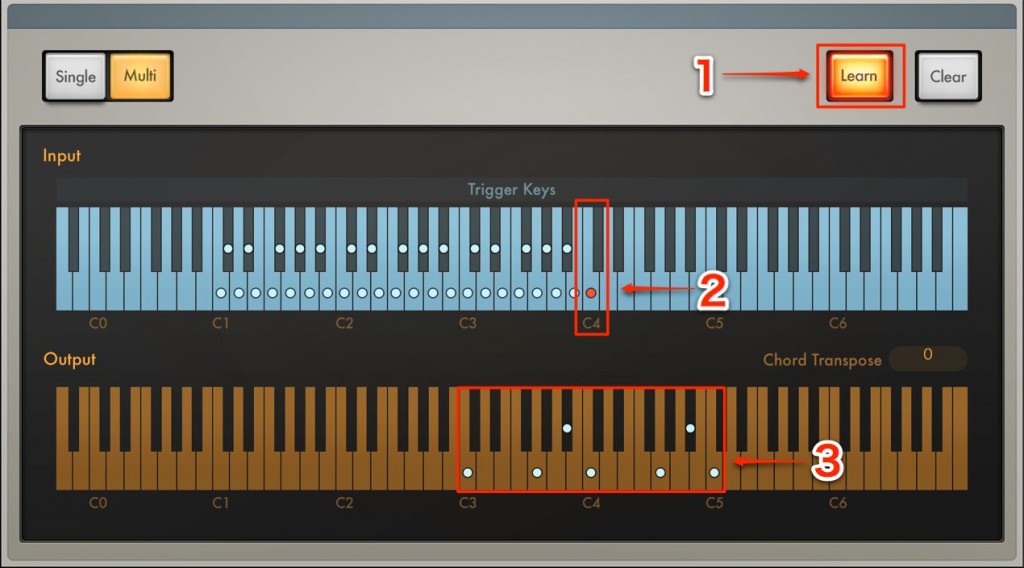
- 1_Light up Learn
- 2_Click the key you want to assign (it lights up red)
- 3_Click to specify the chord to be played

Once the settings are done, "Save" them.
You can then use them in other songs as well.

Frequently Asked Questions
Q1. From which version of Logic Pro is Chord Trigger available?
It is provided as a MIDI FX feature in Logic X and later versions. It is, of course, available in the latest Logic Pro.
Q2. What is the difference between Single mode and Multi mode in Chord Trigger?
Single mode assigns the same chord type to every key, while Multi mode lets you assign a different chord to each key individually. Choose between them according to the needs of the song.
Q3. Can I use the original chords I registered in other songs?
Yes. By saving after setting them up, you can reuse the same chord settings in other song projects.
Q4. What are the benefits of combining Chord Trigger with the Arpeggiator?
Combining multiple MIDI FX lets you expand simple chord playing into arpeggio patterns, generating more complex and expressive phrases.
Q5. Can Chord Trigger be used on tracks other than MIDI tracks?
It also works on Software Instrument tracks, so you can use it on both MIDI tracks and Software Instrument tracks.
NEW ARTICLES
Latest English Articles











