Logic Pro's AutoFilter is an effect that automatically changes a track's tone over time. In the filter section, you choose the type of frequency cut from three types, high-pass, band-pass and low-pass, adjust the amount of cut with the cutoff value and the emphasis with resonance. The parameter that determines the strength of the cut indicates "how many dB the frequency one octave away is cut"; setting a lower number gives a natural change in tone, while a higher number gives a drastic, unusual sound. It is a basic yet powerful effect technique that can be used for many purposes, from adding accents to drums to giving movement to synthesizers.
Give your sound movement with Logic's AutoFilter
"AutoFilter" is an effect that can change a track's tone over time.
Because it adds movement to the sound,
even a monotonous phrase can become an eye-catching, memorable track.
The "filter effect", which cuts low or high frequencies, is very well known,
and as its name suggests, this effect changes the amount of cut automatically.
- For accents on drum patterns and breakbeats
- To add movement to synthesizers
- Applied to the master track as a flashy special effect
Depending on your ideas, you can create very interesting effects like these.
Many of the concepts in this "AutoFilter" are
common to various software such as synthesizers and samplers.
So understanding what the values mean
will be very useful from here on.
AutoFilter videos
1_Filter section *This video
2_Envelope section
3_LFO / distortion section
Video point: The structure of AutoFilter
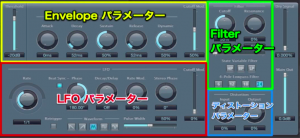
AutoFilter consists of four main parts.
This time we explain the most basic "filter" section.
As touched on briefly above,
a "filter" changes the tone by removing frequencies from the track.
Video point: Filter types
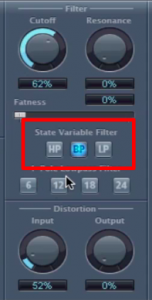
This is an important setting that determines which frequencies are cut (removed).
- HP (high-pass): removes the lows and passes the highs
- BP (band-pass): removes the lows and highs and passes the mids
- LP (low-pass): removes the highs and passes the lows
Each has a distinctive sound,
so you should be able to learn them quickly.
These are also explained in detail in the following article.

Video point: Cutoff and Resonance
After deciding the cut type above,
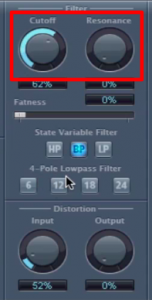
- Cutoff: how much to remove?
- Resonance: how much to emphasize the frequencies at the cut point?
In the case of this "AutoFilter", these values move automatically.
"Resonance" in particular helps emphasize that movement.
Video point: Adjusting the nuance of the cut
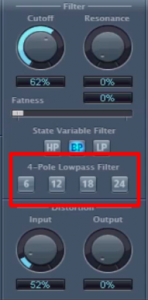
You can decide how strongly to cut.
The larger the number, the more drastically it cuts.
This number means
how many dB the frequency one octave away is cut
.
Let's check these with an EQ.
"6 (-6 dB)"
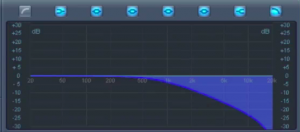
"24 (-24 dB)"
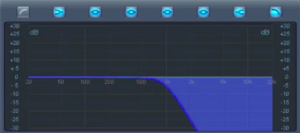
This is how they look.
If too much is removed and the sound doesn't come through clearly,
aim for a "natural cut" with a lower number
If you want to create an extreme or unusual sound,
aim for a "drastic cut" with a higher number
This is how you can control the nuance.
Frequently Asked Questions
Q1. How many filter types can be used in Logic Pro's AutoFilter?
There are three: high-pass (HP), band-pass (BP) and low-pass (LP). High-pass removes the lows and passes the highs, band-pass passes only the mids, and low-pass removes the highs and passes the lows.
Q2. What is the difference between Cutoff and Resonance?
Cutoff determines the amount of cut, and Resonance adjusts how much the cut frequency band is emphasized. Raising Resonance makes the filter's movement more noticeable.
Q3. What happens when the number of the cut parameter is larger?
The larger the number, the more drastic the cut. 6 (-6 dB) is natural and 24 (-24 dB) is a more severe cut, so you can adjust it to suit the sound you are aiming for.
Q4. In what situations is AutoFilter used?
It can be used in many creative situations, such as adding accents to drum patterns, adding movement to synthesizers and as a flashy special effect on the master track.
NEW ARTICLES
Latest English Articles