
FL Studio's time stretch function is an important feature that lets you freely stretch or shrink the length of audio clips to perfectly fit a song's tempo and beat structure. It can be used in many music production situations, such as adjusting loops that don't match the tempo, changing the length of sound effects and creating variations of drum patterns. Just enable STRETCH in the playlist's waveform mode and drag the edge of a clip to apply it easily, and snap values allow flexible editing, making arrangement work efficient.
Stretch Audio Material to Match Your Song
Time stretch is a function that stretches or shrinks the performance in an audio clip to optimize it for your song.
- You want to use a loop that doesn't match the song's tempo
- You want to change the length of a sound effect
It's used in cases like these.
The following video explains one example.
Arranging with Time Stretch
Changing Drum Patterns

By making a drum pattern "half or double" its length, you can quickly try out various patterns.
How to Apply Time Stretch in FL Studio
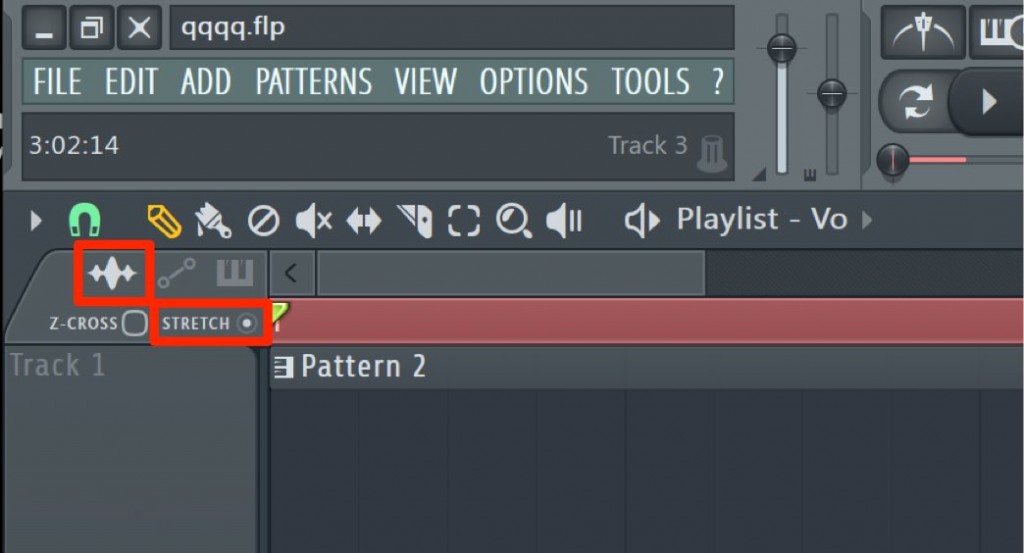
Switch the upper left of the playlist to waveform mode and check "STRETCH" shown below it.
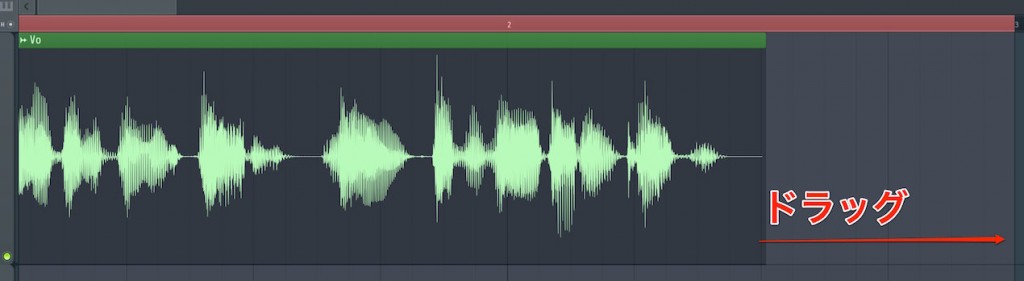
Then, drag the left or right edge of an audio clip to stretch or shrink it.
Even when the length falls short of the bars like this, by dragging the clip,
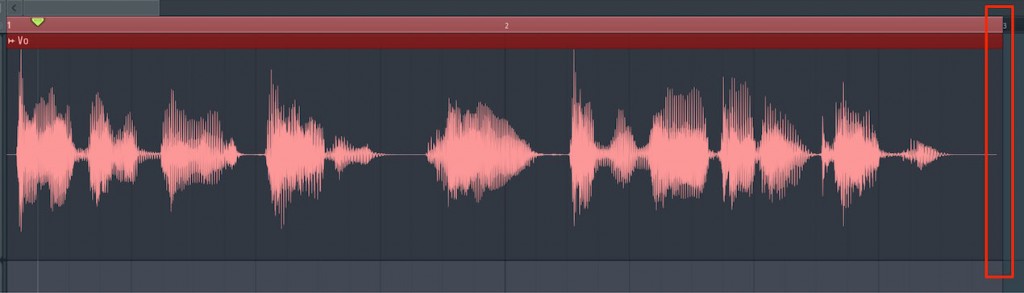
you can fit the performance exactly to the number of bars.
Note that the unit of the stretch depends on the "snap value".

Frequently Asked Questions
Q1. What kind of function is FL Studio's time stretch?
Time stretch stretches or shrinks the performance in an audio clip to fit the song's tempo and number of bars. It can be used for loops with a different tempo, adjusting the length of sound effects, changing drum patterns and more.
Q2. Please tell me the steps for using time stretch.
Switch the upper left of the playlist to waveform mode and check "STRETCH" shown below it. Then you can drag the left or right edge of an audio clip to adjust its length.
Q3. Does time stretch degrade the sound quality?
Large amounts of stretching may affect the sound quality. The quality varies with the audio engine's quality settings and choice of algorithm, so we recommend adjusting them as needed.
Q4. What are the benefits of changing the length of a drum pattern?
Changing a drum pattern to "half or double" lets you quickly try out multiple variations. It makes rhythm arrangement more efficient and broadens your creative range.
NEW ARTICLES
Latest English Articles











