
Using sidechain in FL Studio lets you easily create the groove typical of club music, where the volume of the bass or synth drops automatically whenever the kick hits. This article explains in detail how to set it up with both FL's stock compressor and third-party plug-ins, so you can create professional dynamics effects by adjusting parameters such as threshold, ratio, attack and release. It also covers why you prepare two kicks and how to apply the technique to tracks other than synths, so readers can bring this technique into their own productions right away.
A staple technique of club music: sidechain

Here we explain sidechain, a staple technique of club music.
It is set up so that the volume of the bass and synthesizer drops whenever the kick hits.
It sounds like this.
The volume of the bass and synth swells in sync with the kick, creating a distinctive groove.
FL Studio makes setting up sidechain very easy.
Sidechain uses a compressor, an effect that adjusts volume (dynamics).
The setup differs slightly between the stock compressor and a compressor you have added separately,
so we explain both cases.
Using three types of sidechain: video tutorial
Why prepare two kicks
One is used as the normal kick that plays in the song,
and the other is used only to sidechain other tracks (it is not output).
This way, the target tracks keep pumping even in parts of the arrangement where the kick drops out.
Here, "Kick" is for playing and "Kick2" is for the sidechain.

- 1_Select "Kick2"
- 2_Right-click the area outlined in yellow on the track you want to apply the sidechain to
- 3_Select "Sidechain to this track only" from the menu
Now "Kick2" is not sent to the master track, so you can no longer hear it.
Below, the settings for the stock compressor and an added compressor are described on separate tabs.
- FL stock compressor settings
- Third-party compressor settings
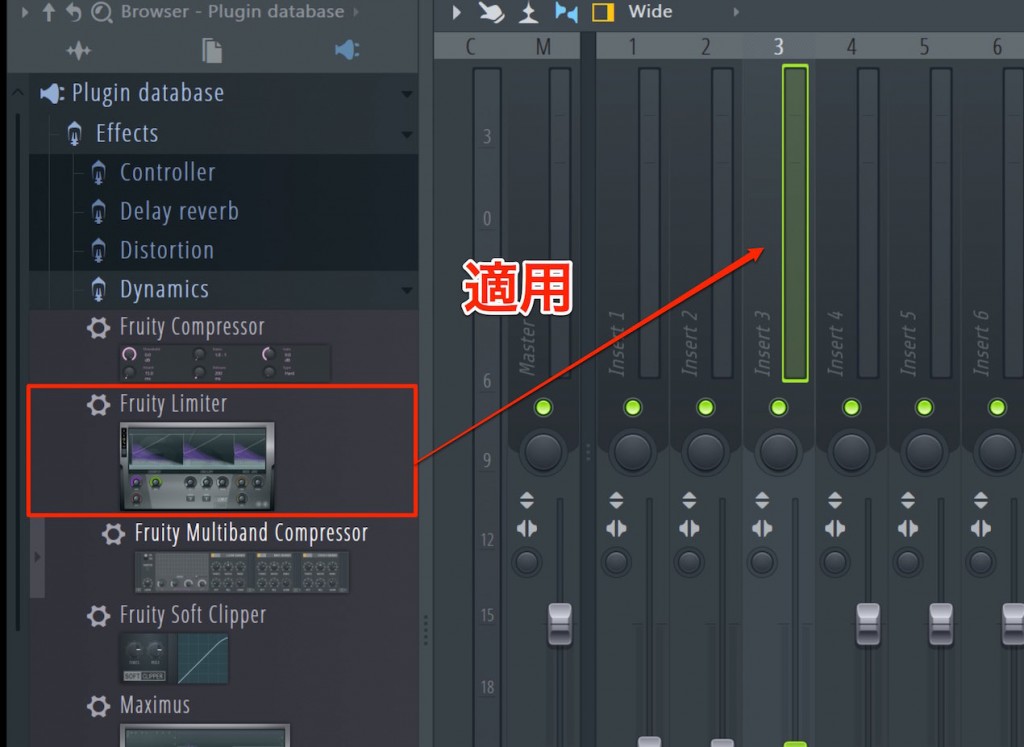
Apply "Fruity Limiter" to the track that receives the sidechain effect (the synth here).
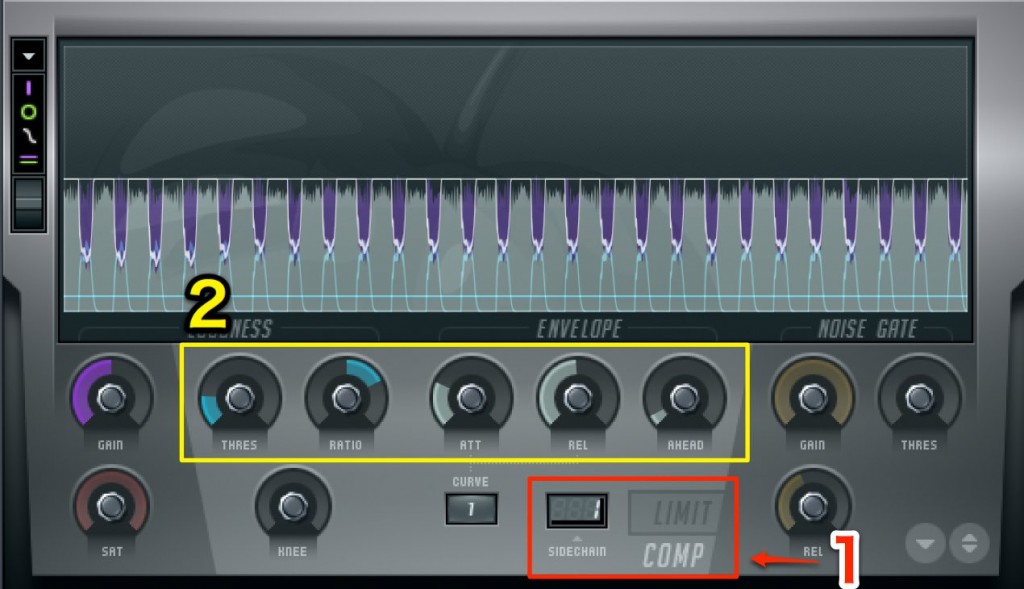
- 1_Switch to "COMP mode" and specify the sidechain channel on the left.
- 2_Set up the compressor while checking the sound.
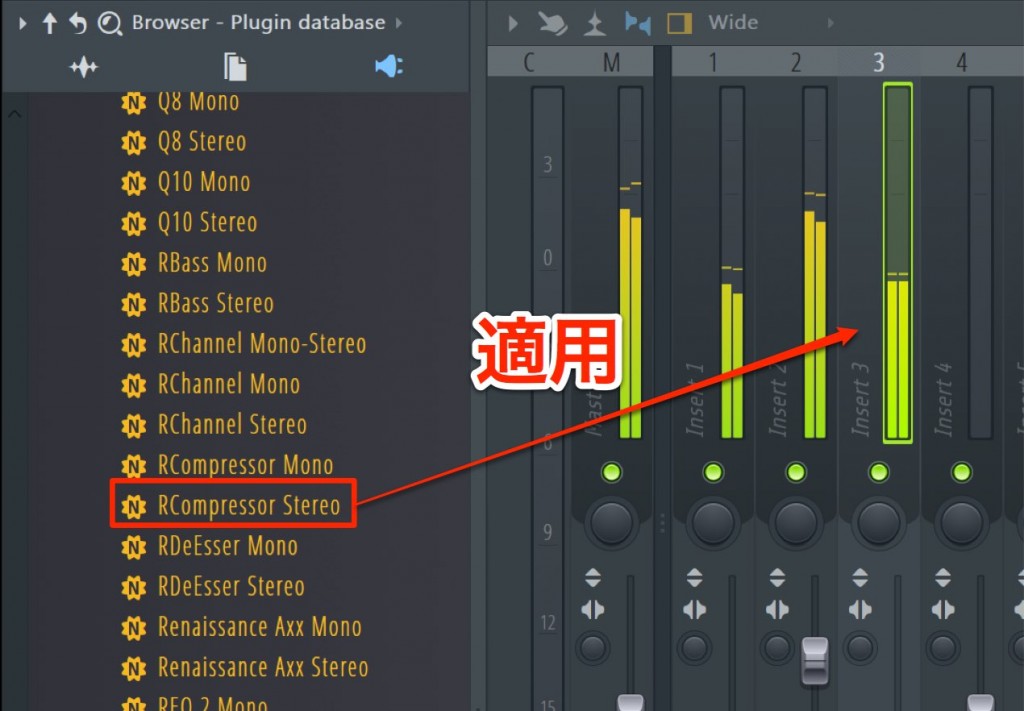
Here we use Waves "Rcomp" as an example.
Other added effects can be set up the same way.
Apply "Rcomp" to the track that receives the sidechain effect (the synth here).

Click the gear icon at the top of the compressor.
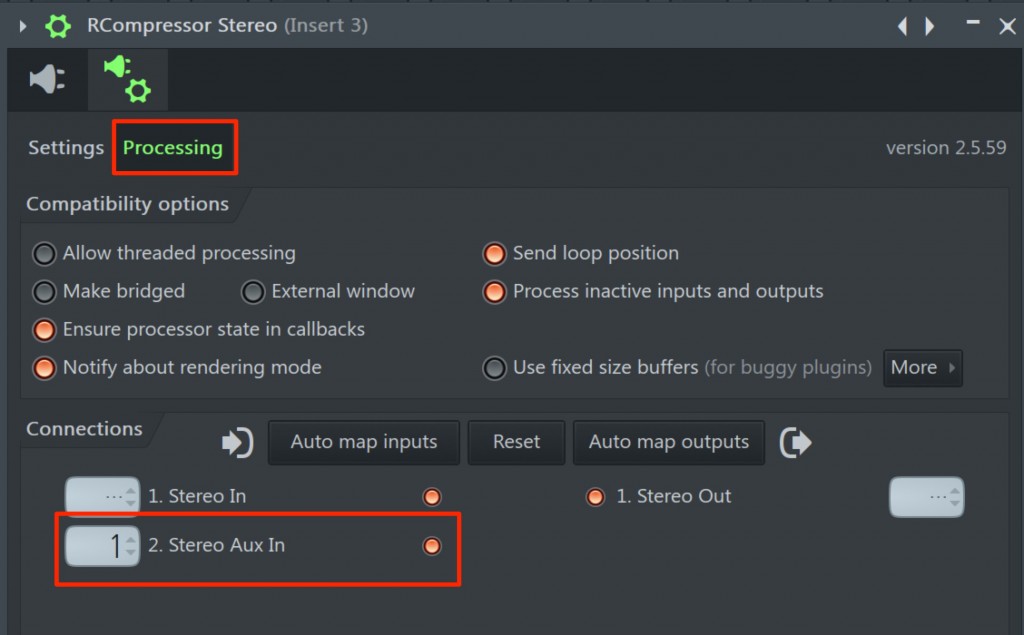
Select the "Processing" tab and specify the sidechain channel on the left of "2. Stereo Aux In".
Do not forget to turn on the power switch on the right.
Then adjust Rcomp's parameters.
- FL stock compressor settings
- Third-party compressor settings
Compressor parameters
- Threshold: Adjusts how much the volume drops.
- Ratio: Setting it higher makes the effect easier to hear.
- Attack: Determines how quickly the volume drops. A fast setting is recommended.
- Release: Specifies the time until the volume returns to normal.
The basic setting is to listen to "Kick1" and have the wave come back on the 8th-note offbeat.
This time we used the kick and synthesizer as an example,
but you are free to use any combination, such as bass tracks or vocals.
Do not be bound by existing methods; experiment in various ways and aim for interesting effects.

Frequently Asked Questions
Q1. What is sidechain in FL Studio?
Sidechain is an effect technique using a compressor that automatically lowers the volume of another track (such as bass or synth) whenever a specific track (such as the kick) plays, creating a distinctive pumping and groove.
Q2. Why do I need to prepare two kicks?
One is used as the drum sound in the performance, and the other is used only to send the sidechain signal to other tracks. This lets the synth and other tracks pump even in parts where the kick is not playing.
Q3. What is the trick to setting the compressor's release?
The basic setting is to listen to the kick and have the wave return to the original volume on the 8th-note offbeat. This creates a natural, pleasant groove.
Q4. Can sidechain be used for combinations other than kick and synth?
Yes, it can be used with any combination of tracks, such as bass tracks or vocals. Do not be bound by existing methods; try various combinations to aim for creative effects.
Q5. Are the settings different for FL's stock compressor and third-party plug-ins?
Yes, they are different. With FL's stock "Fruity Limiter", you specify the sidechain channel in COMP mode, while with third-party plug-ins such as Waves "Rcomp", you set it up on the Processing tab.
NEW ARTICLES
Latest English Articles











