
Setting the pan (stereo placement) with FL Studio's mixer can greatly improve the sound design of your songs. Choosing between mono and stereo prevents clashes when several instruments overlap and lets you create a three-dimensional mix that spreads left and right. Just by adjusting the separation knob, you can freely control everything from placement in the center to a fully stereo sound, with the major benefit that even DTM beginners can easily achieve professional stereo placement.
Sound design that switches tracks between mono and stereo
By controlling mono and stereo, you can prevent clashes with other instruments,
or get a wide, spacious sound.
The video below uses a third-party plug-in, but please watch it for reference.
Video tutorial
The left/right position and width of a sound like this is called the "stereo image".
In mixing, you need to place the stereo image deliberately,
and FL Studio's mixer makes this very easy.
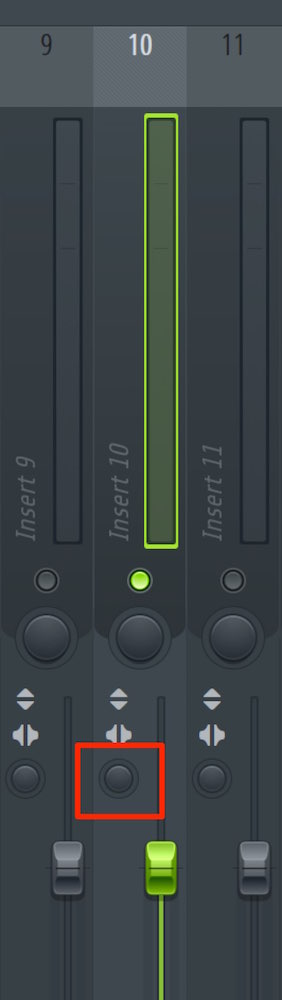
Use the separation function outlined in red on the track.
- In the center: the track's original sound
- The further you move the knob to the right, the narrower the image becomes, until it is mono
- The further you move the knob to the left, the wider the image becomes
With this function, you can easily make a sound close to mono and pan it to one side,
or widen it greatly so it spreads evenly left and right.
Please give it a try.

Frequently Asked Questions
Q1. Which function do I use to adjust the stereo image in FL Studio?
Use the separation function outlined in red on the mixer. Moving this knob lets you freely adjust the width of the stereo image from mono to stereo.
Q2. What is the difference between pan and stereo?
Pan refers to moving a sound toward the left or right, while stereo refers to a stereo image spread evenly left and right. You can control both with the separation function.
Q3. Why do I need to pay attention to the stereo image when mixing?
When several instruments are placed in the same position, their sounds clash and the whole song becomes muddy. Placing the stereo image deliberately makes each instrument easier to hear clearly, giving a professional finish.
NEW ARTICLES
Latest English Articles











