
Choke settings in FL Studio greatly improve the precision of drum sounds by linking multiple channels. This article explains in detail how to set an open hi-hat to be stopped automatically by a closed hi-hat; using this technique makes the groove clearer and tightens the whole song. As an essential drum programming technique, correctly assigning a channel's "Cut" and "By" values lets you achieve a professional drum sound.
Choke Settings Linked Across Multiple Channels Are Possible Too

In the section on choke, we explained a setting that stops the previous sound when a single channel is triggered repeatedly.
This time, we'll explain
choke settings that link multiple channels, such as "stopping an open hi-hat with a closed hi-hat."
First, please listen to the sample sound.
An open hi-hat is placed on the eighth-note offbeats, but it sounds a little sloppy.
In contrast, when the open hi-hat is choked by the closed hi-hat,
it tightens up and the groove becomes clearer.
This time, let's look at how to set this up.
Choke Settings Linking Multiple Channels
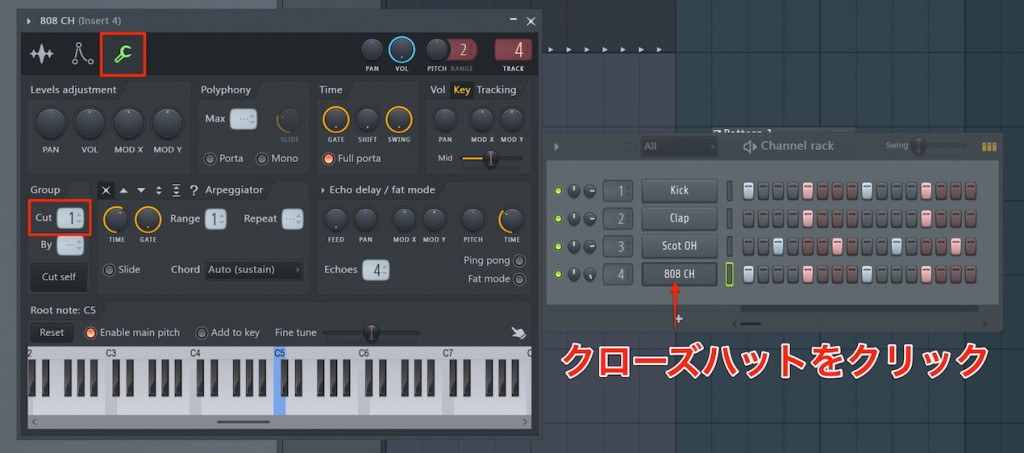
Click the channel that stops the sound (here, the closed hi-hat) and open its editor.
Select the wrench icon and assign a number to "Cut" under "Group."
Here we used "1," but if another instrument is already using "1" for a different purpose,
set it to "2" or similar, making sure it doesn't overlap with other numbers.
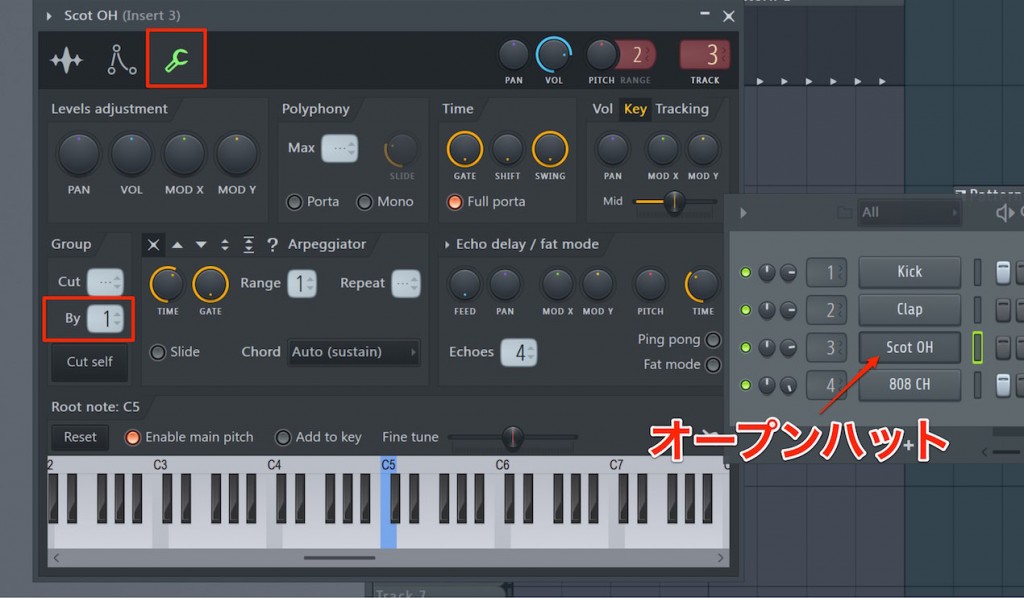
Next, click the channel whose sound is stopped (here, the open hi-hat) and open its editor.
Likewise, select the wrench icon and assign the number you set for the closed hi-hat to "By" under "Group."
The open hi-hat's sustain will now be stopped by the closed hi-hat.

Frequently Asked Questions
Q1. How should I decide the "Cut" and "By" values in FL Studio?
For "Cut," assign a number to the channel that stops the sound (closed hi-hat), and for "By," set that same number on the channel whose sound is stopped (open hi-hat). Be careful not to use a number that overlaps with other instruments.
Q2. What does a choke setting between open and closed hi-hats improve?
Automatically stopping the open hi-hat with the closed hi-hat tightens the drum sound, makes the groove clearer and gives a professional sound.
Q3. What happens if I use the same choke number for multiple instruments?
Unintended sounds will be stopped, so it's important to assign a different number to each choke setting. Choose numbers that don't overlap between instruments.
NEW ARTICLES
Latest English Articles











