
When controlling the length of audio samples in FL Studio, the default one-shot mode plays each sample through to the end, so you cannot fine-tune its length. Using ADSR mode lets audio play freely according to the length of each note, so you can freely control drum sounds such as kicks and snares as well as the tails of samples. This article explains in detail how to set up ADSR in FL Studio and what each parameter does, giving you practical knowledge for more natural and expressive beatmaking.
Control the groove by choosing between one-shot and ADSR
When you program audio samples in the Piano roll,
by default they behave in one-shot mode.
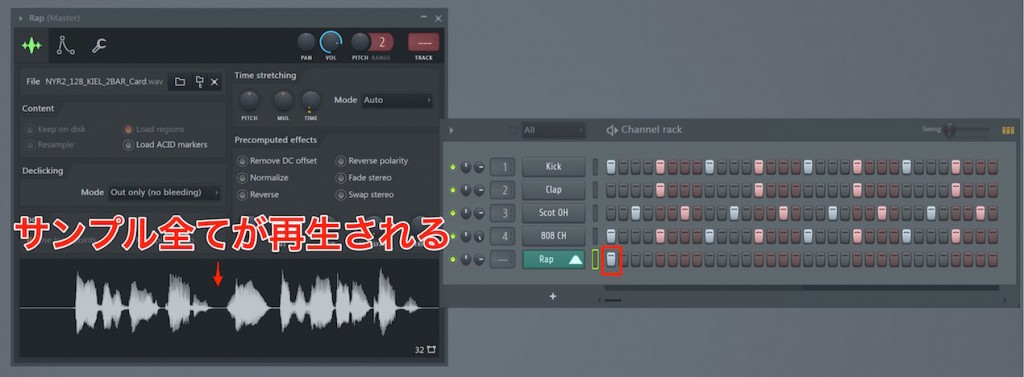
One-shot has the characteristic that once a sample has been triggered, it plays all the way to the end.
This can be convenient,
but as shown below, you cannot specify a playback length that stops the sound and then comes back in.
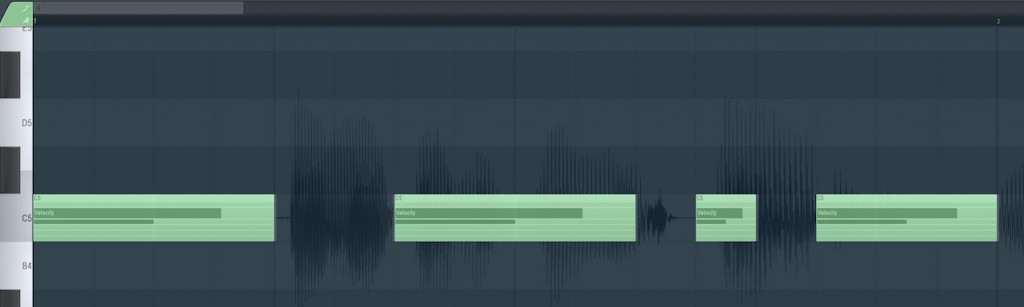
In that case, ADSR mode comes in handy.
The audio sample plays only for the length of the note, so it is very useful for controlling length.
ADSR in general is explained in detail in the following article, so please give it a read.
ADSR settings in FL STUDIO
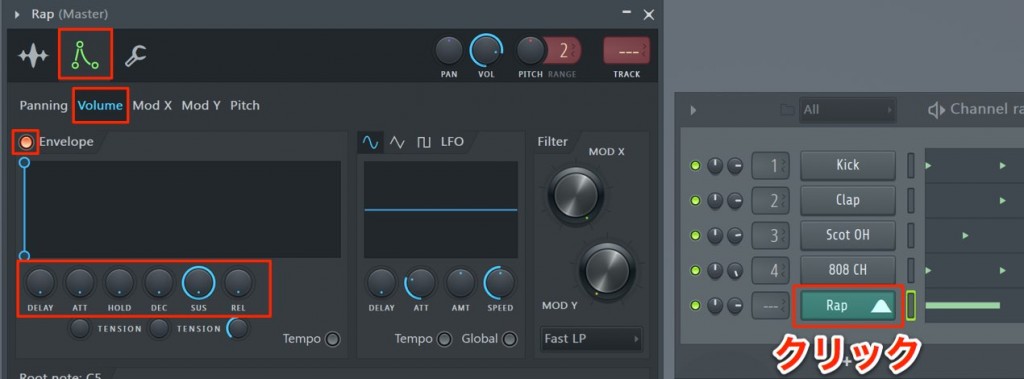
The setup is very easy.
In the Channel rack, click the channel you want to set up to open its editor.
Go to "Volume" on the Envelope tab and turn on "Envelope".
This time, we will set it so the sound plays only while the note is on.
- ATT: Set to zero so the sound plays as soon as the key is pressed
- HOLD: Set to zero to disable holding the volume
- DEC: Any value is fine
- SUS: This sets how much the volume decays while the note is on.
There is no need for it to decay this time, so set it to maximum - REL: The time from when the note turns off until the sound becomes silent.
This time we want playback to stop immediately, so set it to zero
That completes the setup.
The sound now plays in proportion to the length of the note.
This lets you control the length and tail of kicks, snares and so on, which is very convenient.
Please give it a try.

Frequently Asked Questions
Q1. What is one-shot in FL Studio?
One-shot mode is a playback behavior in which an audio sample, once triggered, plays to the end without stopping partway. It is simple, but because you cannot finely control the playback time, it is not suited to complex rhythm patterns.
Q2. What happens if I set REL to 0 in the ADSR settings?
REL controls the decay time after the note turns off. Setting it to 0 makes the sound go silent immediately when the note ends, so playback stops right away.
Q3. How should I adjust the sustain (SUS) value?
SUS sets how much the volume decays while the note is on. Set it to maximum if you want to keep the tail, or to a lower value if you want it to decay quickly, so you can control it to suit the character of the sound.
NEW ARTICLES
Latest English Articles











