
Transpose in Cubase is an indispensable function in DTM production when you need to match a vocalist's key or change the mood of a song. Because it can transpose multiple tracks and events in an instant, it streamlines tedious manual editing. You can change the key in semitone steps just by entering a value in the Info Line, and it is especially powerful for editing melodies, bass, strings, and other parts besides drum tracks. Mastering this function greatly increases your creative freedom and expands your musical expression.
What Is Transpose?
- The song you produced does not fit the vocalist's key
- You want to change the mood of the song
In cases like these, transposition comes in handy.
You could brute-force it by transposing every track by hand,
but with this function, you can change multiple tracks and events in an instant.
Selected questions and answers from the YouTube video

I am a DTM beginner using Cubase. Say I have a song where the verse is in E, the pre-chorus in Em, and the chorus in F#. In a case like this, I do not know how to modulate between them. Please give me some advice.

Possible approaches include inserting a chord between sections or adding a break (with no sense of pitch), but you may also discover something new by checking how it sounds with the verse, pre-chorus, and chorus all in the same key.
Cubase: How to Use Transpose
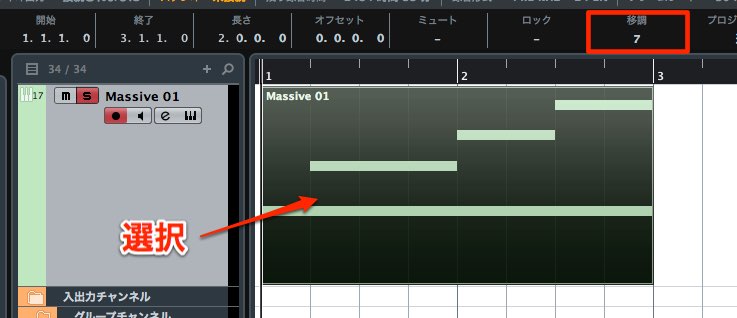
Select the events you want to transpose.
Drag "Transpose" in the Info Line up or down to change it.
"1" raises the pitch a semitone from the original, and "-1" lowers it a semitone.
To change from C to E, raise it 4 semitones by setting it to "4."
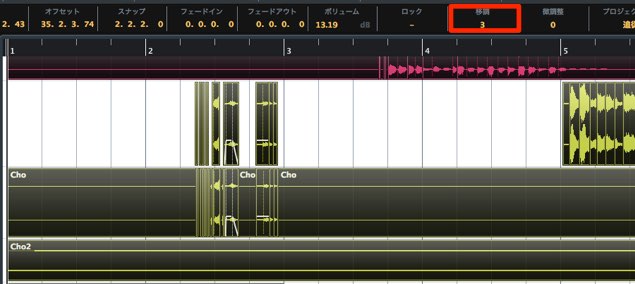
You can also transpose multiple events at the same time.
*Drum tracks have no concept of pitch, so do not use transpose on them.
If you apply it, all the kit sounds change, which is a disaster.
Advanced: Handy Event Editing Techniques
Frequently asked questions
Q1. What is the difference between Transpose and VariAudio in Cubase?
Transpose changes the key of multiple whole tracks, while VariAudio specializes in correcting the pitch of individual notes in recorded audio such as vocals. The former is used for transposing an entire song during composition, the latter for vocal editing.
Q2. What happens if I apply transpose to a drum track?
Drum tracks have no concept of pitch, so applying transpose changes all the kit sounds and breaks the song. Be careful not to apply it to drum tracks.
Q3. What value do I use to transpose from C to E?
C to E is 4 semitones up, so set the value to "4." Each step equals one semitone; enter a positive number to raise and a negative number to lower.
NEW ARTICLES
Latest English Articles











