
Cubase's strip silence function automatically detects and cuts silent sections and low-level noise from audio tracks such as vocal and guitar recordings. Work that takes a long time to edit by hand can be processed quickly and accurately, greatly improving your efficiency. By adjusting four sets of parameters (Open/Close Threshold, minimum opening/closing time, Pre-Roll, and Post-Roll), you can edit naturally while taking breaths and fade-outs into account. It is a basic technique every DTM user who wants to improve the quality of their vocal tracks should learn.
Ideal for Audio Tracks Such as Vocals and Guitar
Using the strip silence function,
you can cut silent sections and low-level noise within a region all at once.

It processes faster and more accurately than working by hand, which improves your efficiency.
Strip Silence Explained
Cubase: How to Use Strip Silence
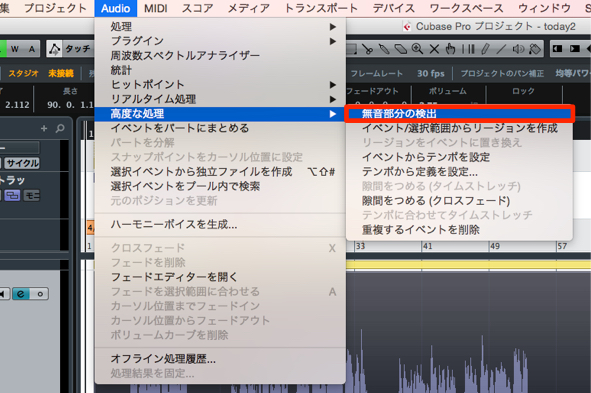
↑ Select the event you want to apply strip silence to,
then choose "Audio" → "Advanced" → "Detect Silence" from the top menu.
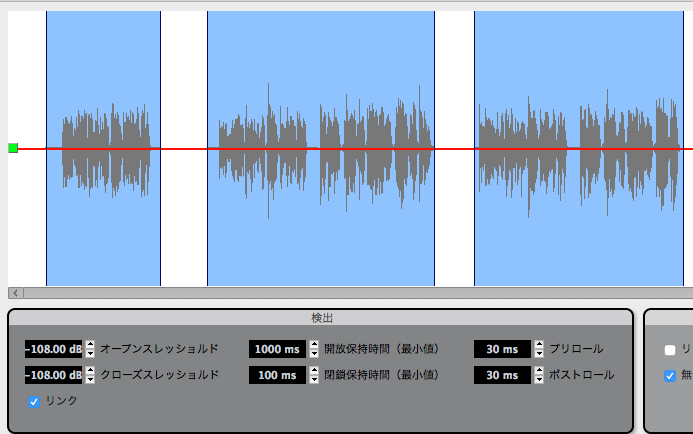
↑ A dialog like this appears.
- Open/Close Threshold
Determines how low a volume is treated as silence or noise. - Min. Opening/Closing Time
Even within a waveform, there are momentary gaps.
This sets how long a gap must last before it is treated as silence.
Shortening the time allows finer detection, but it is best to keep it to a level that does not sound unnatural. - Pre-Roll
Adds some margin before the point where the cut begins.
Use this to account for things like vocal breaths. - Post-Roll
Adds some margin after the point where the cut ends.
Use this so that sounds fading out cleanly are not treated as silence or noise.
Everything outside the areas outlined in blue is treated as silence or noise and cut.
If there are no problems, click "Process."
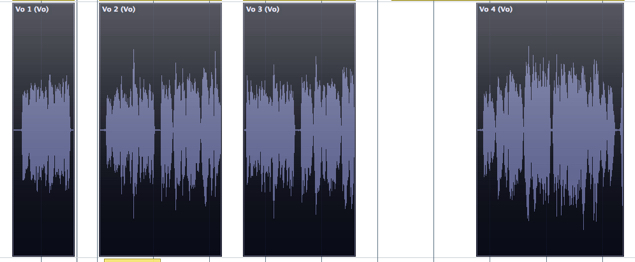
↑ The region has been cut like this.
Very convenient.
Frequently asked questions
Q1. What kinds of tracks is strip silence best suited for?
It is ideal for audio tracks of live instruments such as vocals, guitar, and bass. It is especially effective for improving the quality of vocal recordings, as it efficiently removes noise and silent sections picked up during recording.
Q2. How should I set the Open/Close Threshold?
This parameter determines the volume level treated as silence. For vocals, around -40 to -50 dB is a guideline, but adjust it according to your recording environment. We recommend finding the best value while checking the preview.
Q3. What is the difference between Pre-Roll and Post-Roll?
Pre-Roll is a margin before the cut begins that protects breaths. Post-Roll is a margin after the cut ends that allows a natural fade-out. It is important to set both within a range that does not sound unnatural.
NEW ARTICLES
Latest English Articles











