
Cubase's Solo Defeat function is a handy feature that keeps a specific track playing whenever other tracks are soloed, without muting it. You apply it simply by clicking the solo button with a dedicated modifier combination on Mac or Windows, and once set, the specified track always plays no matter which track you solo. It greatly reduces effort when you always want to monitor the master or a 2-mix track, or when mixing involves checking many tracks, giving you a more efficient production environment.
Solo Defeat: A Function That Is Not Affected by Other Tracks' Solos
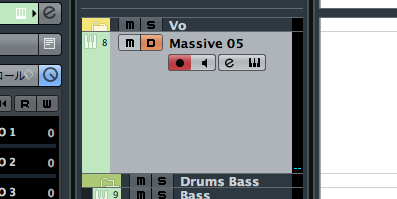
↑ Normally, the solo function mutes the other tracks and plays a track on its own,
but there is also a function called "Solo Defeat".
Solo Defeat does not affect other tracks (does not mute them);
when another track is soloed, this track automatically plays along as if soloed too.
Cubase Solo Defeat Video
*Explained from 2:49.
An Example of Solo Defeat
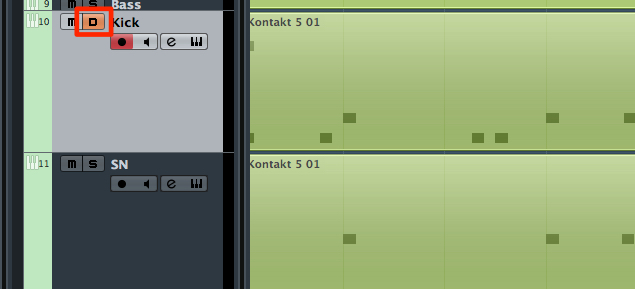
↑ Solo Defeat is applied to the "Kick" track.
At this stage it does not affect other tracks,
so the "Snare" track below it also plays.
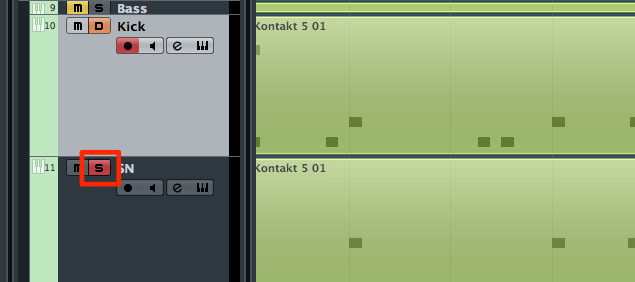
↑ We soloed the "Snare."
Normally only the "Snare" would play,
but the "Kick," set to Solo Defeat, plays at the same time.
How to Apply Solo Defeat
↑ Click the solo button outlined in red with:
Mac: Command + Option + click
Windows: Control + Alt + click
That's all.
A track with Solo Defeat applied
shows "D," as in the image above.
Doing the same operation again
removes Solo Defeat.
Examples of Using Solo Defeat
The benefit of Solo Defeat is that it saves you effort.
Here is one example.
When There Is a Track You Always Want to Hear
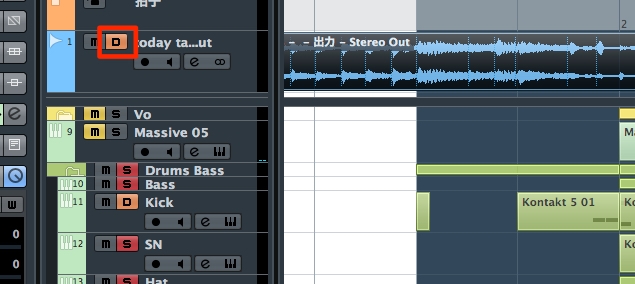
↑ The 2-mix track at the top is set to Solo Defeat.
This way, the 2-mix track always plays no matter which track you solo.
Frequently asked questions
Q1. What is the difference between Solo Defeat and the solo function?
A normal solo mutes the other tracks and plays a track on its own, while Solo Defeat does not affect other tracks and keeps the specified track playing when others are soloed. Its strength is that you can always monitor several tracks at once.
Q2. Is Solo Defeat easy to set up?
Very easy. Just hold Command + Option on Mac or Control + Alt on Windows and click the solo button; the button then shows "D." You can remove it with the same operation.
Q3. When is Solo Defeat useful?
If you set it on a track you always want to play as a reference, such as a 2-mix or master track, it plays automatically while you check other tracks in solo, greatly improving your mixing efficiency.
NEW ARTICLES
Latest English Articles











