
Using Cubase's slice function, you can efficiently extract and reuse the parts you need from an audio file. It's very handy for turning existing audio material into new expressions, such as pulling a kick out of a drum pattern or using part of a vocal. Hitpoint detection automatically recognizes attacks, and after adjusting the threshold you create events, so you can place and edit the material individually and even drag and drop it into a sampler such as Groove Agent ONE.
Cubase: easily reuse part of an audio file
You want to extract the kick from a drum pattern you like.
You want to reuse part of a vocal recording.
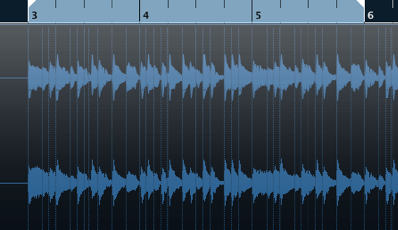
There are plenty of situations where you want to create new effects from audio material like this.
Here is a handy feature you can use in Cubase.
Explanation of slicing
Using the slice function
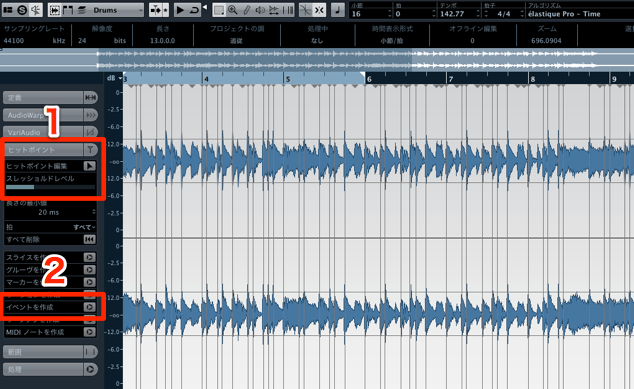
- 1. Move the "Threshold" slider in "Hitpoints."
Split lines appear, so set it so the attacks are properly detected - 2. Click "Create Events"
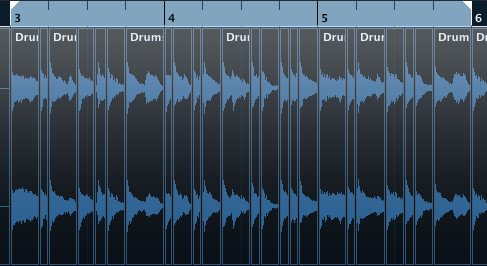
The event is split at the threshold positions above.
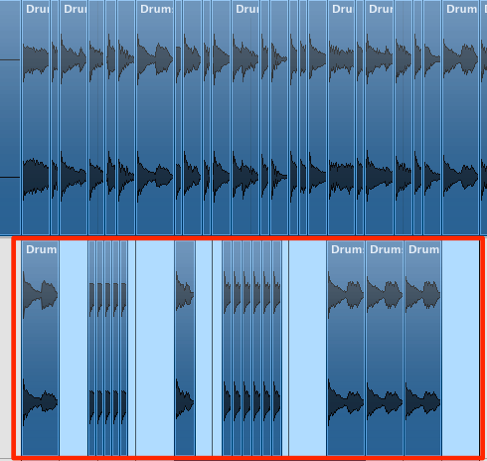
Then just arrange the material however you like.
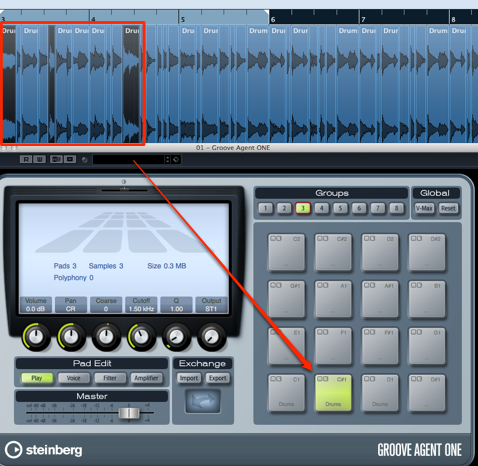
You can also drag the material into a sampler such as "Groove Agent ONE" and use it there.
If this doesn't work, check the article below.
Frequently asked questions
Q1. What can Cubase's slice function be used for?
It comes in handy for extracting kicks and snares from drum loops, cutting out specific vocal phrases, and reusing parts of sample libraries. You can efficiently create new material from existing audio.
Q2. What does the Threshold slider do?
The Threshold slider adjusts the detection sensitivity for the attacks (onsets) of sounds. This makes the split lines appear in the correct positions, improving the accuracy of cutting out material.
Q3. What should I do if sliced events make no sound in Groove Agent ONE?
See the related article introduced in this article, "Groove Agent: No Sound When Loading Slice Events," which describes how to solve the problem. Check your settings and connections.
NEW ARTICLES
Latest English Articles











