
Cubase's randomize function shifts notes placed with step recording slightly earlier or later, adding subtle variation to repeated drum phrases and the like. It prevents the monotony of a repeating pattern and keeps the listener engaged. By adjusting the Randomize value in the Quantize Panel within a range of 0 to 48 ticks and applying it, you create natural fluctuation and improve the overall quality of the song. Values that are too large break up the phrase, so it is important to keep adjustments subtle.
Cubase: What Is Randomize?
Normally, step-recorded notes are placed exactly on the bar or beat.
When a phrase such as a drum pattern is used repeatedly,
listeners start to find the repetition monotonous.
That is where Randomize comes in handy.
As the name suggests, it is a function that shifts notes slightly earlier or later at random.
If the shift is large, the phrase itself falls apart.
Use it only for subtle seasoning.
It keeps listeners engaged to the end and prevents the pattern from becoming monotonous.
Randomize Explained (Video)
Cubase: How to Use Randomize
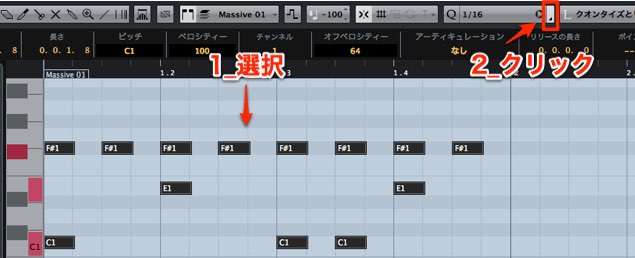
Select the notes you want to randomize and click the area outlined in red above.
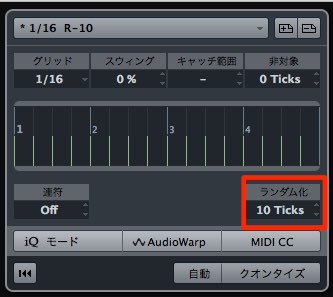
The Quantize Panel opens.
Adjust the "Randomize" value.
Adjust it between 0 and 48 ticks; the larger the number, the greater the randomness.
After deciding the value, click "Apply."
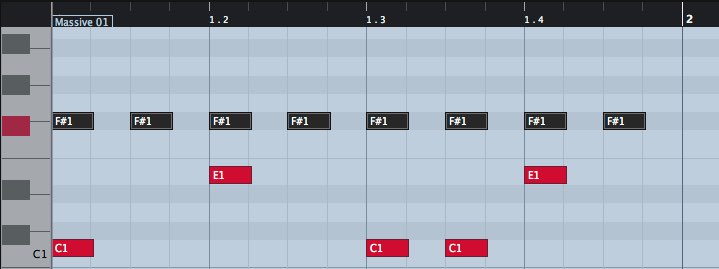
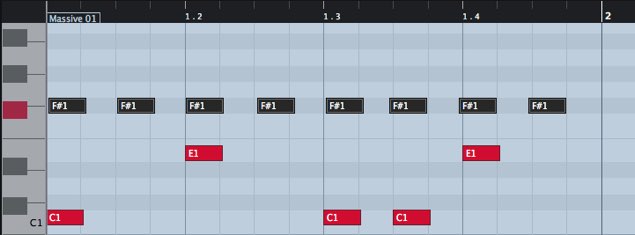
This time, we applied randomize to the drum hi-hat.
Tick Explained
Before
After
Check it many times against the song
and adjust it so it sounds natural.
Frequently asked questions
Q1. What is Cubase's randomize function used for?
It adds subtle timing offsets to repeated phrases such as drums to prevent monotony. It gives listeners a natural groove and sense of tension, creating a human-like performance.
Q2. How many ticks should I set for randomize?
You adjust it in a range of 0 to 48 ticks, but too large a value breaks up the phrase, so we recommend starting with a subtle value. Check it many times against the song and adjust it to a value that sounds natural.
Q3. What kinds of tracks is randomize effective on?
It is especially effective on drum patterns such as hi-hats and kicks. It can also be applied to other tracks such as melodies and bass, as long as they are repeated phrases.
NEW ARTICLES
Latest English Articles











