
When producing with MIDI in Cubase, if multiple instruments such as a drum kit are contained in a single event, you cannot adjust each instrument individually when mixing. This article explains how to split a MIDI event by kit piece with the Dissolve Part function and convert the kick, snare, hi-hat, and so on into individual audio files. Splitting each instrument lets you adjust volume, pan, and effects independently for a more detailed mix. It also introduces multiple outputs as an alternative, along with applications beyond drum instruments, such as splitting chords.
Why Split by Kit Piece
When mixing a song, it is common to convert MIDI programming to audio first.
What causes trouble at that point
is the drum track, with its kick, snare, hi-hat, cymbals, and so on.
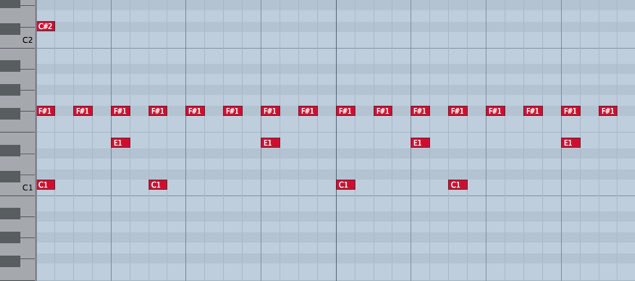
In normal programming, all the kit pieces are in a single event, as shown in the image below.
As a result, all the kit sounds are exported as a single audio file.
To adjust the volume, pan, effects, and so on of each kit piece,
you need to convert each one into a separate audio file.
Here is a convenient way to solve this.
Cubase: How to Split a MIDI Track
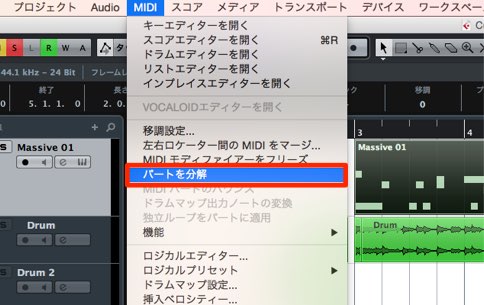
↑ Select the event you want to split,
then choose "MIDI" → "Dissolve Part" from the top menu.
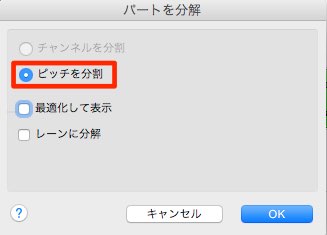
↑ In the dialog, choose "Separate Pitches."
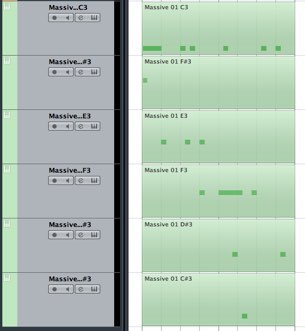
↑ It has been split like this.
Besides drums, you can apply this in other ways, such as splitting chords.
Be sure to try it.
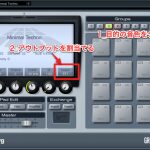
Cubase: You Can Also Use Multiple Outputs
- Ver. 6 and earlier
- Ver. 7.5/8
- Ver. 6 and earlier
- Ver. 7.5/8
Frequently asked questions
Q1. What is the first step to splitting MIDI drums in Cubase?
Select the MIDI event you want to split and choose "MIDI" → "Dissolve Part" from the top menu. Then choose the "Separate Pitches" option in the dialog, and each drum kit piece is automatically split into its own event.
Q2. Once I split the MIDI, can I immediately convert it to audio files?
No. After splitting the MIDI, you need a separate step to convert each track to audio. This lets you export each kit sound as an individual audio file and adjust volume, pan, and effects independently.
Q3. What is the difference between multiple outputs and Dissolve Part?
Dissolve Part splits instruments at the MIDI level and then converts them to audio. Multiple outputs, on the other hand, route multiple instruments from a single synth directly to different outputs, and the procedure differs depending on your Cubase version.
NEW ARTICLES
Latest English Articles











