
In music production with Cubase, dithering is an important process for keeping loss of sound quality to a minimum. This article explains the concrete steps: setting the bit depth at the project stage, applying the UV22HR plugin after mastering, and choosing the bit depth on export. By understanding the points to watch in the mastering process, such as converting from 24-bit to 16-bit and setting the limiter's output, you can produce final masters with professional sound quality.
Using Dithering in Cubase
This article branches off from "Dithering" in the Mix category.
This article will deepen your understanding.

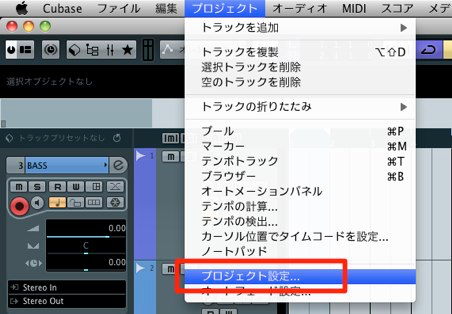
↑ In Cubase, from the menu bar, select "Project" → "Project Setup," where
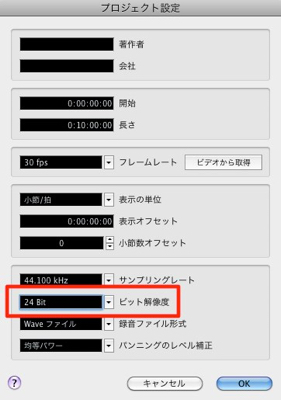
↑ you can choose the bit depth.
The bit depth you choose here is used within the project.
We recommend setting it
at the very beginning, not partway through production.
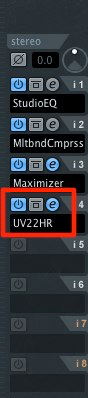
↑ Apply "UV22HR" to the Stereo Out of the project once mixing or mastering is finished.
Always apply UV22HR last in the chain.
UV22HR is found in the "Mastering" folder of the plugins.
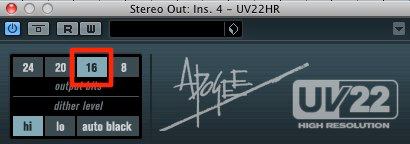
↑ Select the bit depth for export.
If you worked in 24-bit and will export at 16-bit, choose 16-bit.
If you worked in 32-bit and will export at 24-bit, choose 24-bit.
If you are exporting a 24-bit session to a 24-bit WAV, UV22HR is not needed.
One thing to note:
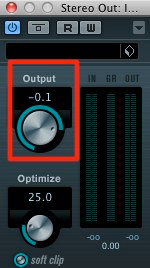
↑ the "Output (Ceiling)" of your limiter or maximizer
must be set to "-0.1 dB." Otherwise, the sound may distort.
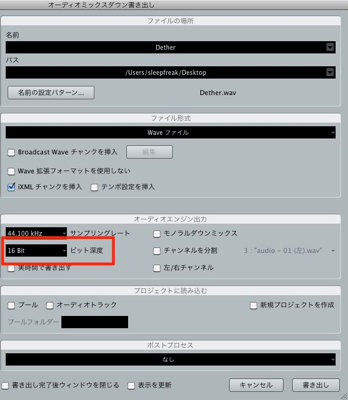
↑ Then simply use the normal Audio Mixdown window,
choose the bit depth you want (the same value as UV22HR above), and export.
It is simple, but it is a dithering step you should always do.
Frequently asked questions
Q1. Which plugin should I use for dithering in Cubase?
Use UV22HR, a plugin included with Cubase. It is in the Mastering category, and you apply it to the Stereo Out after mixing or mastering is finished. Always insert it last in the mastering chain.
Q2. Is UV22HR required when exporting a song made in 24-bit at 16-bit?
Yes, UV22HR is recommended whenever you lower the bit depth. On the other hand, when exporting at the same bit depth (for example, exporting a 24-bit session as a 24-bit WAV), UV22HR is not needed.
Q3. What should I watch out for when using a limiter with dithering?
Always set the limiter's or maximizer's "Output (Ceiling)" to "-0.1 dB." If you neglect this, the sound may distort.
NEW ARTICLES
Latest English Articles











