
This article teaches effective drum production techniques for EDM. It explains concretely how to add groove to four-on-the-floor drum patterns, which tend to become monotonous, by combining hi-hats and delay. By programming hi-hats in 16th notes, setting different delay times on the left and right, separating the original sound from the effect sound with a filter, and then randomly deleting MIDI notes, you can achieve a drum sound with a professional texture. Using effects such as echo, reverb and sidechain in addition to delay enables even more distinctive music production.
Creating Groove by Combining Hi-Hats and Delay
EDM Recipe part 6 introduces something you can use right away: creating groove by combining drums and effects!
We use the very effective combination of a hi-hat and delay as an example.
Drum Production with Effects
First, let's listen to the sound with the technique applied.
It has become a hi-hat sound with more movement!
Now let's go through the process step by step.
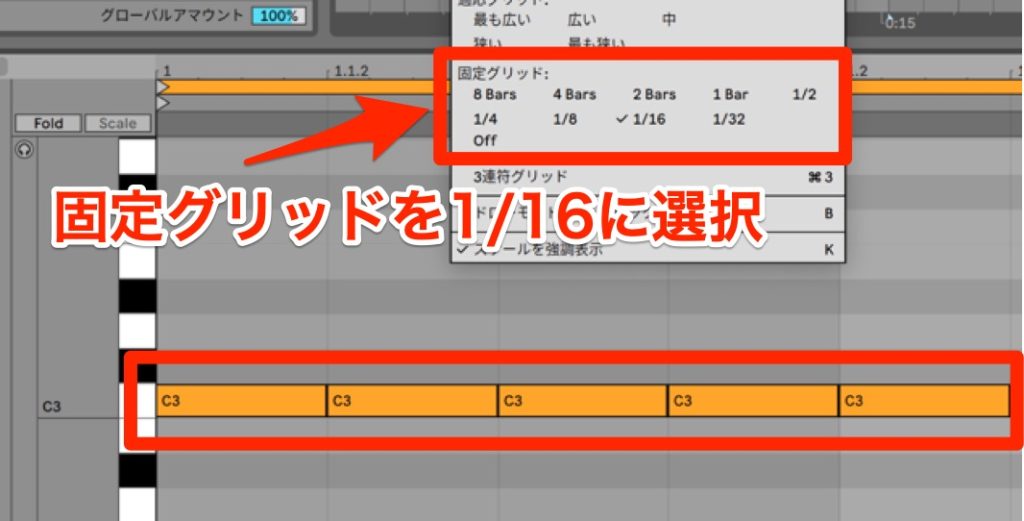
Program the Hi-Hat
First, program the hi-hat sound in [16th notes].
▶︎ Programming the hi-hat
Add a Delay
Next, add a stereo delay, which can be set separately for L and R, to the hi-hat track.
Here are the steps for setting the delay.
- 1_Set the delay time
- 2_Set the feedback
- 3_Set the filter in the delay
To make the sound wider, set different delay times on the left and right.
In this video, the left is set to 3 and the right to 5.
▶︎ Setting the delay time

Next, set the delay's feedback. This time we set it to 20%.
▶︎ Setting the feedback

Next, to separate the original sound from the delay sound, cut the highs and lows with the filter in the delay.
▶︎ Setting the filter

Arrange the Programming
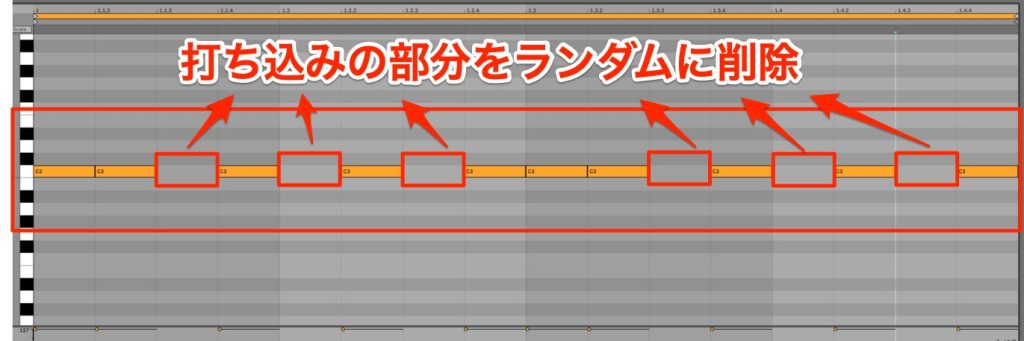
Finally, arrange the programming to change the rhythmic feel of the sound.
Randomly deleting MIDI notes achieves a groovy sound that ordinary programming alone cannot create.
Also, changing the hi-hat programming pattern greatly changes the rhythmic feel of the drums.
▶︎ Arranging the programming
How did you find it?
Four-on-the-floor drum patterns, which tend to become monotonous, can easily be given groove by adding effects.
Besides delay, echo, reverb, sidechain and so on are also often used to add groove to drums.
Please try various effects and make your own songs full of originality!
See you in the next recipe.
Frequently Asked Questions
Q1. What effect does using delay on hi-hats have in DTM?
Adding delay to hi-hats creates depth and movement in monotonous drum patterns. Setting different delay times on the left and right gives a groovy sound with a sense of stereo width.
Q2. What are the most important parameters in the delay settings?
Three are important: delay time, feedback and filter settings. Set different delay times on the left and right, keep feedback to around 20%, and cut the highs and lows with the filter to adjust the balance with the original sound.
Q3. Is there a way to give drums groove without effects?
Arranging the programming is effective. Randomly deleting MIDI notes or changing the hi-hat pattern creates a human-like groove. Combining it with effects such as delay and reverb makes the sound even more refined.
[DTM] EDM Recipe part 6 introduces something you can use right away: creating groove by combining drums and effects! We use the very effective combination of a hi-hat and delay as an example. Please try it in your own production!
Article: https://t.co/vBkLvKE5me
Video: https://t.co/UZephVG3sJ#dtm #edm #composing pic.twitter.com/Zg4kGLVtkI
— SLEEP FREAKS (@SLEEPFREAKS_DTM) May 27, 2023
NEW ARTICLES
Latest English Articles











