
After updating to Waves V9r23, some users have reported that plug-ins no longer appear in their DAW. This article explains in detail how to reinstall using the offline installer, noting that in many cases the problem is solved by checking all plug-ins when installing. If an error appears at startup, you may also need to remove Vitamin and WLM Plus. Learning these fixes lets you use the plug-ins you purchased normally.
Plug-ins don't appear in the DAW after updating
The recent "OneKnob Pumper" giveaway:
many of you have probably already installed it.
However, some people reported that none of their Waves plug-ins "appear in the DAW."
This time, we describe how to solve this.
Solution
After trying various methods, this is the one that worked in some cases.
Go to the download page below. (Login required)
http://www.waves.com/downloads/v9
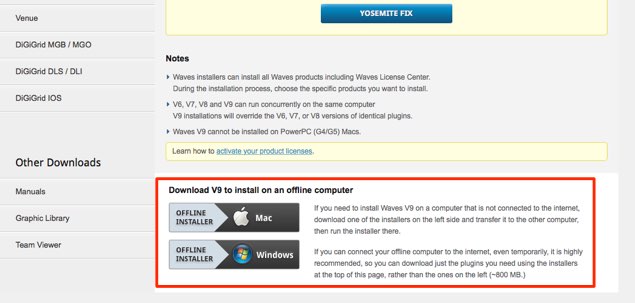
Download the "Offline Installer" at the bottom of the page.
It takes a little while.
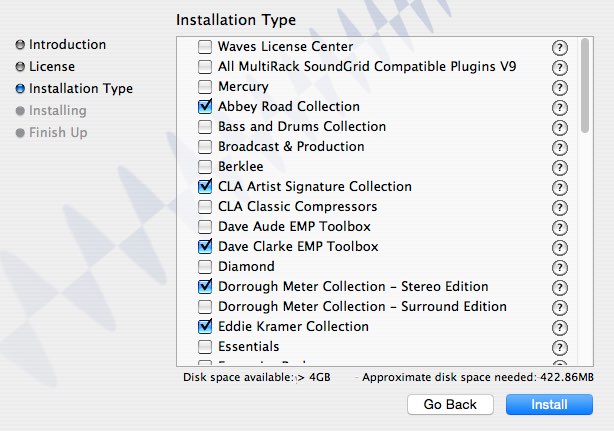
Run the installation.
When you do, check all the plug-ins you own.
Once installation finishes, your DAW should recognize the plug-ins.
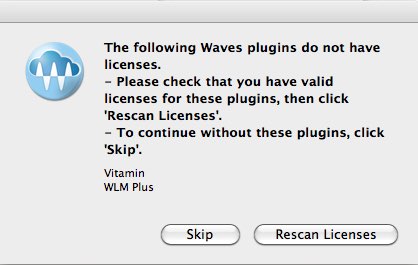
If a message like this appears when you launch your DAW,
you need to remove "Vitamin" and "WLM Plus."
Please refer to the following article.
https://sleepfreaks-dtm.com/dtm-trouble/waves-demo/
Frequently asked questions
Q1. Why don't my plug-ins appear in the DAW after updating Waves?
Plug-in recognition information can be lost during the update process. Reinstalling all the plug-ins with the offline installer solves it in most cases.
Q2. Where can I download the offline installer?
Log in to Waves' official download page and click "Offline Installer" at the bottom of the page to download it. The file is large, so the download takes time.
Q3. I was told to remove "Vitamin" and "WLM Plus" during installation. Why?
These plug-ins can cause errors when the DAW starts, so removing them avoids the problem. See the related article for how to remove them.
Q4. What should I do if the offline installer doesn't solve the problem?
Try clearing caches, rescanning plug-ins in your DAW, and restarting your computer. If that still doesn't solve it, we recommend contacting Waves support.
NEW ARTICLES
Latest English Articles











