
When the edit window of a Waves plugin turns completely white, the cause is an underpowered graphics card or a compatibility problem. It often happens on Windows after you open several Waves plugins, and restarting does not fix it. To solve the problem, the first recommended step is to update your graphics driver to the latest version. Check your current graphics card with the dxdiag command, then install the latest driver from the manufacturer's website. If that does not help, adding or replacing the graphics card resolves the problem in most cases. This is a must-read fix for anyone who wants a stable DTM environment.
The Edit Window Is Completely White... and You Can't Edit
The Waves series is famous for its mixing plugins.

With its good usability and high sound quality, it has become a standard tool for mixing.
- Manufacturer website
http://www.waves.com/Default.aspx?l=7 - Sleepfreaks tutorial article
https://sleepfreaks-dtm.com/dtm-materials/waves/
However, depending on the computer, the edit window may turn completely white,
making editing impossible.
Here are the characteristics I have confirmed:
- Windows environment
- Occurs after opening more than a certain number of Waves plugins
- Restarting does not fix it
This is quite a troublesome problem.
However, there is a way to fix it.
We will introduce it here.
Update the Graphics Driver
From the website of your computer's manufacturer,
download and install the latest graphics driver.
First, you need to check which graphics card your computer is currently using.
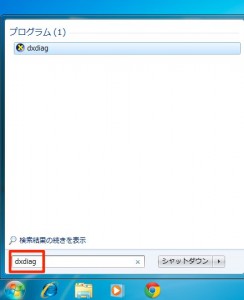
Type "dxdiag" in the Start menu search box.
Then launch "dxdiag" from the results.
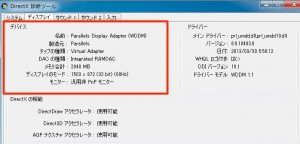
The area outlined in red on the "Display" tab shows the information about your graphics card.
Based on this information, download the driver from the manufacturer's website.
Add a Graphics Card (If the Above Does Not Solve It)
Processing what appears on your computer and displaying it on the screen:
that is the job of the graphics card.
This problem occurs when the graphics card cannot keep up,
or when it is not compatible with Waves.

If you add or replace the graphics card,
the problem is fixed in most cases.
Graphics cards can be bought inexpensively.
http://www.dospara.co.jp/5top/
*Be sure to check your computer and buy a compatible card.
Frequently asked questions
Q1. What causes the Waves plugin window to turn completely white?
The cause is either an underpowered graphics card or poor compatibility between the card and Waves plugins. The problem tends to become noticeable when several Waves plugins are open at once, and it has been reported especially on Windows.
Q2. How do I check my graphics driver?
Type "dxdiag" in the Windows Start menu search and launch the tool that appears. The "Display" tab shows your graphics card information, which you can use to download the latest driver from the manufacturer's website.
Q3. What should I do if updating the graphics driver does not help?
Consider adding or replacing the graphics card. Installing a new graphics card improves the problem in most cases. When buying one, always check that it is compatible with your computer.
NEW ARTICLES
Latest English Articles











