
When producing audio in Logic Pro, if the Master meter looks different than usual, surround mode may be enabled. Surround mode is for formats such as 5.1ch that require multiple speakers, so you can't monitor accurately on stereo speakers or headphones. This article explains the cause and the fix when you've accidentally ended up in surround mode. You can easily solve the problem by changing the track's output setting from "Surround" to "Stereo Out."
Surround mode in Logic
While you're producing, you suddenly notice
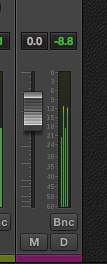
that the Master display looks different than usual...
This is because it has switched to "surround mode".
Surround requires at least three speakers,
so you can't monitor and adjust accurately in a stereo setup or on headphones.
Living in a high-rise apartment, wearing a bathrobe after a bath with a cat on your lap,
watching a movie while drinking wine:
that movie's audio might be in surround.
You need to fix it right away.
Solution
When you use some of the instruments provided by default,
Logic may switch to "surround mode."

Look among your tracks for any whose "Output" is set to "Surround."
Then, change it to "Stereo Out" to turn surround off.
The "Master" track also returns to normal.
Frequently asked questions
Q1. Why does the meter display change in Logic Pro?
Because the Master track has switched to surround mode. When a default instrument or a track's output setting is "Surround," the meter display differs from usual. This isn't suitable for working in a stereo setup.
Q2. How do I change surround mode back to stereo?
Check the track's "Output" setting and change it from "Surround" to "Stereo Out." This turns off surround mode, and the Master track returns to normal.
Q3. When does Logic Pro's surround mode turn on automatically?
It may switch to surround mode automatically when you use instruments provided by default. It can also depend on the settings when you create a new project.
NEW ARTICLES
Latest English Articles











