

When other software goes silent while Studio One is running, the cause is that Studio One takes exclusive control of the audio device. This article explains in detail how to fix it. A simple setting change, going to "Options" → "Audio Setup" → "Control Panel" from the menu and unchecking "Exclusive Mode," lets other applications such as Skype and YouTube output audio normally. It is a problem music production beginners often stumble on, and knowing this fix greatly improves your efficiency.
No sound from your computer
While Studio One is running,
sound from other software doesn't play.
Sound from Skype and the internet (YouTube) also stops coming out.
Here, we look at how to fix this.
Solution
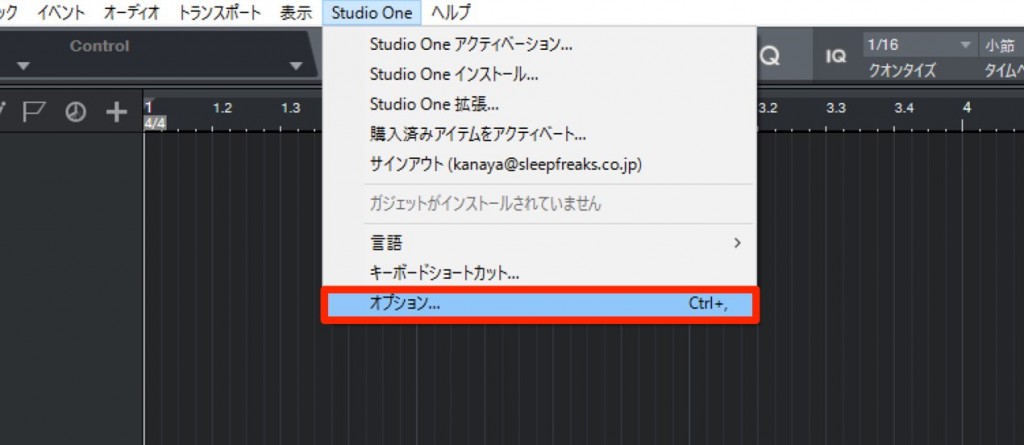
From the top menu, select "Studio One" → "Options."

Select "Audio Setup" and click "Control Panel."

Uncheck "Exclusive Mode."
That completes the setup.
The output device is no longer taken over by Studio One, and sound from other software comes out as well.
Frequently asked questions
Q1. Why does YouTube audio stop when I launch Studio One?
Because Studio One takes exclusive control of the audio device in "Exclusive Mode." In this mode, applications other than Studio One can't output audio. You can solve it by changing the setting.
Q2. Does disabling Exclusive Mode reduce Studio One's performance?
Turning off Exclusive Mode has no major effect on Studio One's basic performance. Using shared mode across multiple applications makes your work more convenient.
Q3. Will audio from call apps such as Skype also play at the same time?
Yes. Disabling Exclusive Mode lets Skype and other applications output audio normally even while Studio One is running.
NEW ARTICLES
Latest English Articles











