
If you can't install Native Instruments software because the installation disc is damaged or lost, you can solve the problem by downloading it from the official website. Just log in to My Account, check your registered products, and download the software you need to reinstall it easily. Using the new license management tool "NATIVE ACCESS" makes installation and updates faster and more flexible, making your production environment more efficient.
For damaged or lost Native Instruments discs
The installation disc is damaged or lost,
so you can't install the product...
What we recommend trying is "downloading from the website".
You can download installers from Native Instruments' servers.
Using the newly released "NATIVE ACCESS,"
you can do what this article describes even more smoothly.

Solution
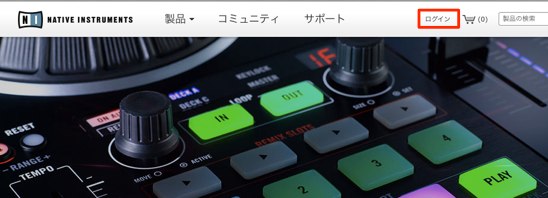
Go to the Native Instruments website and select "Log In."
URL: http://www.native-instruments.com/jp/
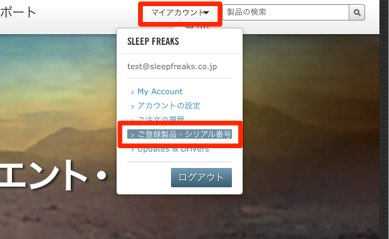
From "My Account," select "My Products & Serials."
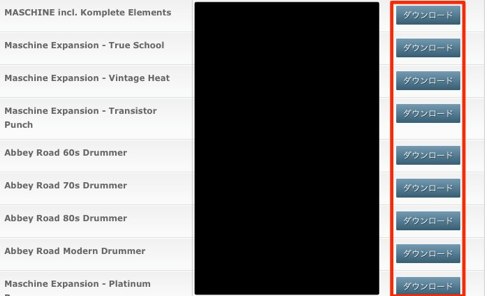
Your products are listed,
so "download" the product you need.
Frequently asked questions
Q1. If I lose a Native Instruments disc, how can I reinstall the software?
Log in to the official Native Instruments website and download it from the "My Products & Serials" page in My Account to reinstall it. You don't need the disc.
Q2. What is NATIVE ACCESS?
It's a new license management tool that replaces the former Native Instruments Service Center. It lets you install and update faster and more flexibly.
Q3. Is authorization required when using a downloaded installer?
Yes, after installation you need to activate (authorize) it with your serial number. Using NATIVE ACCESS makes the authorization process smoother.
NEW ARTICLES
Latest English Articles











