
With the release of Mac OS X 10.8 Mountain Lion, compatibility of the DAWs and plugins essential to DTM production became an important concern. This article summarizes compatibility information for the latest versions of major DAWs, including Pro Tools, Logic, Cubase, and Studio One, and of staple plugins such as Spectrasonics, Waves, and Kontakt. It also explains in detail how to change your security settings when an installer will not launch, to help you upgrade smoothly. It is full of practical information so you can move to the new OS with confidence and set up your production environment.
Mac_10.8_DAW Compatibility Status
Apple has released its new Mac OS, 10.8 "Mountain Lion."

http://itunes.apple.com/jp/app/os-x-mountain-lion/id537386512?ls=1&mt=12
What you probably want to know is whether your DAW-related software is compatible.
We have summarized the status of the DAW software used in Sleepfreaks lessons.
We will update this page as updaters are released.
*These are the results of our own testing.
What If an Installer or Updater Won't Install?
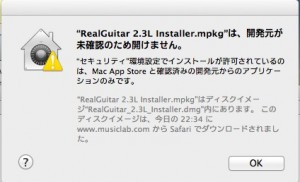
↑ Here is what to do if an error like this prevents installation.

↑ Click "System Preferences."
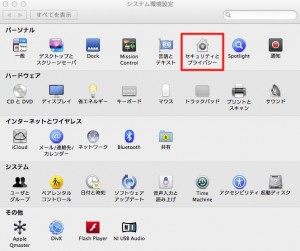
↑ Select "Security & Privacy."
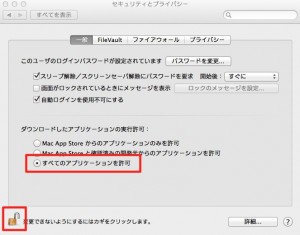
↑ On the "General" tab, click the lock to unlock it,
and check "Allow applications downloaded from: Anywhere."
You can now install.
Compatibility by Software
Pro Tools

Fully supported in the latest version, 10.3.
http://www.avid.com/jp/products/family/pro-tools
Log in to your account,
then download and install version 10.3.
Logic
Fully supported in the latest version, 9.1.7.
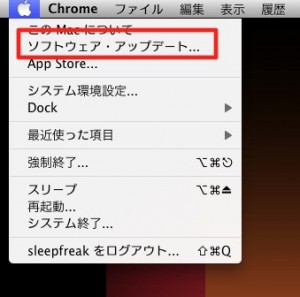
↑ Update to the latest version here.
Cubase

Launches with the latest version.
Download and install the latest version from the following URL.
http://japan.steinberg.net/jp/support/downloads/cubase_6.html
Studio One

Launches with the latest version.
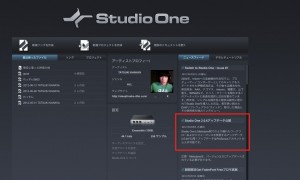
Update to the latest version from the area outlined in red.
Spectrasonics



Launches with the latest version.
http://auth.spectrasonics.net/useracct/ (login required)
Download and install the latest version.
BFD2
Launches with the latest version.
http://www.fxpansion.com/index.php?page=10&tab=81 (login required)
Download and install the latest version.
Melodyne
Launches with the latest version.

Download and install the latest version.
http://www.celemony.com/cgi-bin/WebObjects/LicenseApp (login required)
Auto-Tune

Launches with the latest version. (32-bit version)
Download and install the latest version.
http://www.antarestech.com/download/update.shtml
Komplete 8

Launches with the latest version.
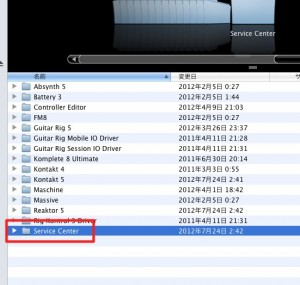
From "Applications" → "Native Instruments" → "Service Center,"
update or install.
*When launching Pro Tools, it froze while loading Kontakt 5.
We solved this by removing Kontakt 5 from the "System HD" → "Library" → "Application Support" → "Digidesign" → "Plug-Ins" folder
and putting it back after Pro Tools had launched.
RealGuitar
Launches with the latest version.
http://www.musiclab.com/download.html
Download and install the latest version.
*You may need to activate it again.
Waves
Launches with the latest version.
From "Applications" → "Waves" → "Applications" → "wlc,"
update to the new version.
Frequently asked questions
Q1. What should I do if an installer won't launch on Mac 10.8 Mountain Lion?
Open "Security & Privacy" in System Preferences, unlock the lock on the General tab, and allow applications from anywhere. Then run the installation.
Q2. What is the minimum Pro Tools version needed on Mac 10.8?
Pro Tools is fully supported from version 10.3. Log in to your account to download and install the latest version.
Q3. What can I do if Pro Tools freezes when using Kontakt 5?
Temporarily move Kontakt 5 out of the Library → Application Support → Digidesign → Plug-Ins folder on your System HD, then put it back after Pro Tools has launched.
Q4. Is there anything to watch out for when using plugins such as RealGuitar and Waves on Mac 10.8?
Updating to the latest version is essential. RealGuitar may need to be activated again, so it is a good idea to have your license information on hand.
NEW ARTICLES
Latest English Articles











