
When you drag and drop MIDI patterns from a soft synth into Cubase, unwanted tracks may be created automatically. This article shows how to solve the problem easily by checking "Import dropped File as single Part" and unchecking "Split channels for File Type 0" in the "MIDI File" section of Preferences. It is a workflow technique that comes in handy when using major drum plug-ins such as Addictive Drums and BFD.
Settings for importing MIDI patterns from soft synths

"Addictive Drums"/"BFD"/"Stylus"/"Maschine": there are many soft synths
whose internal MIDI patterns can be dragged and dropped into Cubase.
However, the problem that tends to come up
is that extra tracks are created automatically.
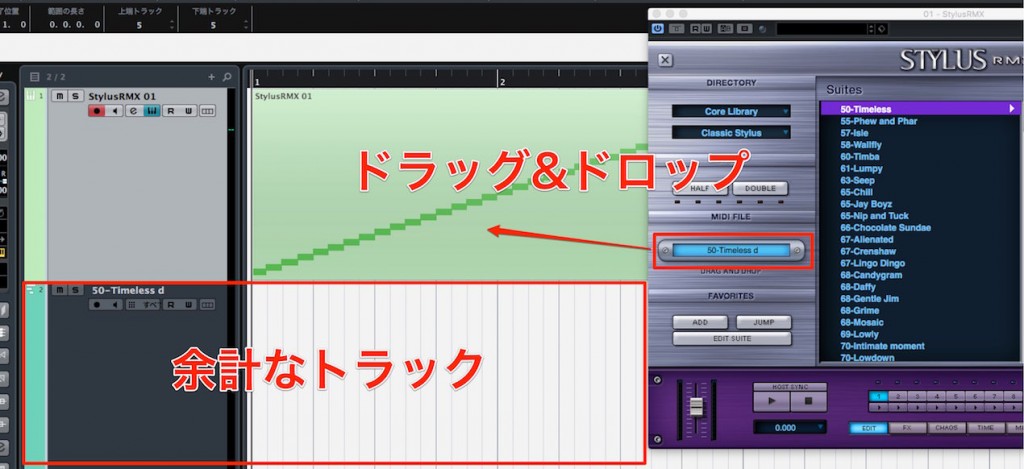
Extra tracks get created like this.
This time, we introduce how to fix this.
How to fix it

Open "Preferences" from the top menu.

Select the "MIDI File" section.
- Check "Import dropped File as single Part."
- Uncheck "Split channels for File Type 0."
From now on, extra tracks will no longer be created.
Be sure to try it.
Frequently asked questions
Q1. Why does Cubase add tracks every time I drag and drop a MIDI pattern?
With the default settings, MIDI files are imported split across multiple channels, so unwanted tracks are created automatically. You can fix this by adjusting the MIDI File section of Preferences.
Q2. What happens when I uncheck "Split channels for File Type 0"?
Data from multiple channels is imported together as a single part, keeping the number of tracks created to a minimum and making your project easier to organize.
Q3. Does this setting only work for Addictive Drums?
No. It applies to all soft synths whose MIDI patterns can be imported by drag and drop, such as BFD and Stylus, making your DAW work more efficient.
NEW ARTICLES
Latest English Articles











