
When MIDI notes don't play in Cubase, mainly on drum tracks, the cause is often the event transpose setting on the info line. Unlike pitched instruments, drums have no kit piece corresponding to the transposed value, so they go silent. This article explains how to check the transpose function and what to do when changing key partway through a song. In particular, it gives a practical solution: setting "Global Transpose" to "Independent" avoids the problem for tracks without pitch.
The notes are in the right place, but no sound comes out
MIDI notes you programmed don't play...
We explain how to troubleshoot this problem.

As shown here, there is nothing wrong with the pitch of the MIDI notes or the notes assigned in the instrument.
The velocity is also normal. So why doesn't it play?
This symptom occurs especially often on drum tracks.
That's because with pitched instruments, it is easier to notice.
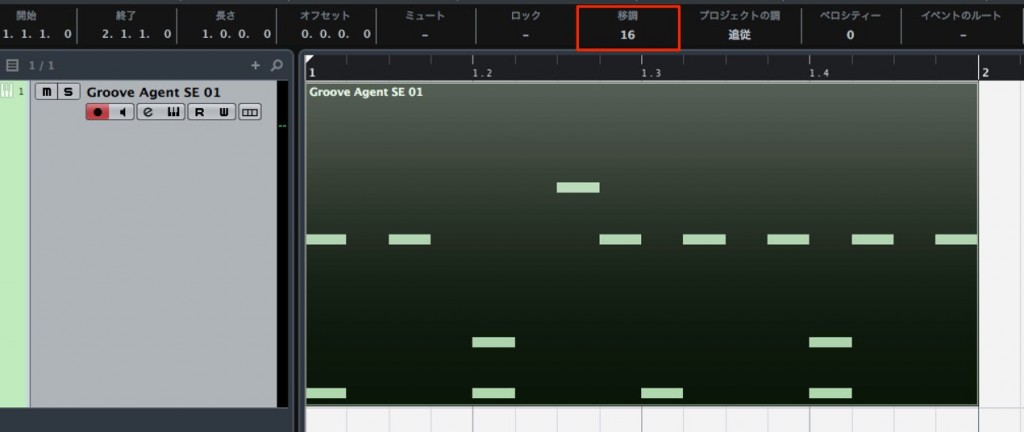
Check the event's Transpose on the info line.
This number may have been changed.
If this has been changed,
the performance you actually programmed is played back with its pitch changed.
For drums, there may be no kit piece for that pitch, so it goes silent.
Likewise, if the wrong kit pieces are being played, you need to check this setting.
Be especially careful when you change key partway through a song.
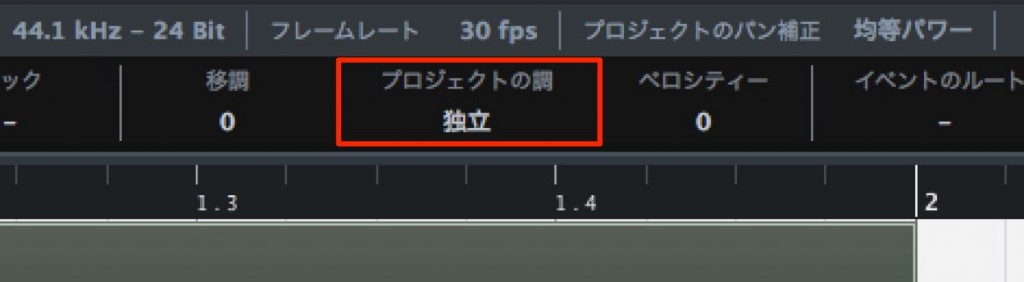
If you are using the transpose function,
it's a good idea to set "Global Transpose" to "Independent" for tracks without pitch, such as drums.
Frequently asked questions
Q1. Why don't my programmed MIDI notes make any sound?
The event transpose setting on the info line may have been changed. If this value is changed, a pitch change is automatically applied to the notes you programmed, and drum tracks in particular go silent because there is no corresponding kit piece. Check the info line and reset the transpose value.
Q2. Why is it only the drum track that has no sound?
Drums are instruments without pitch, so they are easily affected by the transpose function. If you change key partway through a song, setting "Global Transpose" to "Independent" avoids affecting the drum track.
Q3. My drums stopped playing when I changed key partway through the song.
If you are using the transpose function, set "Global Transpose" to "Independent" for tracks without pitch, such as drums. This keeps them unaffected by the key change so the drums play normally.
NEW ARTICLES
Latest English Articles











