
When the tempo of a MIDI file imported from a software synth in Logic Pro X changes on its own, the cause is the "Import tempo information too?" notification setting in the preferences. You can solve this by changing the setting to "No" or by selecting "No" in the dialog that appears when you import a MIDI file. If choosing manually every time is a hassle, check "Do not show this message again" in the dialog to lock in the behavior you prefer. This lets you import MIDI files smoothly while keeping your project's tempo.
Check What Happens When You Import a MIDI File
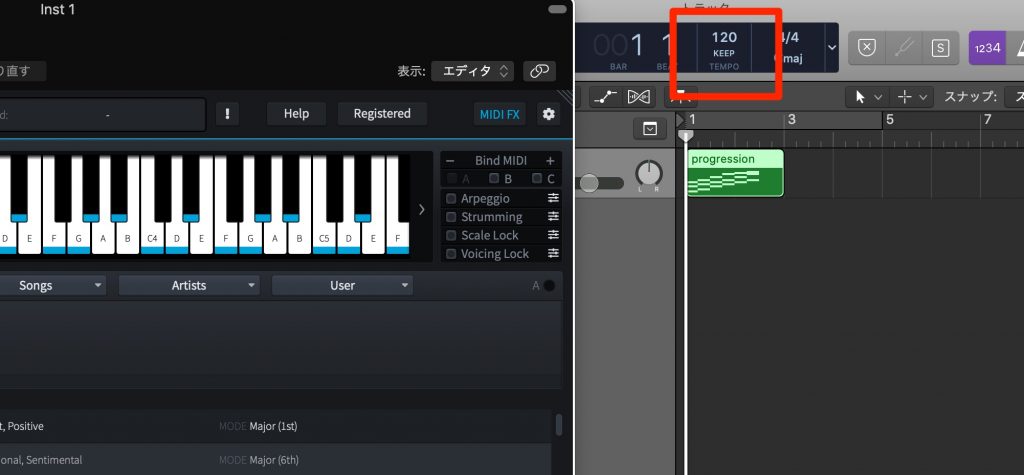
Here we solve the problem of Logic's tempo being forcibly changed when you import a MIDI file from a software synth or similar source.
MIDI Import Settings: Video Explanation
Frequently Asked Questions
Q1. Why does the tempo change when I import MIDI in Logic Pro X?
By default, Logic is set to automatically import the tempo information contained in the MIDI file. You can prevent this by changing "Import tempo information too?" in the preferences to "No".
Q2. What should I do if I don't want the dialog to appear every time I import a MIDI file?
Check "Do not show this message again" in the dialog and click the option you want ("Import Tempo" or "No"), and the same behavior will be applied from then on.
Q3. Can I make the dialog appear again after setting it once?
Yes. Click "Reset selected warnings" in the "General" tab of the preferences, and the dialog will appear again when you import MIDI.
NEW ARTICLES
Latest English Articles











