
Native Instruments' synthesizer Massive is powerful and popular, but velocity isn't enabled in its initial state, so the dynamics you play on a MIDI keyboard aren't reflected in the sound. This article explains two ways to make velocity work. Adjusting the Vel fader in Env 4 or applying Vel directly to Amp lets you control velocity sensitivity freely and express changes not only in volume but also in tone. It's practical, important knowledge for a problem beginners often encounter when using Massive.
Massive velocity settings
"Massive" is hugely popular software, but
in fact, "velocity" doesn't work in its initial state
By controlling "velocity,"
you can change not only the volume but even the tone.
Here, we describe how to solve this.
There are two solutions.
Solution 1
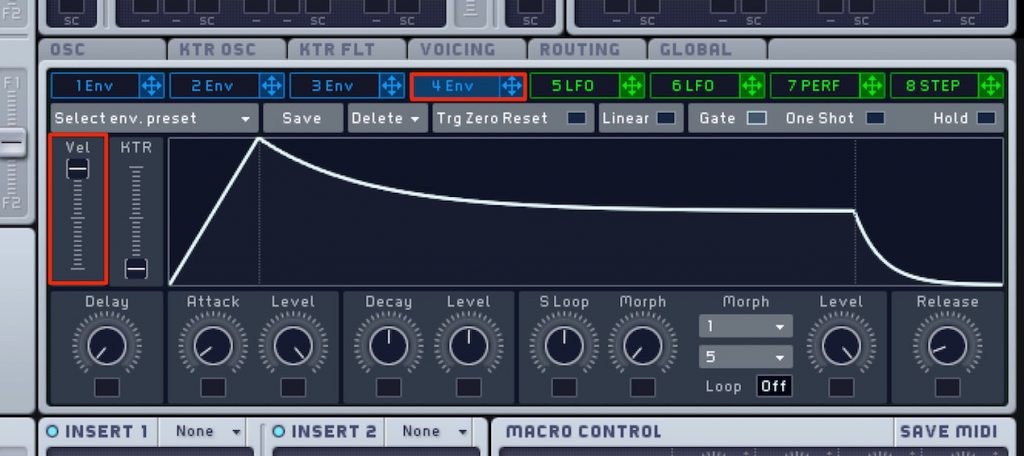
Go to "Env 4," which controls the volume,
and raise the "Vel" fader.
The higher this value, the more faithfully it responds to velocity.
Solution 2

Apply "Vel" in the area outlined in red to "Amp."
From then on, "Massive's" volume changes according to "velocity."
Frequently asked questions
Q1. Why doesn't Massive respond to velocity from my MIDI keyboard?
In Massive's initial state, velocity is effectively disabled. This is because the Vel fader in Env 4 is set to zero or Vel isn't applied to Amp. You can fix it with either of the two procedures introduced in the article.
Q2. How far should I raise the Vel fader in Env 4?
The higher the fader value, the more sensitive the response to velocity. We recommend starting at a medium value (around 50 to 75%) and fine-tuning it to suit how you play. In many cases, it ends up set to 100%.
Q3. Does enabling velocity change the tone too?
Yes, velocity can affect not only volume but also tone. If you also apply Vel to parameters other than volume, such as the filter, you can create tonal changes, like a brighter sound the harder you play.
NEW ARTICLES
Latest English Articles











