
If MIDI notes are automatically quantized when you record in real time in Cubase, the cause is that the "Auto Quantize" function is enabled. This article explains the settings, which differ by Cubase version. By changing a setting in the Transport panel, you can record your performance with exactly the timing you played. Learn this important setting so you don't lose the expressive freedom of playing on a MIDI keyboard.
Quantize applied automatically to real-time recording
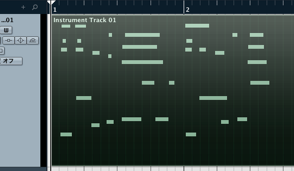
This is how to fix the problem where, when recording in real time with a MIDI keyboard,
"quantize" is applied automatically.
This is caused by "Auto Quantize" being active.
How to stop automatic quantize
- Cubase 7.5 and later
- Cubase 7 and earlier

Switch the part outlined in red on the Transport to "OFF."
From your next recording, notes will appear with the timing you played.
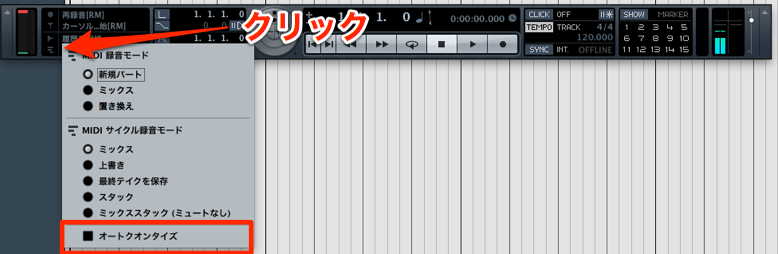
Click the recording mode section of the Transport
and uncheck "Auto Quantize."
From your next recording, notes will appear with the timing you played.
- Ver 7 and earlier
- Ver 7.5 and later
Frequently asked questions
Q1. Why is quantize applied automatically when I record in real time in Cubase?
Because the "Auto Quantize" function is enabled. Disabling it lets you record with exactly the timing you played. The setting's location differs by version, so check the steps for the version you're using.
Q2. Is the setting different between Cubase 7.5 and later and Cubase 7 and earlier?
Yes. In Cubase 7.5 and later, switch the part outlined in red on the Transport to OFF. In Cubase 7 and earlier, uncheck "Auto Quantize" in the recording mode section of the Transport. Check your version and follow the correct steps.
Q3. After disabling Auto Quantize, can I still apply quantize intentionally?
Yes. Auto Quantize only disables automatic quantizing during recording, so you can still use the quantize function manually afterward to adjust timing.
NEW ARTICLES
Latest English Articles











