
For DTM creators who have made an original CD, getting the song titles and artist name to appear automatically when listeners insert it into a computer is an important final step. This article explains how to register with CDDB (a database of track information) and shows that registration takes just a few simple steps from iTunes. Registering with CDDB means your release information appears in iTunes, so your CD is recognized in a way that stays in listeners' memories. It can take up to a week for the information to appear, so registering early, before the CD's release, is recommended.
CDDB Registration: A Must When Making a CD
Making an original CD.
Many of you probably do DTM precisely for this.
You can deliver the results of all your work to listeners as a finished release.
The goal is right in front of you.
However,
there is one last finishing touch needed.
That is:
making the song titles appear when listeners put the CD into their computer.
You know how, when you insert a commercial CD into a computer, it automatically uses the internet to show
the artist name, album name, song titles, genre, and so on.
Everyone has benefited from this at some point.
This works by the computer accessing a database called CDDB to get the track information.
Here, we introduce how to register with CDDB.
Register your original CD information with CDDB
so that your work stays in listeners' memories.
How to Register with CDDB
This is also very easy.
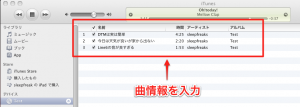
↑ Insert your original CD into your computer and enter the track information in iTunes.
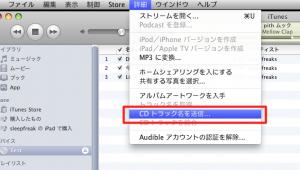
↑ When you have entered the information,
click "Submit CD Track Names" from the menu bar.
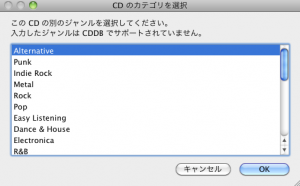
↑ Select the genre.
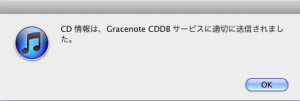
↑ If this screen appears, it worked.
Your original CD's information will now appear in iTunes.
However, it can take up to about a week for the information to appear, so if you are releasing a CD, register early!
For iTunes 11

Click "Options" and select "Submit Track Names."
Optimizing Your Master for iTunes

Frequently asked questions
Q1. How long does it take to register with CDDB?
After registering with CDDB, it can take up to about a week for the track information to appear in systems such as iTunes. If you plan to release a CD, we recommend registering well in advance.
Q2. After entering track information in iTunes, how do I submit it?
Click "Submit CD Track Names" or "Submit Track Names" from the menu bar (in iTunes 11, choose it from "Options"), select the genre, and submit.
Q3. What is CDDB?
CDDB is an online database that manages metadata for music CDs (artist name, album name, song titles, and so on). Computers access it over the internet and automatically retrieve and display the track information.
NEW ARTICLES
Latest English Articles











