
This article explains in detail how to fix Soundflower not being recognized after updating to Mac OS X 10.11 El Capitan. It covers how installing Soundflower 2.0b2 solves the problem, how to deal with security warnings, and how to install via right-click. Users facing compatibility problems with Soundflower, which is essential for audio routing in music production, can learn concrete troubleshooting steps and how to use tools such as AppCleaner, allowing them to build a stable production environment on El Capitan.
Soundflower not recognized on Mac OS X 10.11 El Capitan

Mac's new OS, "OS X El Capitan," recently became available as a free download.
However, Soundflower not being recognized has been reported,
and it appears this can be fixed by installing Soundflower 2.0b2.
Points to note about updating
As of October 3, 2015, many manufacturers of DAW software such as Cubase
may state that the OS is "not supported" until compatibility has been confirmed,
so it may be wise to hold off on updating for a while.
Updating to "OS X El Capitan" is entirely at your own risk.
Example: "Cubase"
"OS X El Capitan (10.11) compatibility status"
We hope this helps you decide.
Installing Soundflower 2.0b2

Installing Soundflower version 2.0b2 solves the problem.
You can download it from the link below.
(If you are using an older version of Soundflower, uninstall it first.)
Can't be opened because it is from an unidentified developer

If you see the message "can't be opened because it is from an unidentified developer" during installation,
open your Mac's "System Preferences."

In "System Preferences," click "Security & Privacy."
Using "Open Anyway" in "Security & Privacy"

Select the "General" tab and click "Open Anyway."
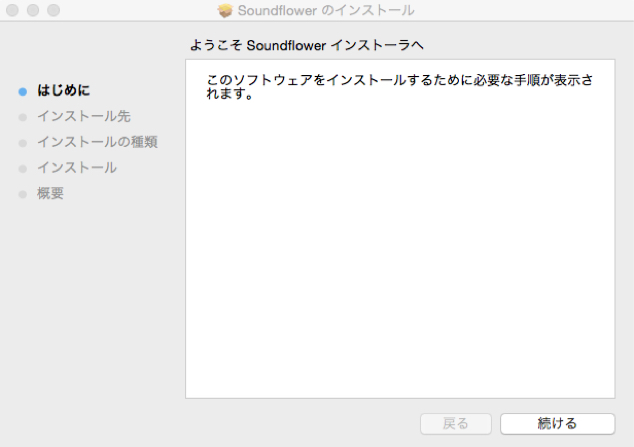
You can now install it, but
music production users often see this warning, for example when installing drivers,
and opening "Security & Privacy" every time is a hassle.
In that case, it's easier to open it with a right-click (Control-click).
Opening with a right-click (Control + click)
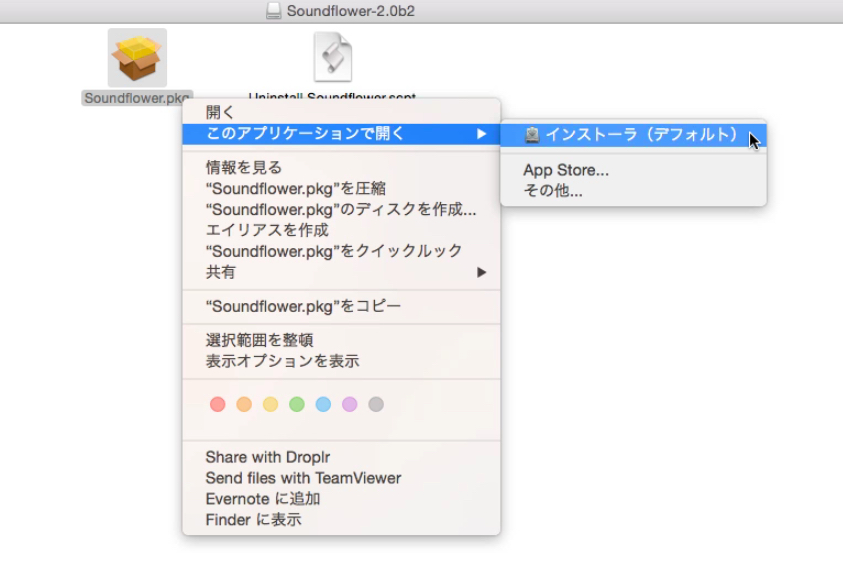
Right-click and choose "Open" → "Installer."

When you click Open here,
you can install it without going
to "Security & Privacy" in "System Preferences."
LadioCast Ver. 0.11.2

If you use LadioCast, it's a good idea to update to the current latest version.
"LadioCast Ver. 0.11.2"
If the update doesn't go well, uninstall it once first.
"AppCleaner": easily uninstall Mac apps

The app "AppCleaner"
removes applications completely, including related files. It appears to support El Capitan as well and is free to use.

After installing and launching AppCleaner,
simply drag and drop the app you want to uninstall into the "AppCleaner" window.

Related files are displayed, and you can also choose files from the list to delete.
Soundflower / LadioCast tutorial video
Frequently asked questions
Q1. What should I do if Soundflower isn't recognized on OS X El Capitan?
Installing Soundflower 2.0b2 solves it. If you have an older version, uninstall it first. You can download it from the official site.
Q2. What should I do if "can't be opened because it is from an unidentified developer" appears when installing Soundflower?
Opening it with a Control-click lets you install it directly without going through System Preferences, saving you from changing security settings every time.
Q3. Is there a recommended tool for removing Soundflower cleanly?
We recommend the free tool AppCleaner. It uninstalls completely, including related files, which prevents trouble when reinstalling.
Q4. Do DAWs such as Cubase support El Capitan?
As of October 2015, many manufacturers stated it was "not supported" until compatibility was confirmed, so we recommend deciding carefully and updating at your own risk.
NEW ARTICLES
Latest English Articles











