
Cubase 6 is the first major update in two years, and its biggest feature is full 64-bit support on both Mac and Windows. Thanks to 64-bit support, projects that previously would not run due to insufficient memory can now play back, and overall performance has improved greatly. It also includes many practical, easy-to-use new features, such as clearer waveform and MIDI displays, 64-bit REX file support, dramatically improved audio detection accuracy, and a new take comping function. Assets from the previous version carry over easily, making this a very practical upgrade for existing users.
The First Major Update in About Two Years
Two years have already passed since Cubase 5 was released.
After a series of updates up to version 5.5.2,
Cubase 6 will be released in March!!

It is packed with new features and improvements,
which are also introduced on the manufacturer's site, http://japan.steinberg.net/jp/products/cubase/new_features.html
.
We will leave the detailed features to the manufacturer's page,
and here I would like to share my impressions from actually trying Cubase 6.
Full 64-Bit Support on Both Operating Systems
On Windows, 64-bit was already supported as of version 5,
but on Mac it could only run in 32-bit.
As a Mac user, this is the part I was most looking forward to.
Simply installing Cubase 6 still runs it in 32-bit only.
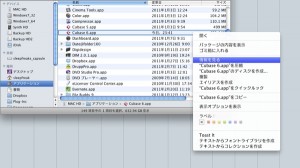
↑ Select "Cubase 6" in Applications and right-click.
Choose "Get Info" from the menu.
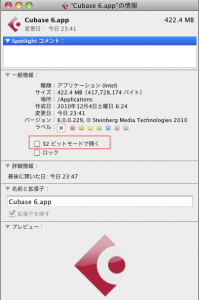
↑ Uncheck "Open in 32-bit mode," outlined in red.
From the next launch, Cubase will start in 64-bit mode.
The 64-bit results were excellent: projects that previously would not run due to insufficient memory
played back with ease. I was delighted.
I also tried 64-bit on Windows, and it runs well there too!!
Performance
As touched on above, what concerns people most about a new version
is probably performance: does it run stably?
When I opened my existing Cubase 5 projects in version 6,
there was nothing that looked like a bug, and it ran very stably.
I also tried it on Mac and Windows, in 32-bit and 64-bit, with no problems.
All basic operations are fast and smooth.
Its responsiveness may be the best of any DAW.
There is no stress at all.
The software itself is built on Cubase 5,
so Cubase 4 and 5 users should be able to switch over without confusion.
Names Scroll
Track and preset names are long
and do not fit on the screen... I think everyone has experienced this at least once.
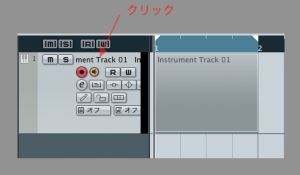
↑ It is hard to tell from the image, but track names now scroll.
This is really convenient.
Clearer, Cleaner Waveform and MIDI Displays
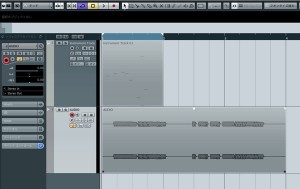
↑ This is the screen you look at most while working.
As the image shows, it has been made beautiful and easy to see.
There are also more color customization options, so there is nothing to complain about.
REX Files Can Be Loaded in 64-Bit
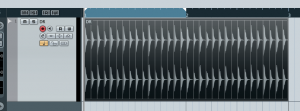
↑ REX files are often used on sample CDs,
but previously they could not be loaded in 64-bit mode.
This is great news for anyone who produces with samples.
Audio Detection
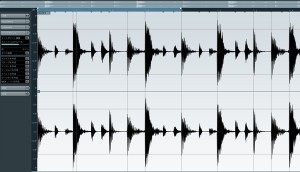
↑ Audio attack detection has improved dramatically,
and it reliably detects even the parts that version 5 missed.
Functions such as audio quantize and creating MIDI from audio can be performed accurately.
Comping and Editing Takes
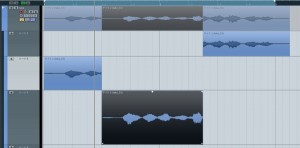
↑ The convenient take comping already found in Pro Tools and Logic is now possible.
It is very handy because you can easily combine just the best parts of takes recorded several times in a loop.
The Included HALion Sonic Is Good
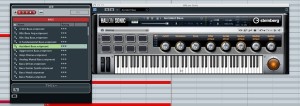
↑ I usually program with other software synths,
but the natural sound, ease of editing, and light CPU load exceeded my expectations.
Even DTM beginners can use it with confidence and create high-quality work.
A Novel Way to Write CC Data
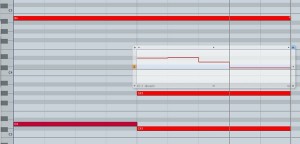
↑ Double-clicking a note in the Key Editor
opens a separate window where you can write CC data.
It is so easy to use that you will not want to go back to another DAW.
Sound Quality
The resolution of the mids to highs has improved, and sounds cut through better.
The solidity of the midrange in particular is very nice.
I only opened version 5 projects,
so mixing with version 6 in mind should let you take your songs even further.
Frequently asked questions
Q1. Does Cubase 6 run in 64-bit on Mac?
Yes. Cubase 6 fully supports 64-bit on Mac as well. However, it runs in 32-bit mode right after installation, so uncheck "Open in 32-bit mode" in the application's Get Info window to switch to 64-bit mode.
Q2. Is it safe to open Cubase 5 projects in Cubase 6?
Yes. Cubase 6 was developed on the basis of version 5 and is highly compatible with existing projects; in our testing it ran stably with no bugs. Users can switch over without confusion.
Q3. What new editing features were added in Cubase 6?
The take comping function lets you easily combine just the best parts of multiple takes recorded in a loop. It also lets you write CC data intuitively by double-clicking a note in the Key Editor.
Q4. What improves with 64-bit?
The limit on memory usage is lifted, so projects that previously could not play back due to insufficient memory now run with ease. REX files can also be loaded.
Q5. Has the audio detection function improved?
Yes. Attack detection accuracy has improved dramatically, and it reliably detects even the parts that version 5 missed. Audio quantize and converting audio to MIDI can be done more accurately.
NEW ARTICLES
Latest English Articles











