
Steinberg's CMC series of Cubase-dedicated controllers is hardware that greatly improves the efficiency of DTM work. You can choose from several models, such as ones focused on mixing or on editing, and after a simple installation you can assign any operation to each button in Cubase. Its novel fader controller allows intuitive operation, and features such as LED display of track volume, instant display of software synth windows, and integration with automation contribute greatly to efficient production.
The CMC Series: Controllers That Greatly Boost Your Efficiency
Steinberg has released a new product:
Cubase-dedicated controllers, the "CMC series".
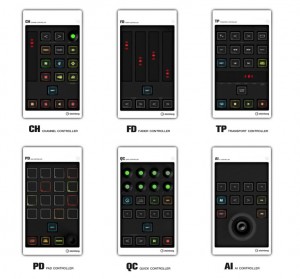
↑ There are six models in total.
You can choose according to your working style, such as models focused on mixing, editing, or playback.
I wanted all of them (lol).
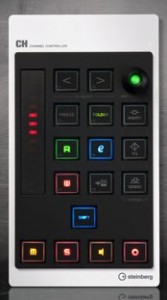
↑ I chose this Channel Controller for its well-balanced layout and features.
Installation and Setup
Installation is very easy.
Insert the included CD
and continue through the installer. There is nothing confusing.
*Connect the device with the USB cable first.
After an installation of about 3 seconds, restart your computer.
*This was not in the manual, but a restart may be required.
After restarting, launch Cubase.
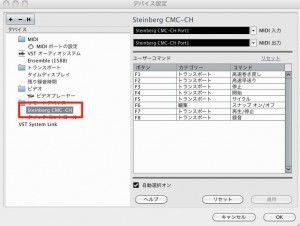
↑ If you check "Devices" → "Device Setup" from the menu bar,
you will see that the device is recognized, as in the area outlined in red.
You can also assign any operation to each button from the right-hand side.
*Assigned operations work only while the Shift button on the device is held.
You just choose from pull-down menus, so it is very easy.
You can assign almost any operation available in Cubase,
so it is handy to assign the ones you use often.
How It Feels to Use
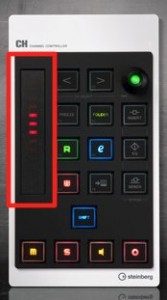
↑ It is a novel kind of fader controller.
It responds more faithfully when you use the pad of your finger rather than your fingertip.
Also, when you switch tracks,
the LEDs instantly show that track's volume position.
It's convenient.
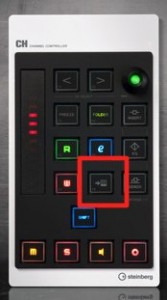
↑ It shows the window of the loaded software synth in one press.
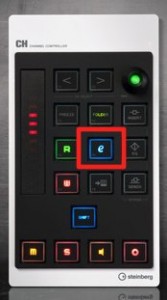
↑ It is also great that you can jump to the "Edit window," which shows all the information for the track.
I was also thrilled by the integration of pressing the "W" button to write automation immediately.
I'm very satisfied, confident that using the CMC will greatly improve my efficiency.
Frequently asked questions
Q1. Can the CMC series be used with DAWs other than Cubase?
The article introduces it as a Cubase-dedicated controller. You need to check the manufacturer's specifications for use with other DAWs.
Q2. Isn't setup difficult?
It is very easy. Run the installer from the included CD, restart, and have Cubase recognize the device in Device Setup; then you can assign operations from the pull-down menus.
Q3. What models are in the CMC series?
There are six models in total, such as ones focused on mixing, editing, and playback, so you can choose according to your working style. The well-balanced Channel Controller is popular.
Q4. How does the fader feel to use?
Using the pad of your finger makes it respond more faithfully than your fingertip, and it is very responsive: when you switch tracks, the LEDs instantly show the volume position.
NEW ARTICLES
Latest English Articles











