
This article tests whether the Antelope Audio Zen Q is truly worth it compared with budget audio interfaces. Zen Q's greatest strength is that it brings the same high-precision 64-bit AFC clock technology found in high-end units costing over ¥180,000 into the ¥50,000 to ¥120,000 price range, something made possible because Antelope began as a long-established maker of master clock generators. On top of that, console-grade discrete mic preamps and FPGA-based effects processing with near-zero latency produce a clear difference in sound quality from recording through mixing, as our audio comparisons demonstrate.
A New Face Priced Just Over ¥100,000: How Good Is It?
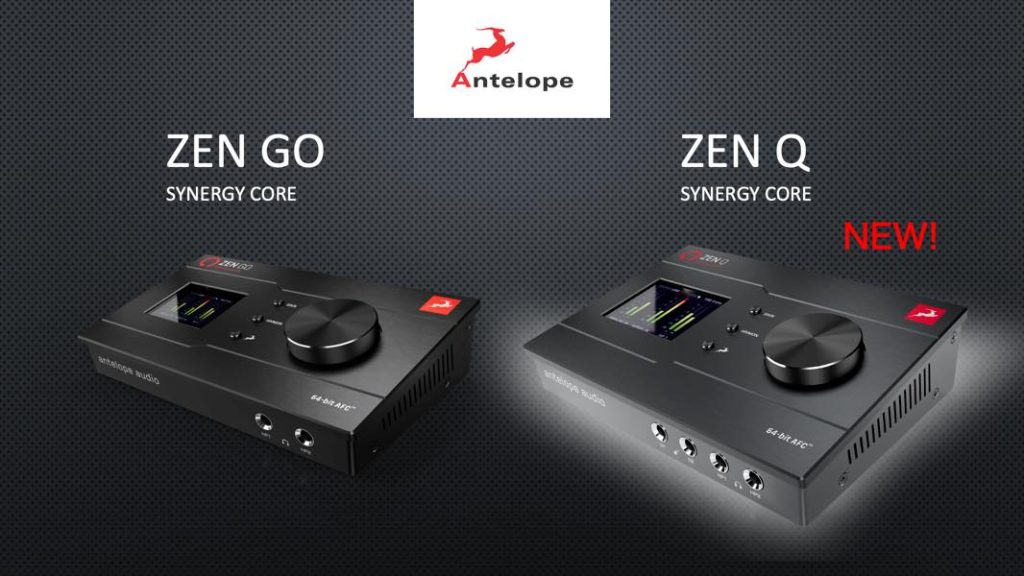
Antelope Audio recently released Zen Q, the mid-range model of its Zen series designed for desktop and mobile use.
Antelope audio interfaces have been drawing rapidly growing attention in recent years thanks to their sound quality and value.
However, since Antelope originally made professional equipment, its prices are on the high side.
The Zen Q sells for around ¥125,000 and its little brother, the Zen Go, for around ¥50,000 to ¥70,000. Compared with budget models you can buy for about ¥10,000, that is 5 to 10 times or more the price.
For beginners, it is a price that makes you hesitate to jump in, and even if you are considering an upgrade, you probably wonder whether it is really worth that much.
So in this article, while introducing the features of the Zen Q and Zen Go, we also look at how much models in this class differ from budget models.
The Zen series also includes effects processing, like UAD (Apollo), so we will compare and review that as well.
Please read to the end!
Antelope Audio Zen Q / Zen Go Video
Where to Buy
- Zen Q
- Zen Go
Overview of the Antelope Audio Zen Series
The Antelope Zen series is characterized by very high performance inside a compact, bus-powered unit.
We will go into detail later, but here is a quick rundown, including specs.
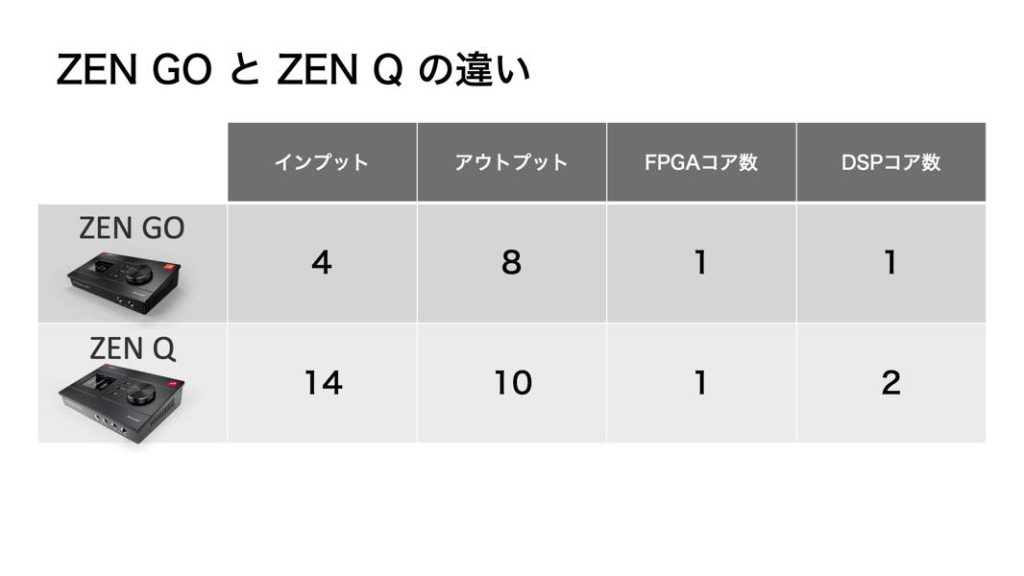
- Zen Q has 14 inputs and 10 outputs; Zen Go has 4 inputs and 8 outputs
- High-precision AD/DA converters with up to 127 dB of headroom
- Console-grade discrete mic preamps
- FPGA and DSP onboard for near-zero-latency effects processing without loading the CPU
- Comes with 37 effects (mainly analog models)*
*During a campaign running until April 30, 2022, the Zen Q gets 10 extra effects and the Zen Go 5 extra effects.
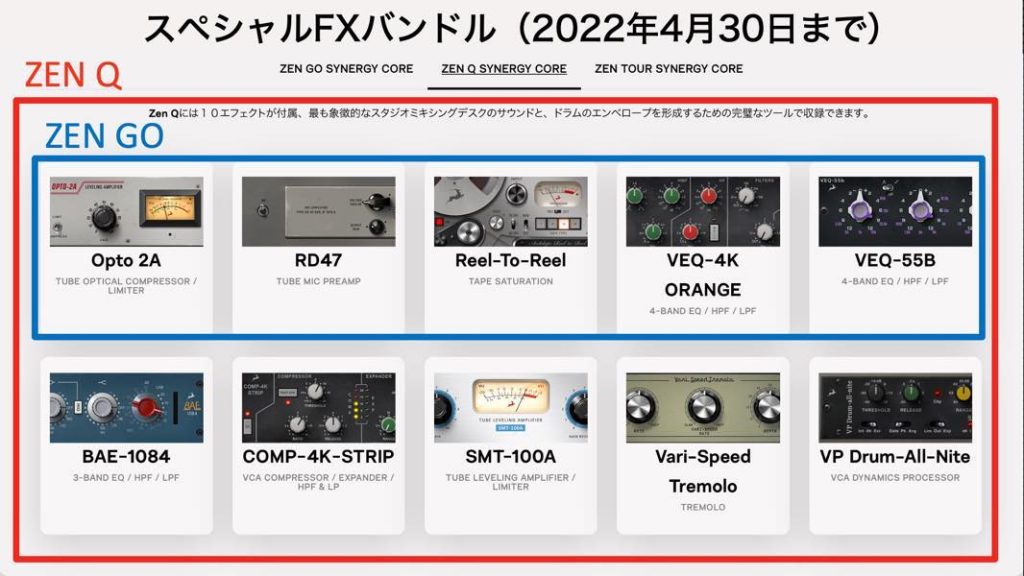
Bitwig Studio and AFX2DAW (a bridge plug-in for using Synergy Core effects in your DAW) are also included.
You can see that the main difference between the Zen Q and Go is the number of inputs and outputs, but it is hard to judge just how impressive the rest is.
So in the following sections, we will unpack the key points.
Clock Technology Behind AD/DA Converter Precision
A major factor in an audio interface's performance is the accuracy of analog-to-digital (AD) and digital-to-analog (DA) conversion.
The high-precision AD/DA converter chips in the Zen series offer up to 127 dB of headroom, but a major distinguishing feature is that their clock technology is among the best in the world.
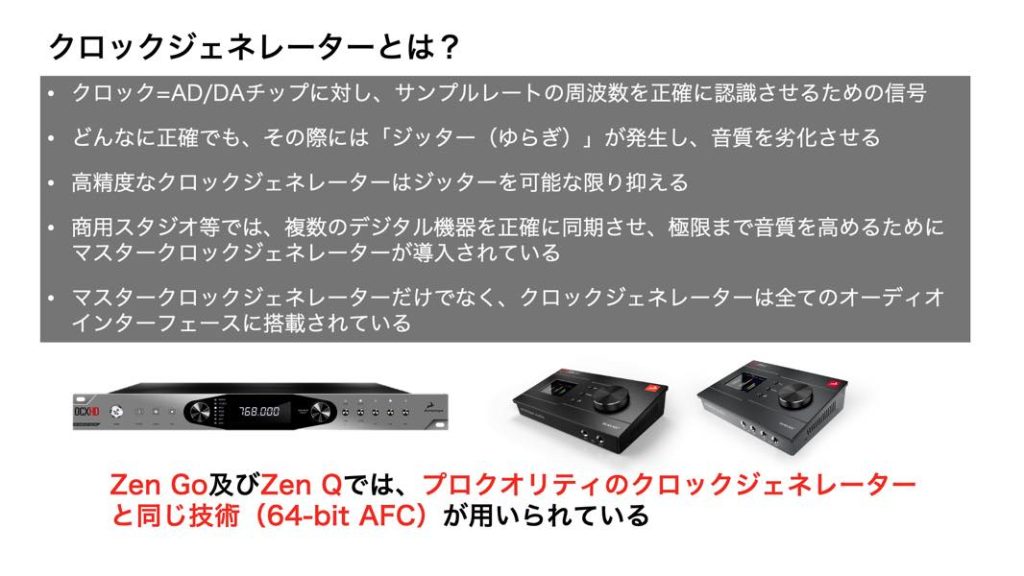
- Clock = the signal that lets the AD/DA chip recognize the sample rate frequency accurately
- No matter how accurate it is, "jitter" (fluctuation) occurs and degrades the sound
- A high-precision clock generator suppresses jitter as much as possible
- Commercial studios and similar facilities use master clock generators to sync multiple digital devices precisely and push sound quality to the limit
- Clock generators, not just master clocks, are built into every audio interface
Antelope Audio was originally a maker that mainly developed these master clock generators, and its standalone products are trusted by professionals worldwide to the point of being an industry standard.
Naturally, such products are expensive, costing around ¥180,000 even at the low end.
The Zen series uses the same technology as those high-end clock generators (64-bit AFC). Achieving this at this price range (around ¥50,000 to ¥120,000) is what makes its value so remarkable.
The more accurate the clock generator, the better the AD/DA sound quality, so you can consider this solid backing for the Zen series' performance.
Recorded Sound Compared with an Entry-Level Product
From here, we test how much the Zen series' recorded sound differs from that of an audio interface costing around ¥10,000 to ¥20,000.
Differences in recorded sound depend not only on the AD conversion accuracy described above but also on the performance of the built-in mic preamps.
The Zen series advertises "console-grade discrete preamps", which is a little hard to grasp.
A "console" generally refers to the large mixing consoles often installed in commercial studios.

CC BY-SA 3.0, Source: Wikimedia Commons
Discrete is a technique used in high-end mic preamps and outboard gear such as NEVE. Instead of IC chips (integrated circuits), it is a circuit built by assembling individual parts such as transistors and capacitors.
It has recently started to appear in budget audio interfaces too, but performance likely differs depending on the parts used inside.
Now let's compare the recorded sound of each.
The ¥10,000-class audio interface seems to record reasonably good sound, but the Zen recording sounds different in the clarity of the highs and the sense of attack.
This becomes even more noticeable when you apply EQ, compression and reverb and do a simple mix with other tracks.
Both were mixed with exactly the same settings, yet there is a big difference in their presence within the whole mix.
About Synergy Core Effects
Overview
Another feature of the Zen series is the Synergy Core system, which processes effects without loading the CPU.
It contains Antelope's own FPGA chip, which keeps latency from effects processing to almost zero.
As noted above, 37 effects come standard, and it is a nice bonus that the campaign adds even more.
There are two ways to apply Synergy Core effects.
One is applying them to inputs in the control panel and recording with them.
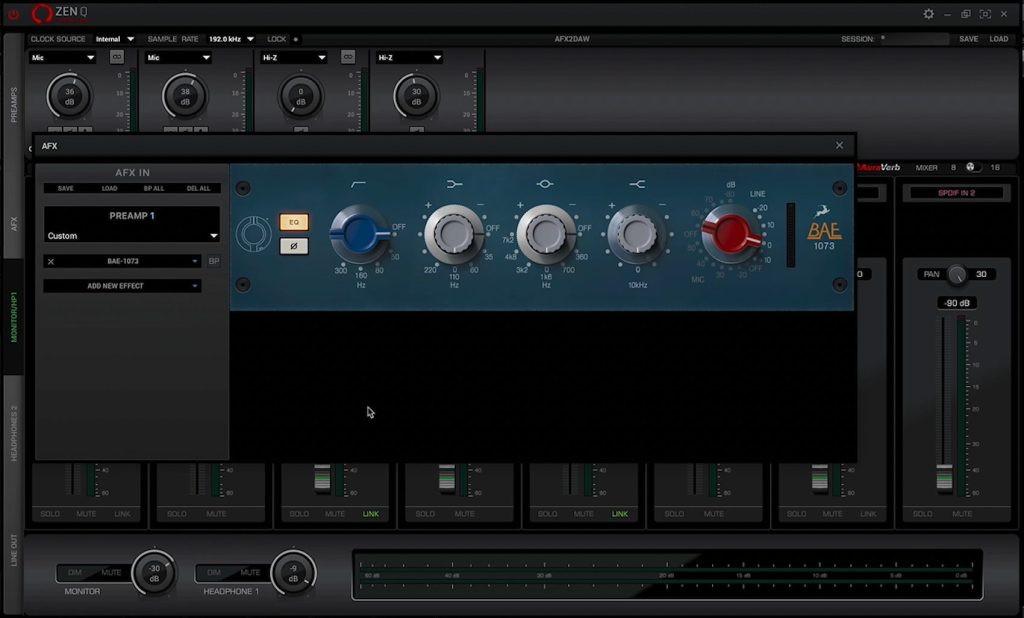
This approach is familiar from Universal Audio Apollo and others, so it is only natural that latency is nearly zero.
The other is using them as plug-ins in your DAW. In this case, you use the AFX2DAW bridge plug-in mentioned above.
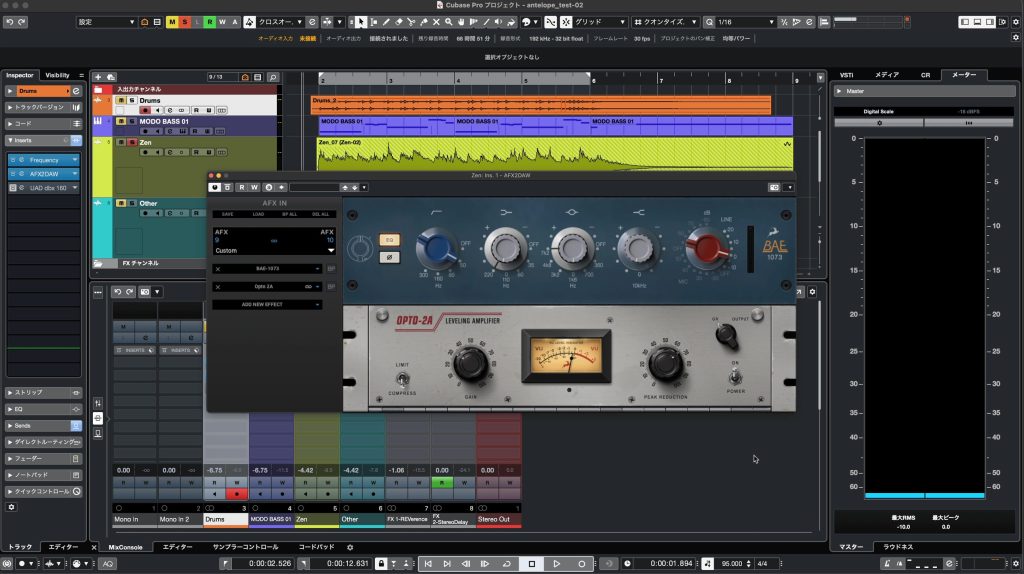
With this approach, the DAW's buffer latency still applies, but the FPGA processing itself adds almost no latency, so latency does not increase as you add more effects.
Depending on your sample rate and buffer size settings, you can keep latency low.
How the FPGA Chip Works
Let's see where FPGA stands compared with conventional digital effects.
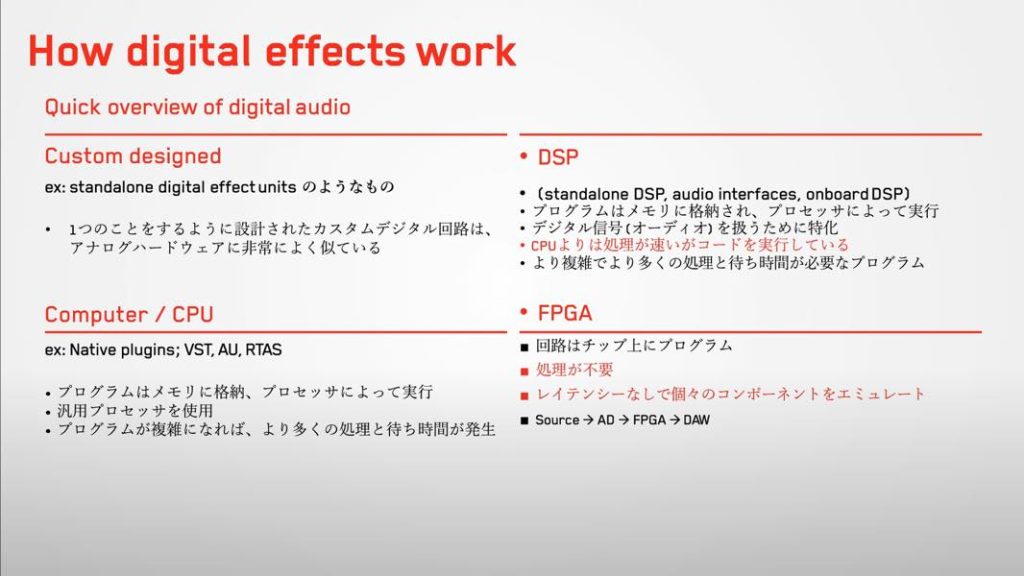
- Custom Designed: hardware specialized for a single effect, i.e. digital outboard gear
- Computer (CPU): the most common approach; the program runs on the computer and is processed by the CPU
- DSP: the approach typified by UAD; the program runs on the computer and is processed by an external DSP
- FPGA: Antelope's own technology; both the program and the processing live on the circuit, which simply takes the signal in and sends it back, much like outboard gear
DSP and FPGA are the same in that external processing spares the CPU, but FPGA needs no time for program execution or processing steps, which is how it achieves near-zero latency.
Sound Comparison
Synergy Core effects have low latency and 37 of them come with the unit. It all sounds great, but how do they actually sound?
We compared them with UAD plug-ins, often called the pinnacle of analog modeling.
The sample is a drum bus, processed with the UAD dbx 160 and the Antelope VCA160, both modeled on the same unit.
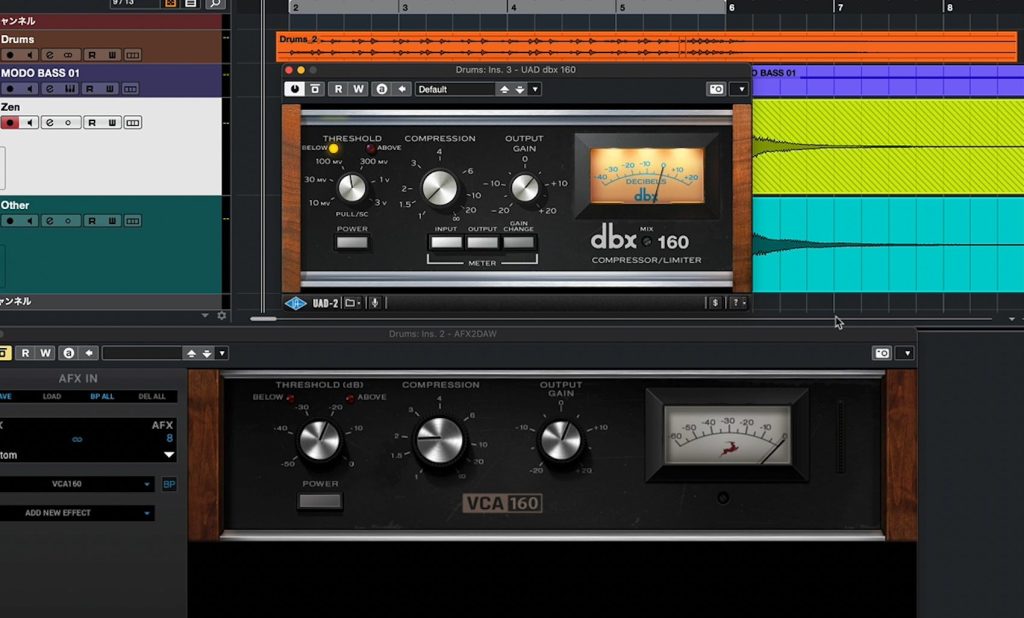
Compared side by side, UAD and Antelope have a similar tendency, each adding the punch and density characteristic of a dbx.
If it holds its own against UAD, which prides itself on meticulous modeling, it seems fair to say Antelope has crafted its models carefully as well.
Personally, I really liked Opto 2A, a model of the LA-2A.
I felt it beautifully reproduces the tension and depth only analog gear can give, so please have a listen.
Opto 2A is included in the extra plug-ins offered until April 30, 2022.
A Caveat
One slight drawback of Synergy Core effects is that it is hard to tell whether you have reached the limit on the number of simultaneous instances, discussed below.
When you use many effects across multiple AFX2DAW plug-ins, effect names eventually start to gray out and can no longer be selected. At first, I did not understand why.
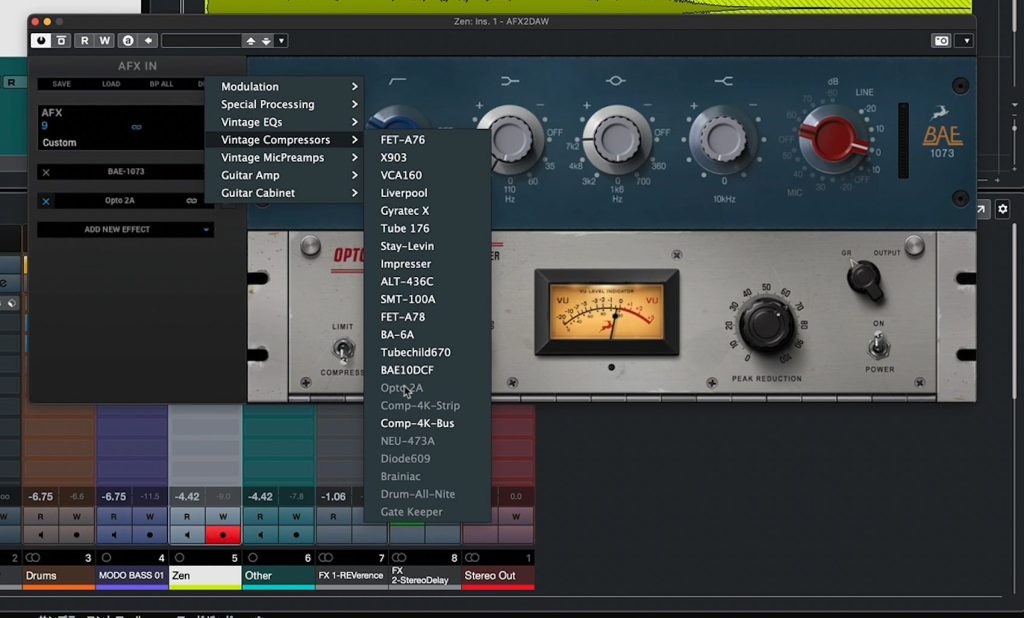
I later learned that you can actually check how many resources each plug-in uses in the control panel.
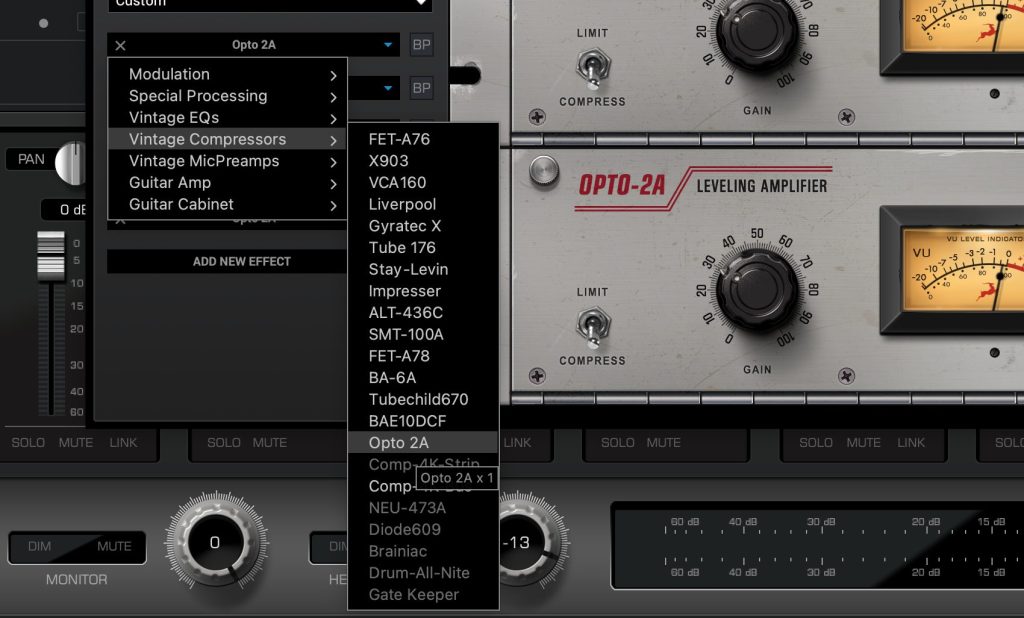
Even so, I did not know this until the manufacturer told me, so I think many people will be confused. Even once you know, having to hover the mouse over the relevant effect in the control panel while working in your DAW is a hassle.
This is a point I would really like to see improved.
Zen Go vs. Zen Q: Differences and How to Choose
As mentioned at the start, the main difference between the Zen Go and Zen Q is the number of inputs and outputs, but the number of DSPs also differs slightly.
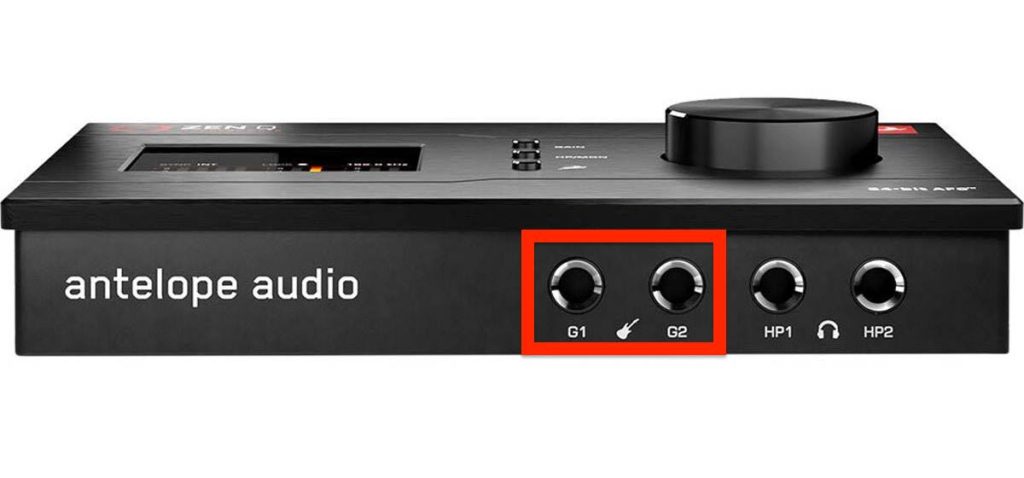
For inputs, both have two combo jacks on the back, but the Zen Q also has two TRS inputs on the front, which is handy for connecting a guitar and a (stereo) synth at the same time.
The outputs differ in particular: the Zen Q has independent Line Outs and an ADAT input.
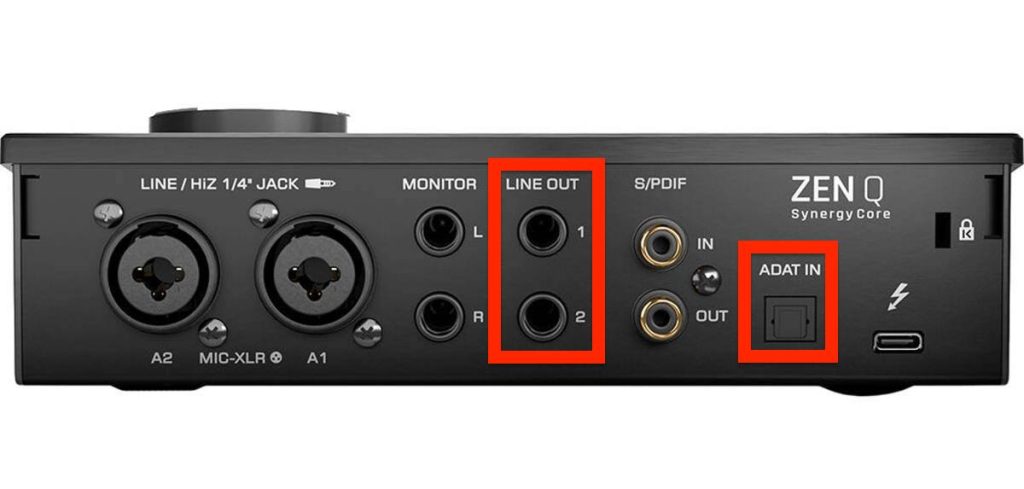
The Line Outs can carry a mix of sources from the software mixer, and ADAT can receive up to 8 channels from a compatible mic preamp or similar device.
Choose the Zen Q if you have needs like the following.
- You want to use two sets of speakers
- You want to expand your headphone outputs
- Send/return to outboard gear (also using the front TRS inputs)
- You have occasions for multi-mic recording
The Zen series also includes DSP, which complements the FPGA.
The number of DSPs affects how many effects you can run at the same time.
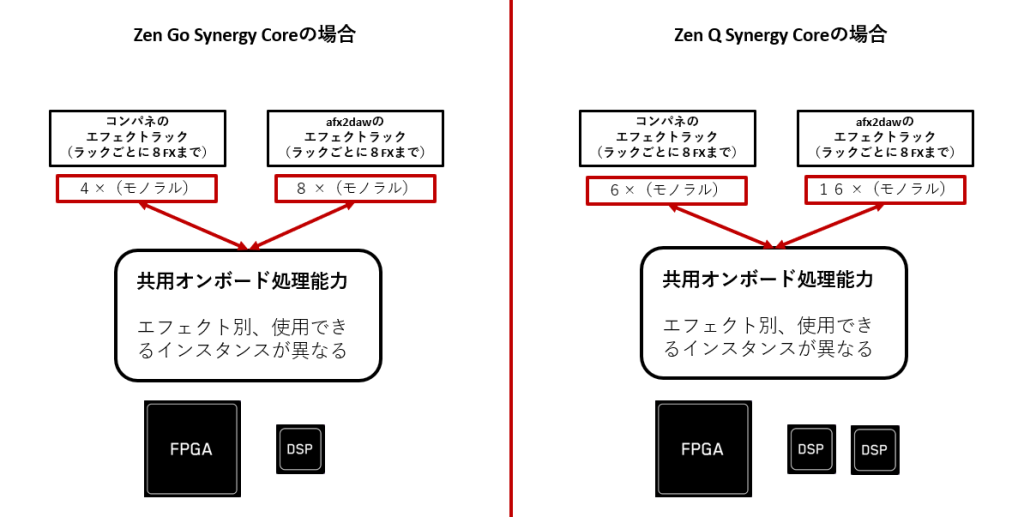
At present there are no modules to expand this, so we recommend the Zen Q if you want to use more effects.
Currently, the Zen Go connects via USB and the Zen Q via Thunderbolt 3, but a USB version of the Zen Q is expected around the end of March 2022.
That is all for this look at the Antelope Zen Q, marking its release, its features and what audio interfaces in this price range can do.
Having used it myself, I was impressed by its solid performance and value, and I feel it has many advantages over competing models.
On the other hand, Antelope drew attention for weak support when the Zen Go was released, so some of you may feel uneasy.
Antelope has worked hard on this since then, and has reportedly made improvements such as placing Japanese-language support at headquarters as part of its main support team, speeding up communication with other departments so it can respond to issues immediately.
Software and firmware are also being improved continually, so I expect confidence in the product to keep growing.
For those moving beyond an entry-level unit in search of a high-performance audio interface, or professionals who want portability and great sound, it is well worth considering.
Does Audio Interface Performance Scale with Price? Putting the Antelope Audio Zen Q to the Test
This time, while introducing the features of the Zen Q and Zen Go, we look at how much models in this class differ from budget models costing around ¥10,000.
Details: https://t.co/iIDWjU34L3#DTM #DTMer pic.twitter.com/GKLZ2ZtQHb
— SLEEP FREAKS (@SLEEPFREAKS_DTM) March 13, 2022
Frequently Asked Questions
Q1. Is the Antelope Audio Zen Q an audio interface for beginners?
At around ¥125,000, it is on the expensive side for beginners, but in terms of performance there is a real, large difference from ¥10,000-class products. It suits users who care about sound quality or who are considering an upgrade.
Q2. How does clock technology affect an audio interface's sound quality?
The clock is a key factor in the accuracy of AD/DA conversion. The more precise the clock and the less jitter (fluctuation) it has, the cleaner and clearer the sound. Because Antelope specializes in developing master clocks, the Zen Q excels in this technology.
Q3. How should I choose between the Zen Q and Zen Go?
The main difference is the number of inputs and outputs: the Zen Q has 14 inputs and 10 outputs, the Zen Go 4 inputs and 8 outputs. Choose the Zen Q if you need multitrack recording or to connect several devices, and the Zen Go for a simpler setup. The core technology is the same.
Q4. What are the advantages of Synergy Core effects?
Effects are processed on an FPGA chip, so they do not load the CPU and achieve near-zero latency. This lets you record while applying effects in real time.
NEW ARTICLES
Latest English Articles











