
This article explains in detail how to design an electronic snare drum sound in music production. You'll learn that controlling a noise oscillator with envelopes allows flexible sound design. From OSC settings and creating the attack to final adjustments with a low-pass filter and distortion, you can learn professional techniques step by step, so beginner and intermediate electronic music producers can gain practical snare-building skills.
Electro snare: control it freely
Following "An Electro Kick," we explain a recipe for a "snare drum."
We create the sound by controlling the "noise oscillator" with an "envelope."
As with the kick, adjusting the decay lets you create a variety of sounds.
How to create the sound
OSC settings
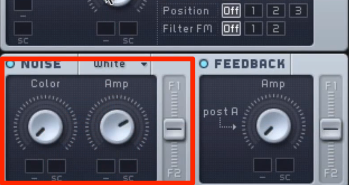
For the snare, we mainly use the "noise oscillator."
At this point, so that no pitched tone sounds, turn "OSC 1, 2, 3" off.
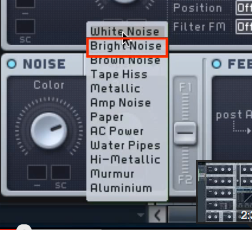
Select the type of noise.
Different types let you create a variety of sounds.
Here, we'll try "Bright Noise," which suits snares.
Applying envelopes
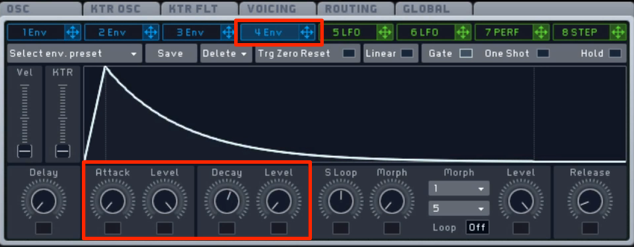
Adjust the overall volume.
- Attack: set to the fastest so the sound starts immediately
- Decay: set the Level on the right to zero and adjust to a suitable length
Creating the attack
A snare has a strong attack.
As with the kick, we'll create this part.
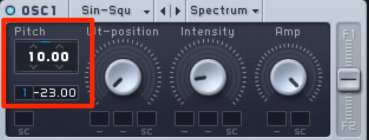
The attack is surprisingly high in pitch.
Set the base pitch high and use an "ENV" so it drops.
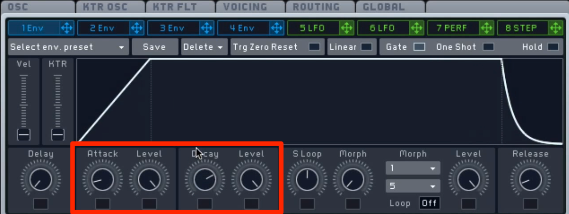
These are the pitch envelope settings.
- Attack: set so the pitch drops over a very short time
- Decay: turn the Level on the right all the way up. You can ignore the Decay value here
Adjust the "Attack" to shape the attack sound.
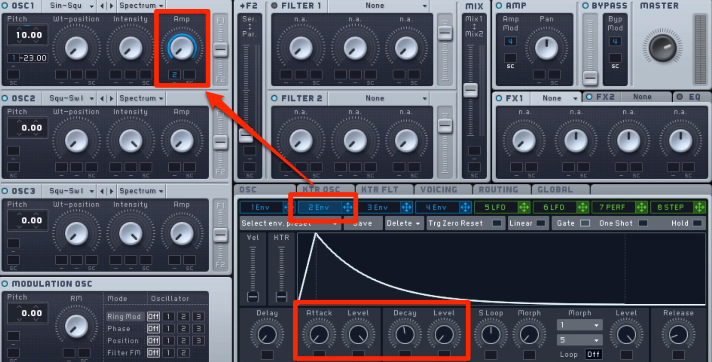
As it is, the attack of "OSC 1" is too long,
so apply a free "ENV" to its volume.
- Attack: set to the fastest so the sound starts immediately
- Decay: set the Level on the right to zero and adjust to a suitable length
Final adjustments to the sound
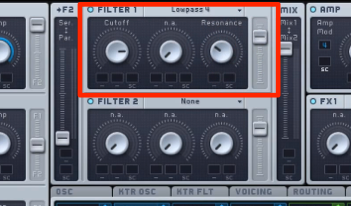
Use a "low-pass filter" to cut harsh highs.
The sound becomes milder.
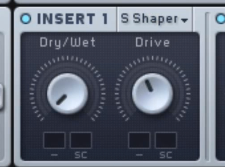
Apply a "distortion effect," which has become standard lately.
It thickens the sound and gives it presence.
The sound is now complete.
Frequently asked questions
Q1. What oscillator is the basis of an electro snare?
The noise oscillator is the main source. Turn OSC 1, 2, 3 off so no pitched tone sounds, and choose a noise type suited to your purpose, such as "Bright Noise."
Q2. How can I emphasize the snare's attack?
The snare's attack is surprisingly high in pitch, so set the base pitch high and adjust it to drop with an envelope. Making use of the pitch envelope is important.
Q3. Any tips for finishing the snare sound naturally?
It's effective to cut harsh highs with a low-pass filter to make it milder, then apply distortion to thicken the sound and give it presence.
NEW ARTICLES
Latest English Articles











