
The LFO is a low-frequency function on a synthesizer that adds movement to pitch and tone, and it is a fundamental element that DTM beginners should master. This article gives a practical explanation of how to apply an LFO, adjust its Depth, set its Rate, and choose its waveform. By understanding how to apply an LFO to pitch and level, how to use tempo sync, and how different waveforms change the effect, you will be able to create more expressive sounds. Through combinations with oscillator waveforms, you will gain professional synthesizer skills.
Synthesizer Basics! The LFO Gives Sounds All Kinds of Expression
An LFO is a low-frequency signal too low to be heard as pitch.
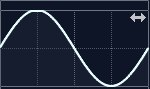
Rather than being used as a sound itself,
it is a function for adding movement to pitch or tone.
You can use the LFO to create all kinds of sounds.
Let's look at the details.
Setting Up the LFO
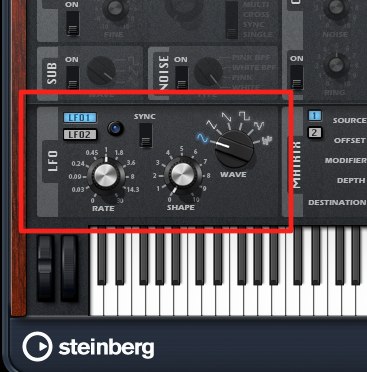
This section is the LFO.
First, an important concept.
You decide what the LFO will be applied to.
The LFO does not actually produce sound,
so its effect only appears once you apply it to something.
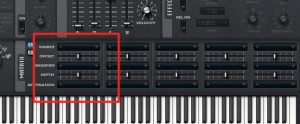
↑ Select "LFO" here
and let's apply it to "Pitch."
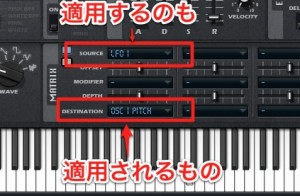
↑ The side doing the modulating (the LFO in this case) is called the "source" or "modulator",
and the side being modulated (pitch in this case) is called the "destination" or "target".
This is also common to almost all synths.
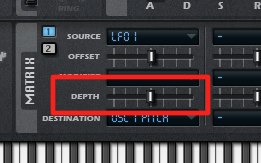
↑ Then move "Depth" to the right. The LFO's effect becomes stronger.
On some synthesizers, it is called "Amount".
Sound
*Depth is moved from 0 to MAX.
Next, let's change the destination to "Level" (volume).
The volume changes like this. ↓
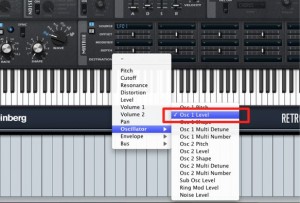
Sound
This concept is the foundation of sound design with LFOs.
You can control almost any other knob this way, too.
LFO Speed (Rate)
By changing the LFO's waveform and speed,
you can control it in even more detail.
First, the LFO's speed.
This is called "Rate".
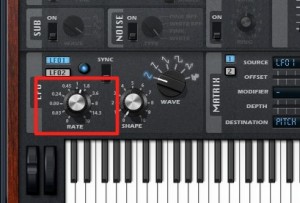
You heard the sound of the LFO applied to pitch above.
From that state, if you turn up the Rate,
the LFO cycle speeds up and the sound becomes like this.
The unit is Hz: how many times the wave repeats per second.
Sound
At first it is 0 Hz, which means 0 cycles per second, so the LFO has no effect.
Turned all the way right, it is 30 Hz, meaning 30 cycles per second.
You will often want to match the LFO's speed to the song.
Most synthesizers have
a "Sync" function that automatically adjusts the wave to the song's tempo.
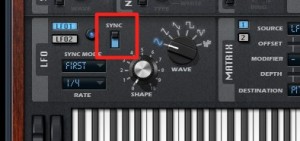
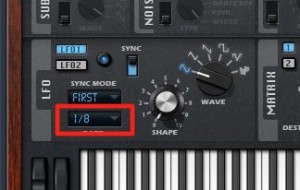
Turn "Sync" on
and set the note value at which the LFO repeats.
Eighth-note sound
Sixteenth-note sound
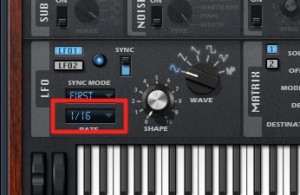
It changes like this.
LFO Waveforms
Next, the LFO waveform.
Which waveform is repeated
changes the effect.
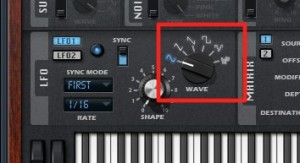
The basic waveforms introduced in "OSC" are the main options.
The destination is controlled in exactly the shape you see.
Which waveform gives you the sound you want?
To understand this, it is important to first try them and learn how they sound.
Frequently asked questions
Q1. What is an LFO, and why is it needed on a synthesizer?
LFO stands for "Low Frequency Oscillator," a signal of too low a frequency to be heard as sound by the human ear. Applying it to pitch, tone, or volume adds movement over time to a static sound, letting you create expressive sounds.
Q2. What is the difference between an LFO's "source" and "target"?
The source (modulator) is the LFO itself, and the target (destination) is what the LFO is applied to, such as pitch, level, or cutoff. The same LFO produces completely different effects depending on the target.
Q3. When should I use the Sync function?
Sync automatically locks the LFO's cycle to the song's tempo. When you need LFO effects that match the song's groove, choosing a value such as eighth or sixteenth notes gives you rhythmic, musical modulation.
Q4. How does the LFO waveform change the sound?
A sine wave gives smooth, natural changes, a triangle wave gives linear changes, a square wave gives abrupt on/off changes, and a sawtooth wave gives sweeping changes. It is important to choose the waveform according to the effect you want.
NEW ARTICLES
Latest English Articles











