
Sounds made with a synthesizer tend to be flat, so it is important to use delay to add a sense of air and depth. This article explains in detail how to set the three main elements of delay, Delay Time, Feedback, and Mix. You will learn practical techniques, from creating natural echoes synced to the tempo, to choosing note values for different effects, adjusting the number of repeats with feedback, and balancing the original sound and the delayed sound. With this knowledge, you can design professional sounds with real depth.
Delay: Essential for Synthesizers
Synthesizers often build sounds from simple waveforms,
so what they inevitably lack is a sense of air and depth.
What fills that gap is delay.
Think of it as an echo.
It plays the original sound back repeatedly.
It sounds like this.
Without delay
With delay
The echoes add atmosphere and depth, don't they?
Delay is also used often in regular mixing,
and it works so well with synthesizers
that most synthesizers have a built-in delay.
Turning On the Delay
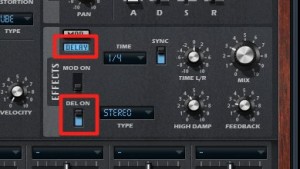
↑ Light up "DELAY" and switch the setting below it to "DEL ON."
The delay is now active on the sound.
Delay Settings
First, set "Delay Time," the most important parameter of a delay.
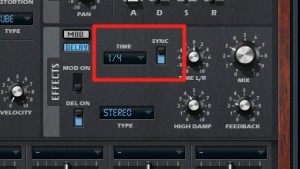
↑ Turning "SYNC" on
syncs the echoes to the song's tempo.
Quarter notes and eighth notes are commonly used,
and the effect matches the note value.
- Quarter note: The echo comes back every quarter note
- Eighth note: The echo comes back every eighth note
The longer the note value, the more strongly you feel (and emphasize) the returning echo.
If you set a short note value,
you get thickness as if two parts were playing: a short delay effect.
Delay time_32nd note
Feedback
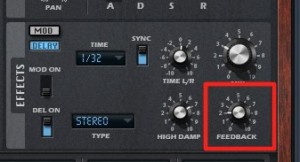
Feedback determines the number of repeats of the echo.
It is set from 0 to 100.
Note that the value is a percentage, not a number of repeats.
At a value of 100, the delay never ends (lol).
It is hard to use as is, and it is often used temporarily with automation, for example when making sound effects.
At a value of 0, it repeats only once
. This is often used to blend vocals, lead synths, and so on into the backing track.
It's like adding a shadow to the sound. Anyone who has used the image software Photoshop will know what I mean (lol).
I usually set it somewhere around 10% to 25%, depending on the song.
Feedback Explained
Arrangement Techniques Using Feedback
Mix
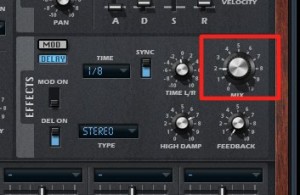
This sets the volume balance between the original sound before the delay and the delayed echo.
It is a very important parameter.
With Mix at 50%,
the original sound and the echo play at the same volume, giving an effect like playing the part twice.
At 0%, the delay has no effect,
and at 100%, you hear only the echo.
For a natural yet effective sound, I usually set it somewhere around 10% to 20%.
Frequently asked questions
Q1. Why do synthesizers need delay?
Simple synthesizer waveforms tend to lack air and depth. Adding the echo effect of a delay gives the sound depth and dimension and helps vocals and lead melodies blend naturally into the mix.
Q2. How do I choose between quarter notes and eighth notes for Delay Time?
With quarter notes, you feel the returning echo strongly; with eighth notes, the echo comes back at shorter intervals and adds thickness. The longer the note value, the more emphasized the effect, and the shorter it is, the more it sounds like a doubled performance.
Q3. Why shouldn't I set Feedback to 100?
Feedback is a percentage of repetition, so at 100 the delay repeats forever and never ends. We recommend around 10 to 25% for normal use, or 0% for a natural effect.
Q4. What is the best setting for Mix?
For a natural yet effective sound, 10 to 20% is a good guideline. At 50%, you get an effect like playing twice, and at 100%, you hear only the delayed sound.
NEW ARTICLES
Latest English Articles











