

Lunacy has released "SKY," a new preset pack for its virtual instrument "CUBE." Built on the concept of "Celestial guitars," SKY contains 30 sound sources and 100 presets, performed by top Los Angeles session guitarists using cutting-edge guitar pedals. With CUBE's innovative 3D interface and intuitive orb-based operation, you can not only use the presets as they are but also blend different sounds to customize them. This article explains the appeal of SKY and how to use CUBE in detail, making it a tool that a wide range of users, from music production beginners to producers, can use to unleash their creativity.
Lunacy Releases SKY, Built Around Guitar Sounds!
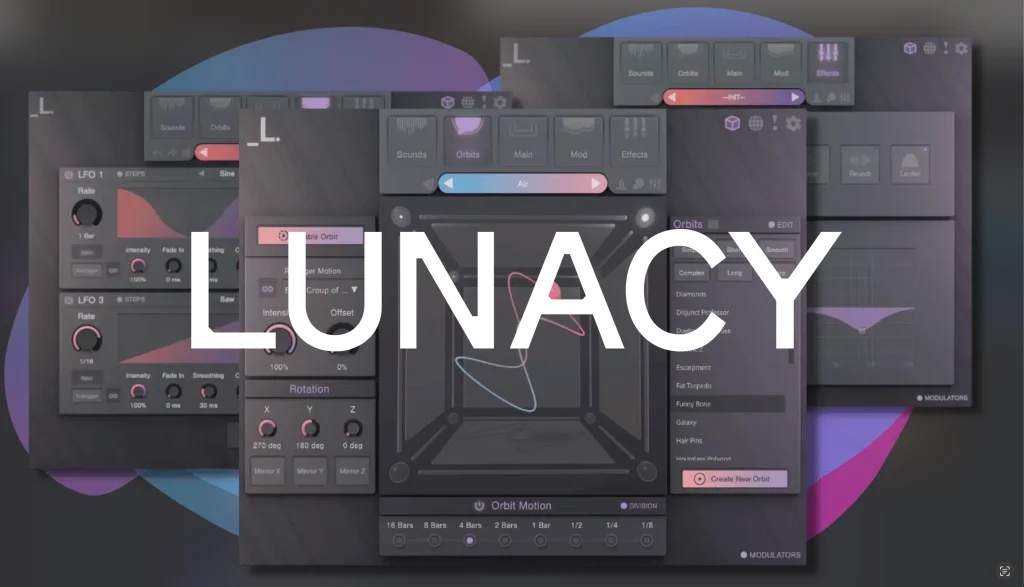
Released in May 2021 by the Los Angeles-based plug-in maker "Lunacy," the groundbreaking virtual instrument "CUBE" drew attention from many producers and music creators, praised for its innovative 3D interface and wide variety of sounds.
So many of you may already know it or find it invaluable in your music production.
Now the preset pack SKY, which further expands CUBE's potential, has been released.
SKY is built on the concept of "Celestial guitars" and is characterized by sounds centered on guitar samples.
In this article, we introduce the appeal of the newly released SKY along with how to use CUBE.
CUBE and Its Dreamlike 3D Interface
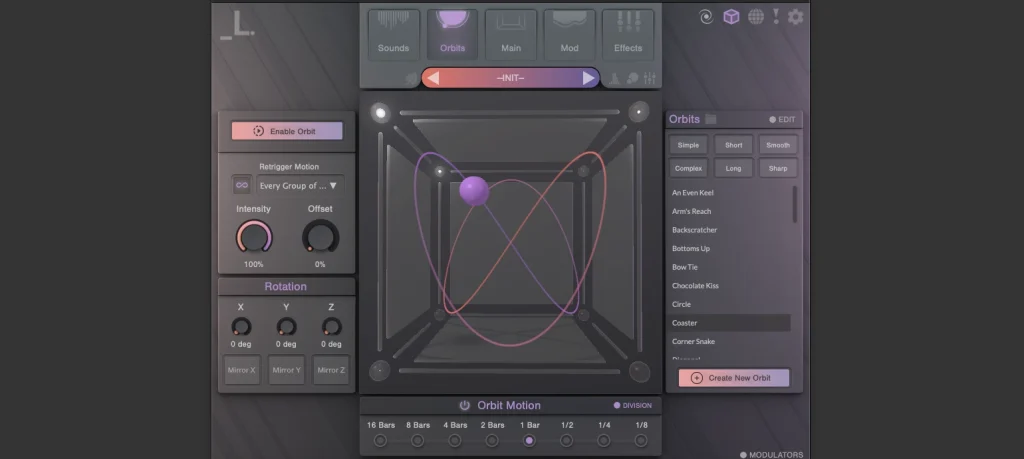
CUBE is a virtual instrument with a beautiful 3D interface for intuitive operation, letting you manipulate sounds visually and customize them easily.
It covers a wide variety of tones, including acoustic guitar, bells, aggressive fat basses and crisp percussive sounds, and offers many dreamlike presets incorporating electronica and cinematic elements.
The presets alone are ready for immediate use, but the 3D interface also lets you blend different sound samples for dynamic, evolving sound design.
With its ease of use and versatility, it is a very appealing product that makes you feel the possibilities of music production.
SKY: Painting Inner Landscapes with Dreamlike Sounds

Next, we introduce SKY, the highlight of this article.
As mentioned at the beginning, SKY is a set of presets built on the concept of "Celestial guitars."
"Celestial guitars" literally means guitars of the heavens or of the celestial bodies, and true to its name, we felt its overall character was a fantastical, rich sound like the heavens or outer space.
We created a simple demo using SKY and the presets included with CUBE, so please have a listen.
* Only the rhythm tracks use a different plug-in.
• Demo
• Each sound from the presets used
• The presets used, combined
All sounds use the presets as they are.
Each sound is so expressive that we could create the demo easily without any tweaking.
The guitar samples in SKY were reportedly performed by top Los Angeles session guitarists using cutting-edge guitar pedals, and the sound has an organic warmth.
A collection of unusual guitar articulations is also packaged as 30 sound sources and 100 presets.
In addition, the detailed sound design is in line with the company's recently released "BEAM," making this a high-quality pack that makes the most of the guitar's character.

How to Use CUBE
Many of you may be interested in SKY, so finally we briefly introduce how to use CUBE.
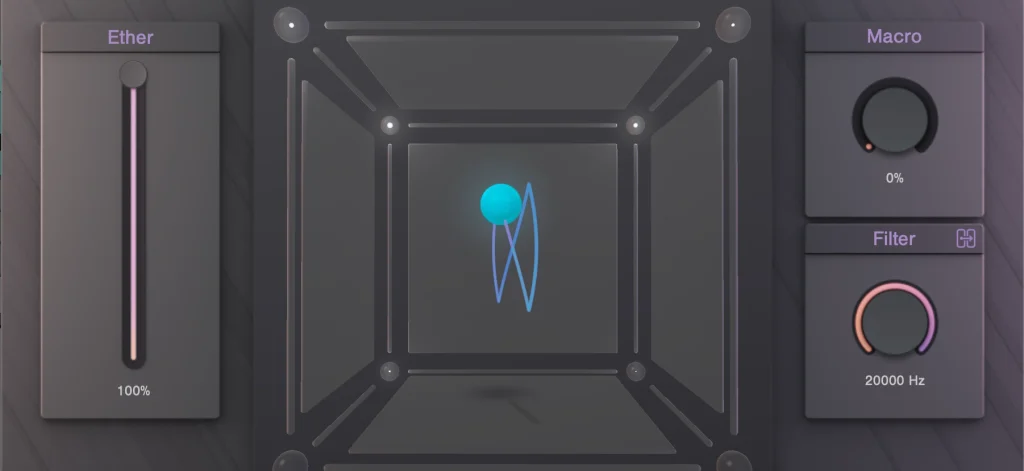
When you launch CUBE, the round sphere in the center of the screen probably catches your eye first.
It is called the orb, and moving the orb adjusts the volumes of different samples to blend the sound.
We explain the details as we go.
Installing Packs
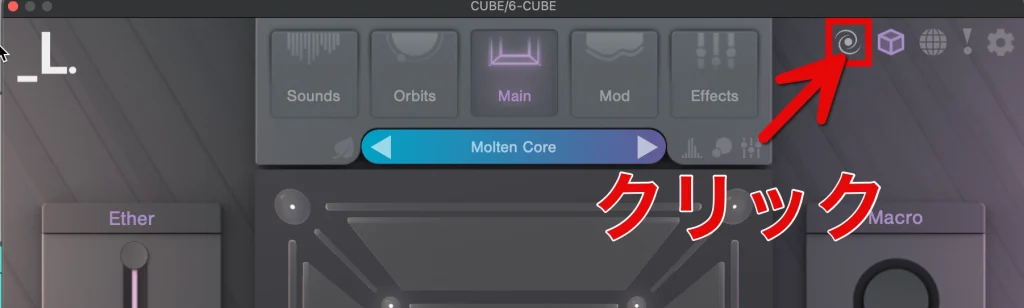
Click "Open Pack Portal" at the top right of the screen to show the list of packs.
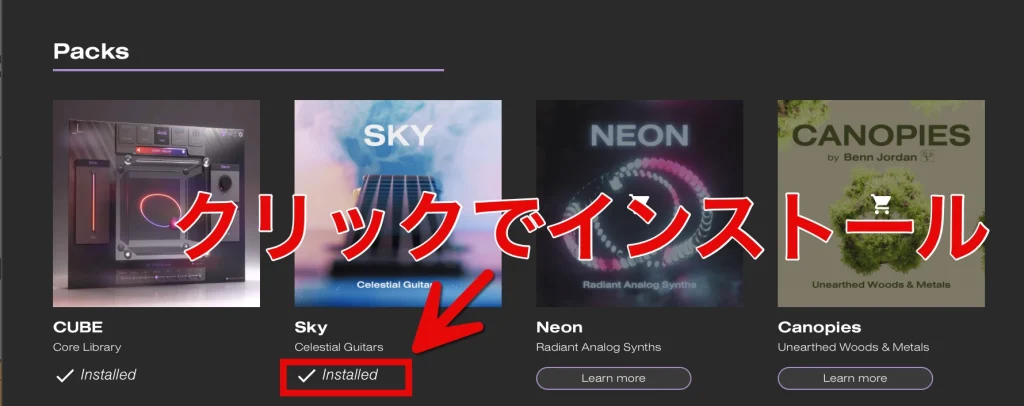
The image shows the screen after installation, but if you are adding SKY, you install it on this screen.
Selecting Presets
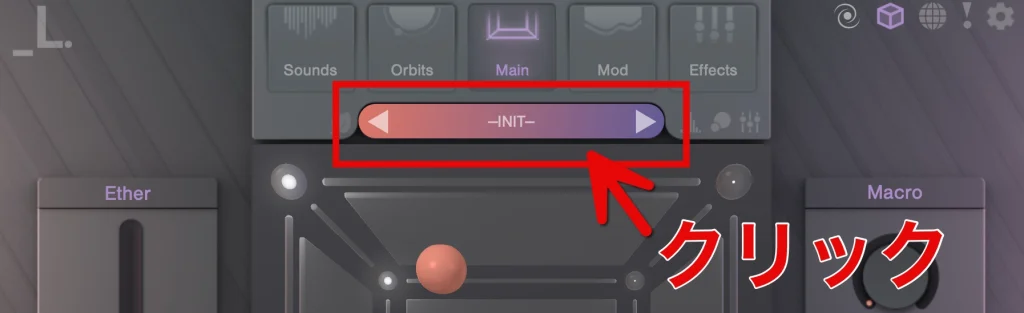
Click the area labeled "-INIT-" above the orb on the main screen to open the full-size "preset browser."
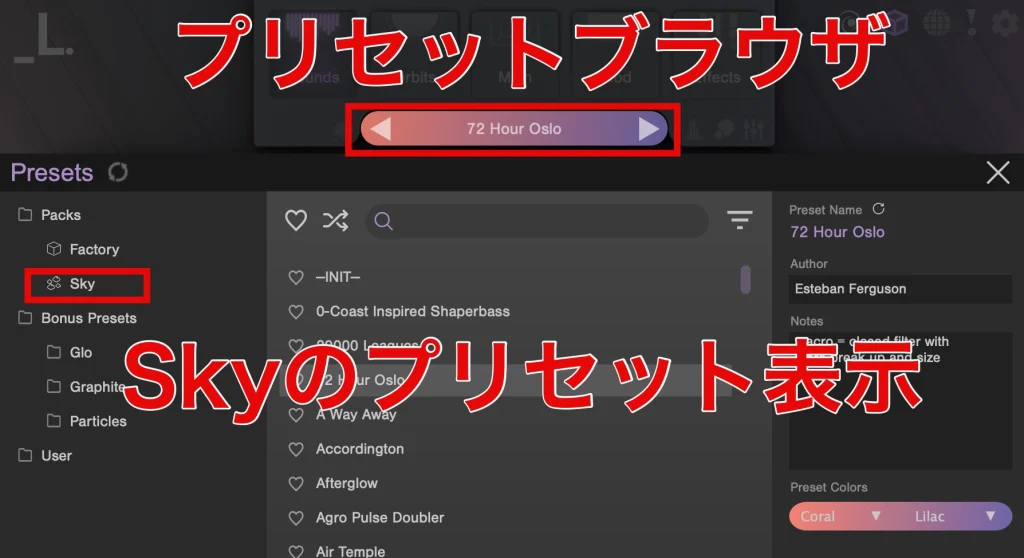
Here, narrow down to the sound you want using categories and tags, and select it.
After installing SKY, its presets also appear in the preset browser.
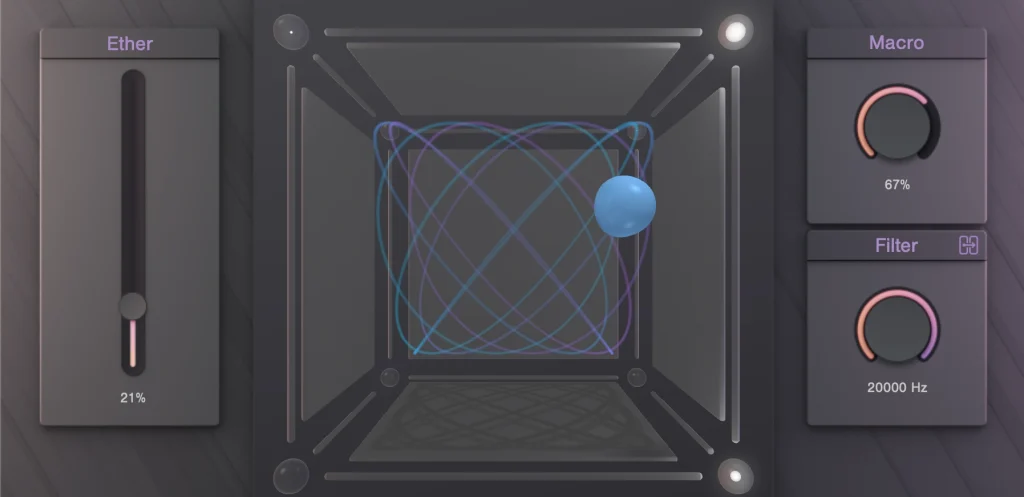
When you return to the main screen after selecting a preset, the orb's path is shown and the orb starts moving.
This is a major feature of CUBE not found in other virtual instruments: by visually following the orb's movement, you can check changes in sound in real time, making it possible to create and adjust sounds intuitively.
Initial Sound Settings
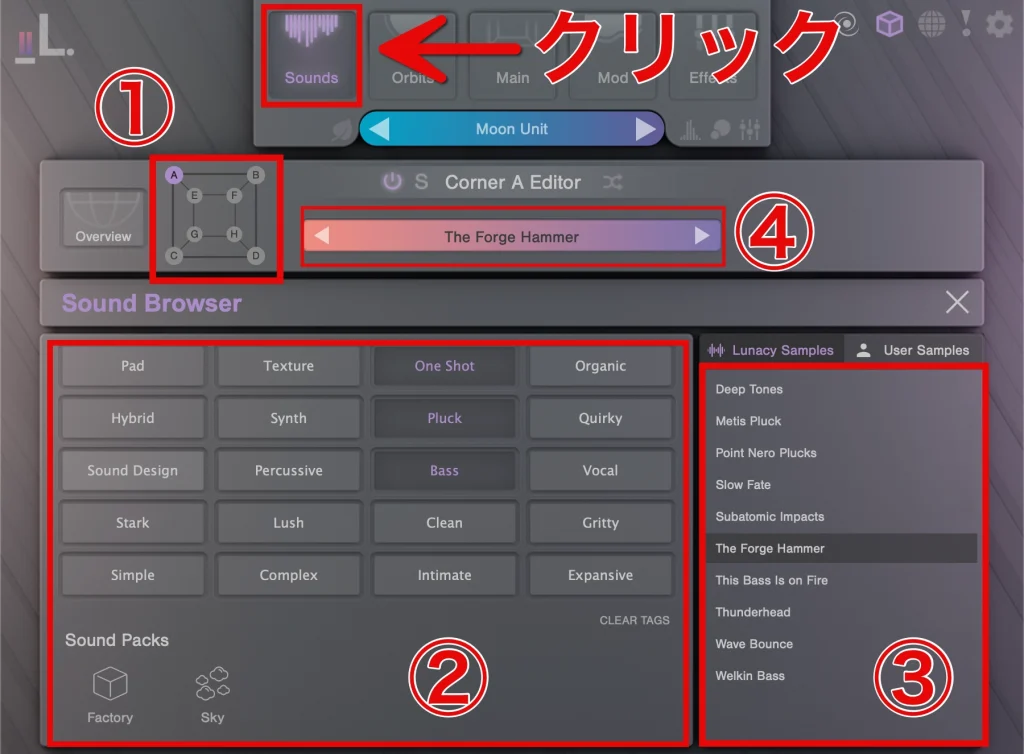
CUBE's main screen has eight corners, and you can assign a different sound to each.
To set up and edit sounds, click "Sounds" at the top.
(1) in the image shows the corners, and clicking "A–D" lets you set the sound for each individually.
Narrow down sounds in (2), and the sounds appear in (3), where you can choose any sound you like.
Clicking (4) shows the editor screen for the selected corner, where you can edit it individually.
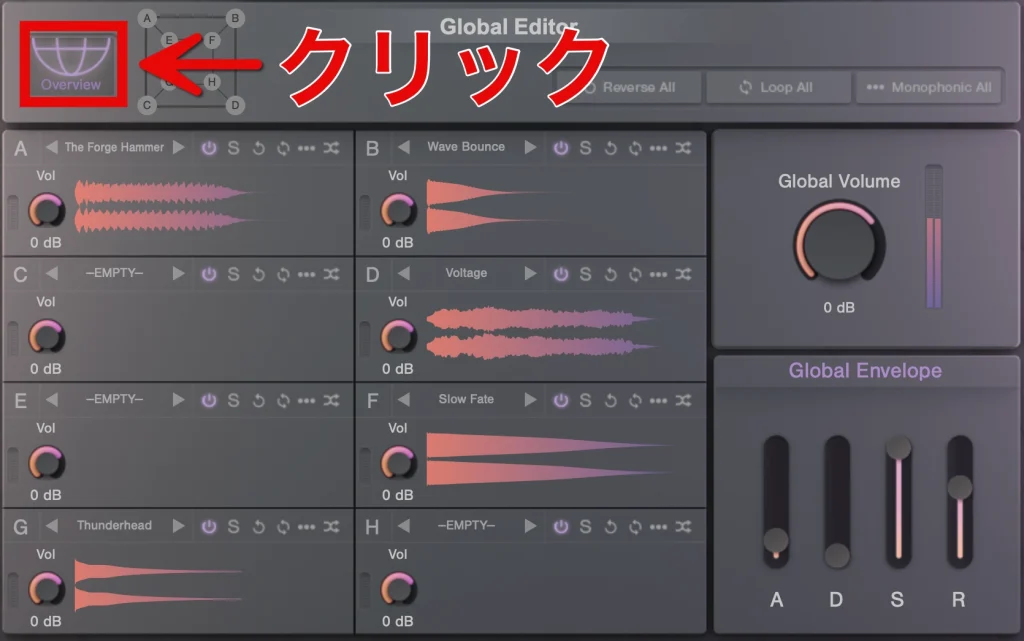
"Overview" shows the editor screens for all eight corners (the global editor).
Use the global editor to adjust the overall character of the sound.
Because you can edit each corner's sound in detail, professional sound design is possible.
Operating the Orb
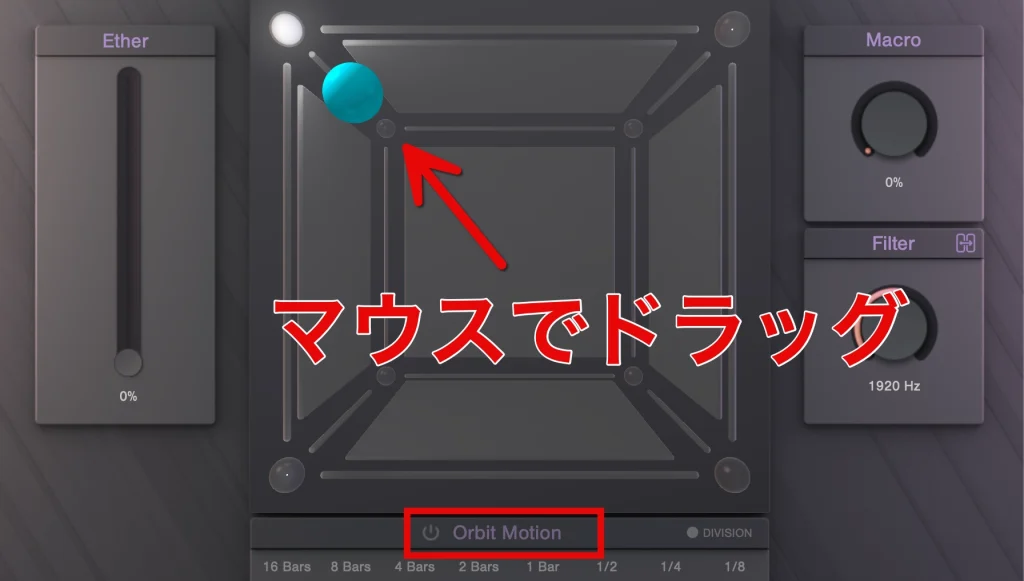
When you checked the orb after loading a preset, it was moving automatically.
This is because a function called "Orbit Motion" was turned on.
Click the mark to the right of "Orbit Motion" to turn it off, and you can control the orb with the mouse.
Moving the orb with the mouse adjusts the volume of each corner's sample to blend the sound.
* The samples in the corners the orb approaches become louder.
Orbit Motion Settings
Orbit Motion is a function for automating the orb's movement.
The path used to automate the movement of the orb and effects is called an "orbit path," and CUBE comes with more than 40 preset orbit paths.
Just choose a preset to set up movement easily.
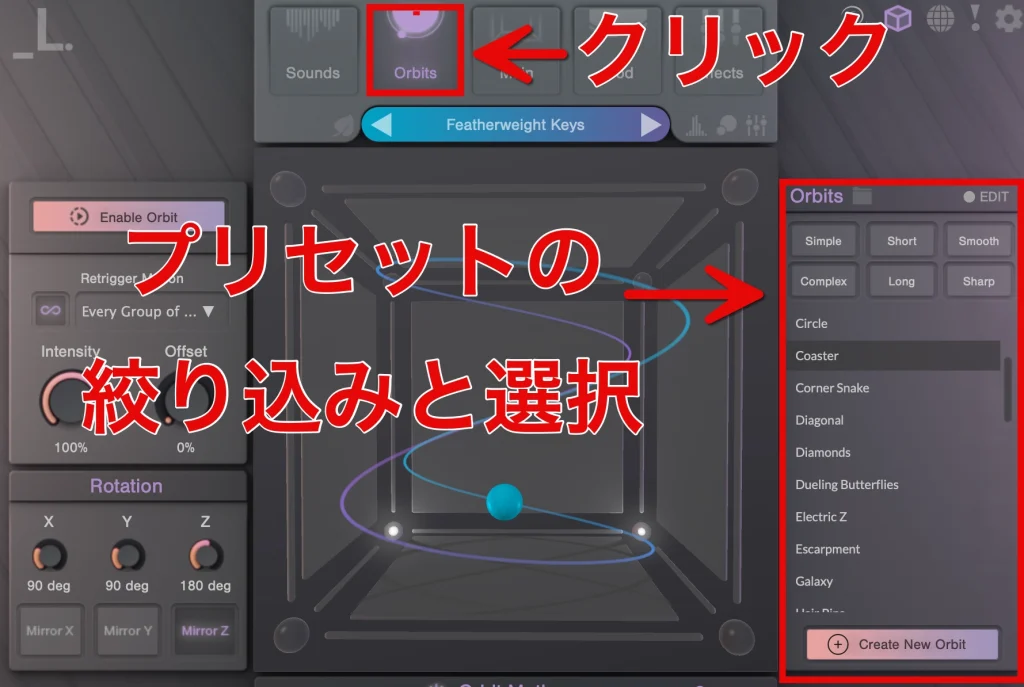
Click "Orbits" at the top of the screen to open the preset selection screen.
You can also set the orb's movement yourself, creating unique movements not possible with the preset orbit paths.
However, start by trying the presets included in CUBE and enjoy the changes in sound.
Effect and Modulation Settings
CUBE also includes a wide range of effects and modulation functions.
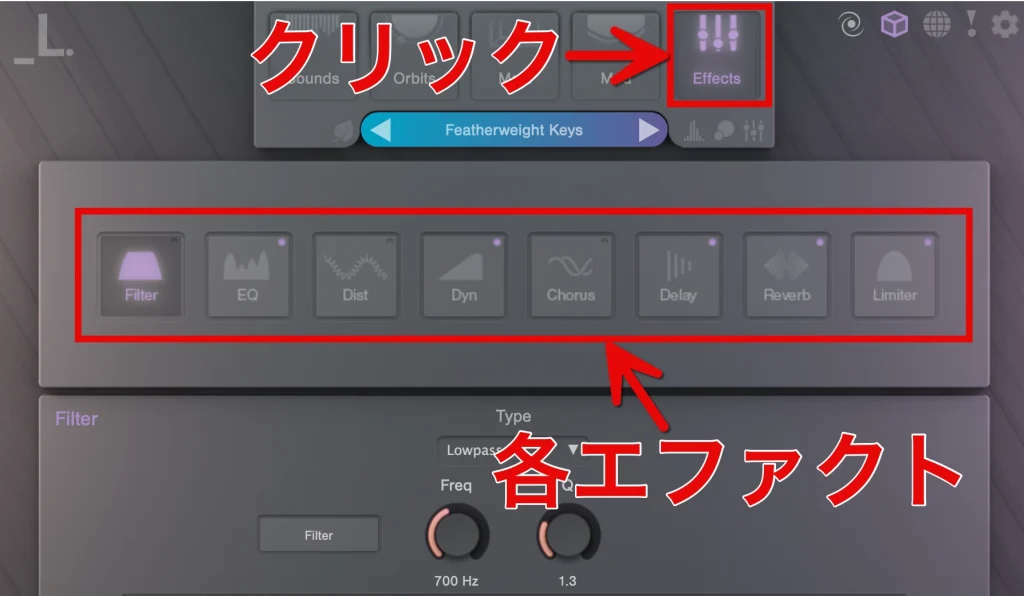
Click "Effects" at the top of the screen to show the available effects.
You can add effects such as filters, reverb and distortion.
A variety of effects let you fine-tune the sound, so you can expect a professional finish.
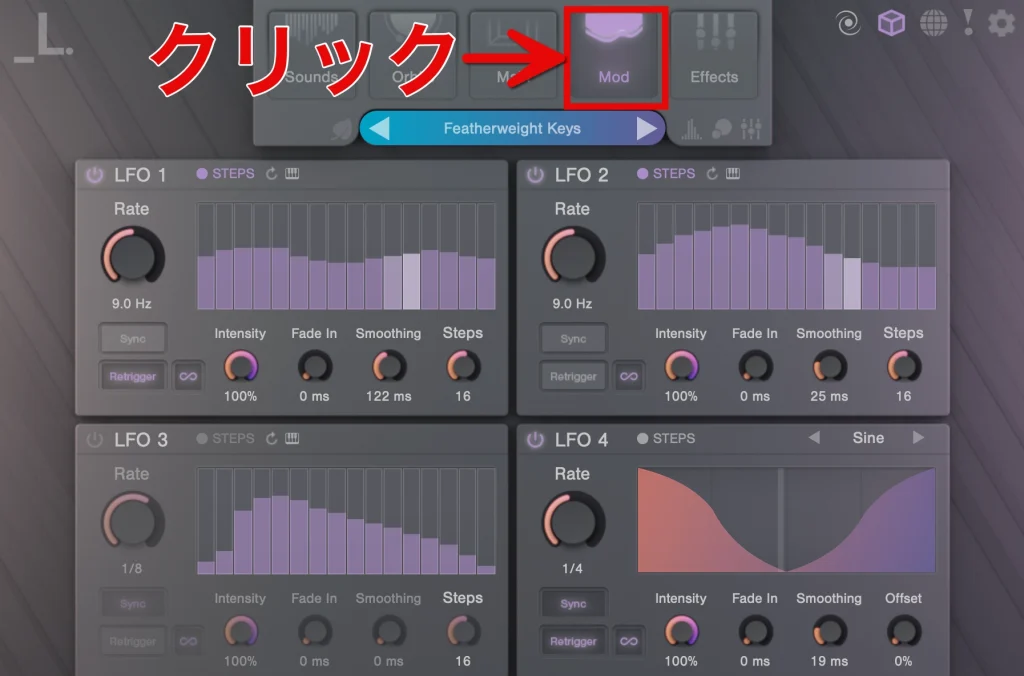
The "Mod" tab next to it is for setting up modulation.
Using four LFOs and Macro knobs, you can add dynamic movement to the sound.
Adjusting the Global Controls
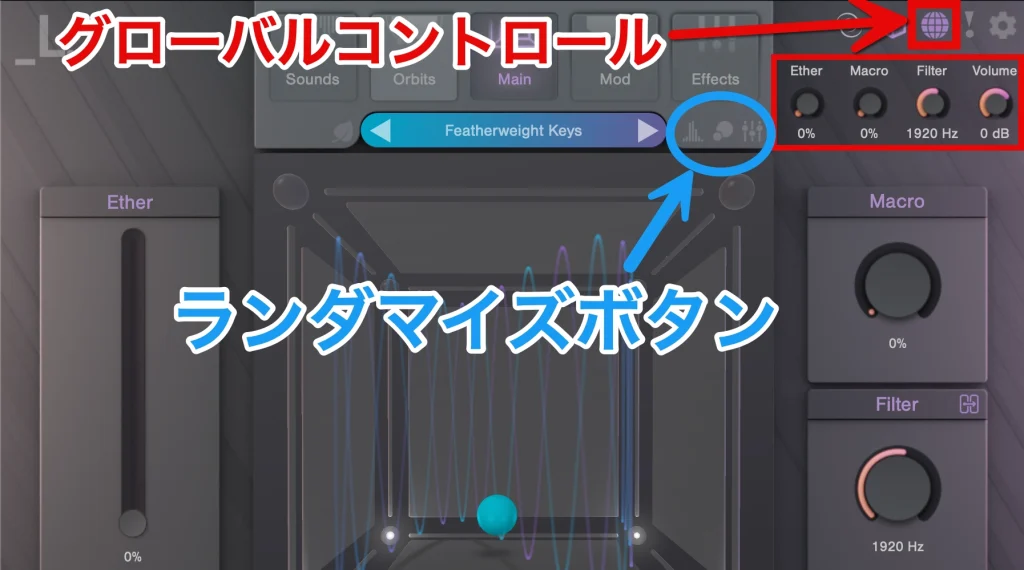
To fine-tune the overall sound of the project, adjust "Ether, Macro, Filter, Volume."
These are on the main screen, but clicking the "global controls button" shows them separately, so they are accessible from any tab and easy to operate.
The basic controls are intuitive, letting you adjust the sound efficiently.
The "randomize button" is likewise accessible from any tab.
The randomize button randomly changes the Sound, Orbit and FX settings.
It is useful when you want to find creative ideas, but there is no undo function, so be careful when using it.
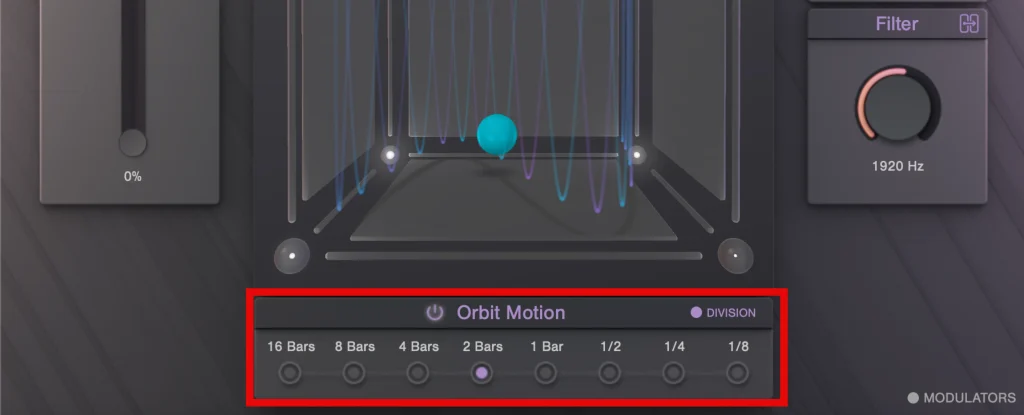
Orbit Motion's "16 Bars to 1/8" is an option for setting the speed of the orb's movement.
For example, with "16 Bars," the orb completes one cycle over 16 bars.
With "1/8," on the other hand, the orb completes one cycle in 1/8 of a bar.
This lets you fine-tune the speed of the orb's movement.
These settings run in sync with your DAW's tempo.
Sale Information and Purchase Pages
To celebrate the release of SKY, the new expansion pack for CUBE, a spring sale is being held.
During the sale, until June 19, all Lunacy products are up to 40% off.
BEAM, which we briefly mentioned in this article, also receives a major free update to version 1.1.
* SKY can be purchased for $29 during the above period, down from its $49 price
* BEAM can be purchased for $59 during the above period, down from its $99 price
Be sure to check them out during this great sale and take your tracks even higher!
Frequently Asked Questions
Q1. What is CUBE, and how does it differ from SKY?
CUBE is a virtual instrument with a 3D interface developed by Lunacy. SKY is a dedicated preset pack for CUBE, expansion content specialized in guitar sounds. If you have CUBE, you can purchase SKY separately, install it and use it.
Q2. What is CUBE's orb function?
The orb is the sphere in the center of CUBE, which moves via the mouse or automatically with the Orbit Motion function. Depending on the orb's position, the volumes of the samples assigned to the eight corners change, letting you blend multiple sounds in real time to create sounds.
Q3. Can SKY's presets be used as they are?
Yes, the 100 presets included in SKY can be used as they are. As in the article's demo, using the presets directly without editing gives you high-quality sound right away. If you need professional sound design, detailed customization is also possible with the editor functions.
Q4. Which DAWs (music production software) does CUBE support?
The article does not list specific DAW compatibility, but as a product of the plug-in maker Lunacy, it is likely compatible with major DAWs (Ableton Live, Logic Pro, Cubase, etc.). We recommend checking the official website for details.
NEW ARTICLES
Latest English Articles











