
Abbey Road Orchestra is the ultimate orchestral sample library recorded by Spitfire Audio at Abbey Road Studios, the mecca of film music. More than 60 hours of performances by world-class players were edited over 2,000 hours, and First Violins alone contains more than 196,000 samples. Multiple mic positions (the MIX series, TREE, CLOSE, VINTAGE and more) can be blended in real time, letting you shape the ideal sound for the genre and purpose of your music. With a rich set of articulations and advanced legato playing, you get natural, expressive orchestral sound just by entering a melody, and it is highly regarded by professional composers.
Supreme Tones Woven by Abbey Road Studios
Abbey Road Orchestra by Spitfire Audio is recorded at Abbey Road Studios, known as the mecca of film music, and is what could be called the pinnacle of orchestral sound collections.
This series pursues the ultimate realism and expressiveness in music production and is highly regarded by professional composers.
This article explains the appeal of Abbey Road Orchestra and how to use it.
Advanced Performance Delivering Unrivaled Sound Quality and Playability
First, please listen to a demo we created with Abbey Road Orchestra.
In the demo, we only changed articulations and made basic dynamics adjustments.
Even with the melody simply entered, it sounds natural, and the legato is extremely smooth.
We were able to create audio of this quality very easily.
Main Product Features
- Overwhelming sound quality: high-quality sound recorded in Abbey Road Studios Studio One
- Diverse mic positions: classic to modern microphones improve recording quality
- Advanced performance technology: controls a variety of playing techniques and subtle timbral changes in real time for natural performances
- A rich range of playing styles: includes a wide variety of articulations
Abbey Road Orchestra offers a strings bundle including First Violins, Second Violins, Violas, Cellos and Basses, and each instrument section can also be purchased individually.
These products also come in two editions: CORE and PROFESSIONAL.
The main differences between CORE and PRO are the number of mic positions and articulations included.
In addition, the PRO edition includes enhancements called "Extended", which let you use more advanced legato playing and additional articulations.
These are covered in detail in the following sections.
Abbey Road Orchestra Introduction Video
The Pinnacle of Sound from High-Resolution Sampling and Mic Positions
The biggest appeal of Abbey Road Orchestra is its overwhelming sound quality.
World-class players performed for more than 60 hours, and the recordings were meticulously edited over more than 2,000 hours.
First Violins in particular contains more than 196,000 samples, realistically reproducing the distinctive acoustics of Abbey Road Studios Studio One.
Diverse Mic Positions and Mixes
A variety of microphones were used in the recording process, and blending the provided mic positions makes it possible to shape the ideal sound for the genre and purpose of your music.
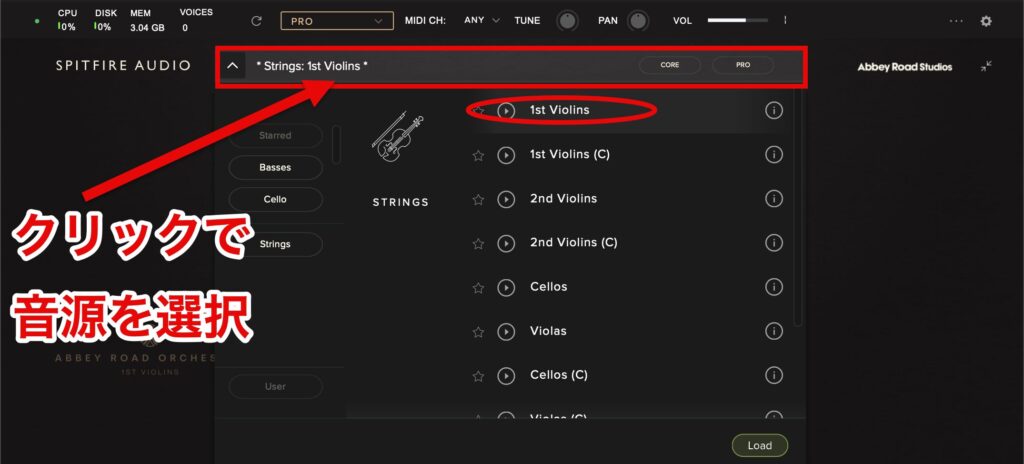
Choose a sound from the preset selector at the top of the screen.
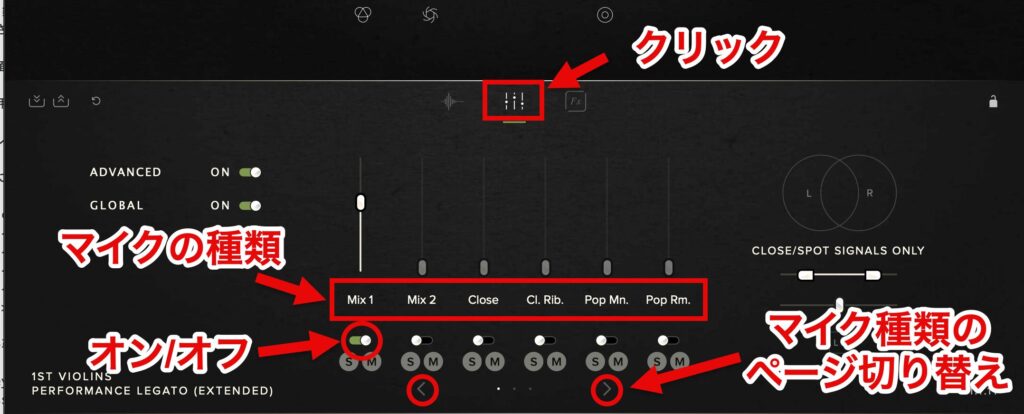
Click the signal mixer to show the types of microphones.
Turn on (green) the microphones you want to use.
Click the arrows (<...>) to go to the next page and show more microphone types.
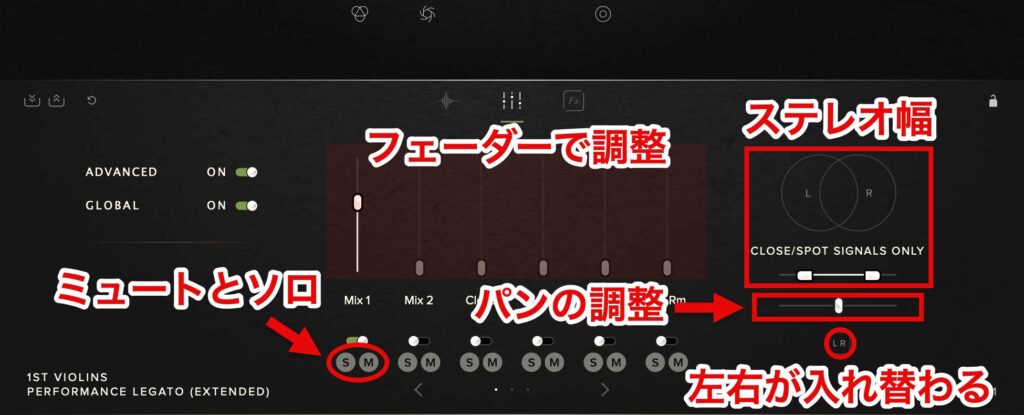
Raise the faders of the microphones you want to use to adjust the balance.
Shape the stereo image by adjusting stereo width and panning.
Clicking the invert button (the LR section) swaps the left and right channels.
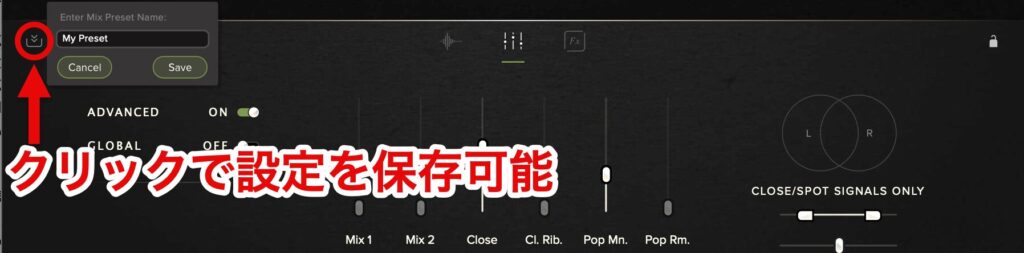
You can also save settings you like as mixer presets.
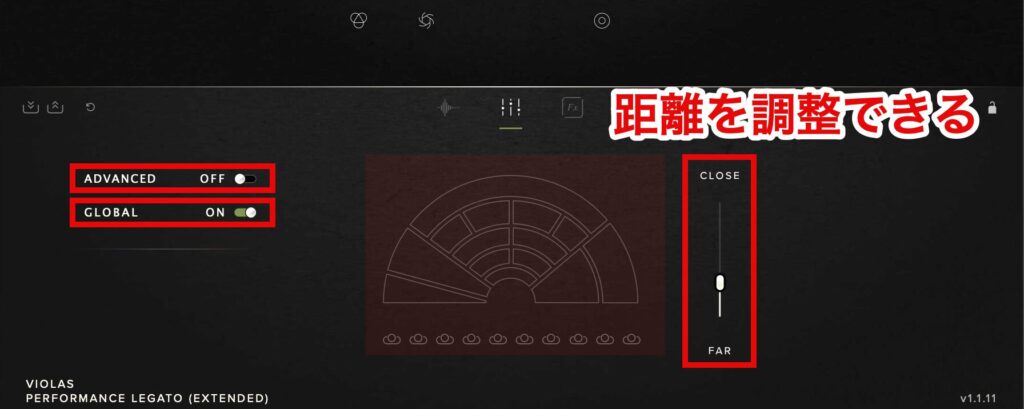
When ADVANCED is off, you can visually adjust the distance between the stage and the audience.
It is normally on, but turning it off shows a diagram of the stage and audience, and raising the fader brings the audience closer.
This is suitable when you want simpler operation.
GLOBAL lets you choose the scope of the mixer settings.
When it is on, mixer changes apply to all articulations; when it is off, they affect only the selected articulation.

Below are the characteristics of representative mic positions and mixes that especially showcase the library's diversity and quality.
- MIX 1: a full-sounding room mix by Simon Rhodes, with balanced acoustics combining multiple mic positions
- MIX 2: a tight, clear mix by Simon Rhodes, ideal for music that emphasizes fast passages and detail
- TREE 1: a three-dimensional arrangement of three of Abbey Road's finest valve omnidirectional microphones, for a rich sound with depth
- CLOSE: a clear sound using small condenser microphones to capture each instrument up close
- OUTRIGGERS 1: a wide image from omnidirectional microphones, reproducing the full width of Studio One
- VINTAGE 1 & 2: uses 1940s ribbon microphones (RM1B and RCA 44BX), ideal for a retro feel or film-score-style orchestral sound
* The CORE edition includes MIX 1 only.
Natural Timbral Changes and Performance Technology That Respond in Real Time
Abbey Road Orchestra does not simply provide high-quality sounds.
It includes its own technology to bring out the full expressiveness of the players through its recorded articulations.

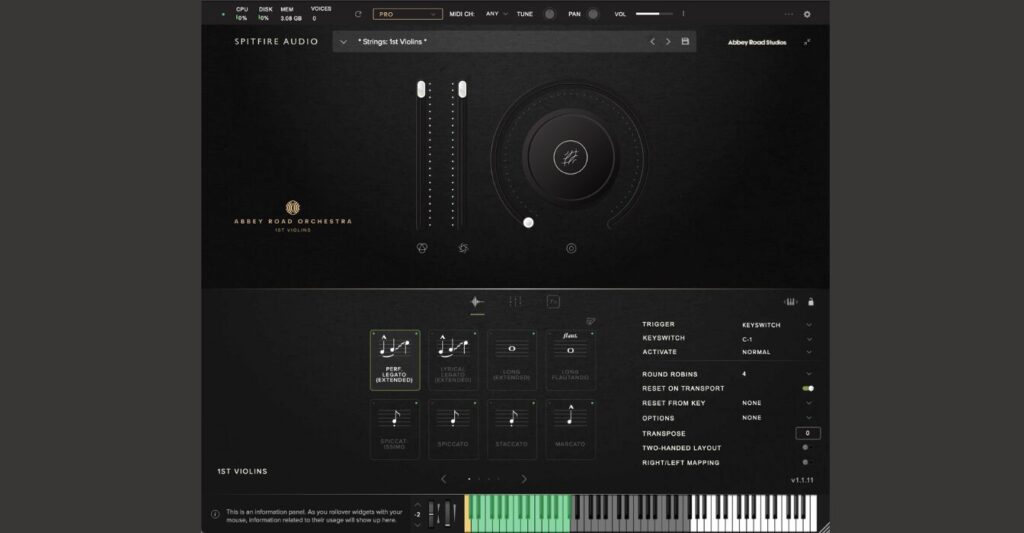
Click the technique switcher to show the articulations.
You can also switch articulations with key switches in the low range of the keyboard.

The key assigned to the selected articulation is shown in yellow.
If you want to change the assigned key, you can specify it with KEYSWITCH.
Drag the keyboard icon to move the key switch position left or right on the keyboard.

In addition, TRIGGER lets you choose from various ways of switching articulations.
- CC RANGE: switches techniques by specifying a CC number and value range on a MIDI controller
- VEL. RANGE (velocity range): switches techniques according to how hard you play the keys (velocity)
- MIDI CHANNEL: switches techniques by playing on different MIDI channels
- SPEED: switches techniques automatically according to playing speed (set by specifying the time interval between notes)

ACTIVATE lets you choose how key switches behave.
- NORMAL (normal mode): pressing a key switch changes the articulation, which continues until you press another key switch.
- LATCH (latch mode): switches to that articulation only while the key switch is held, and automatically returns to the previous articulation when you release it.

The main controls are the primary tools for customizing the overall character of the sound and performance.
- 1. VOLUME: also called Expression; controls the overall volume balance of the performance.
- 2. DYNAMICS: mainly affects sustained articulations, changing the texture and intensity of the sound from soft to strong playing.
Click the center of a knob to show the parameters that can be assigned to it.
After selecting one, adjust it by dragging the white circle up or down.
Double-click a knob to return it to the default value.
- Reverb: adjusts the amount of reverberation
- Release: adjusts the decay time after a note is released
- Tightness: adjusts the sample start point
- Vibrato: adjusts the intensity of vibrato
- Legato Offset: adjusts how quickly legato responds
Extended Articulation Patches
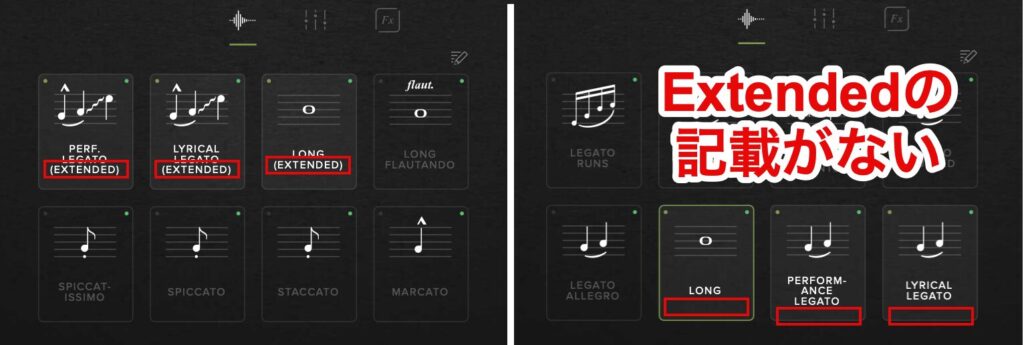
Certain articulations in the PRO edition come with Extended patches.
Patches without the Extended label reproduce basic articulations with high-quality sampling.
They specialize in a single articulation or sound and are simple and easy to use.
Extended patches contain different articulations and are designed so that the appropriate sound and articulation are selected automatically according to key touch (velocity) and playing style (playing speed).
Specifically, the following control is possible.
Changes by velocity
- Pressing keys lightly: a soft attack and tone, smooth note connections
- Pressing with medium force: a standard attack and tone, natural note connections
- Pressing hard: a powerful attack and tone, note connections with separation
Changes by playing speed
- Slow playing: smooth, expressive note connections
- Fast playing: quick, clearly articulated note connections
Articulations That Enable Diverse Performance Expression
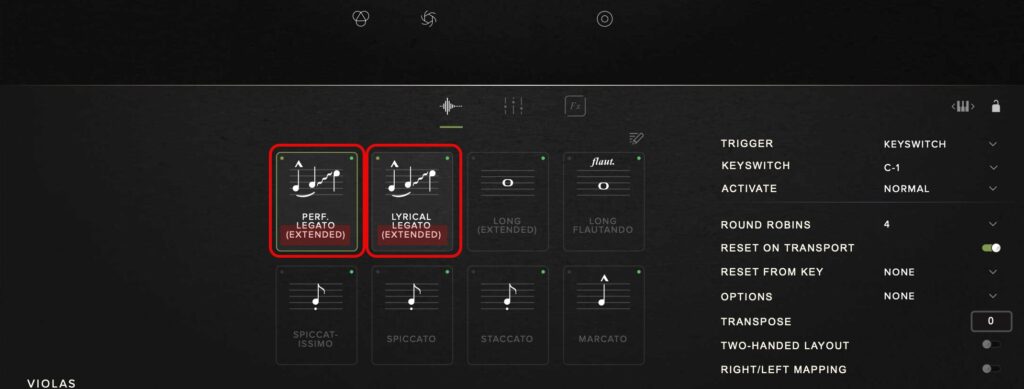
Among the articulations included in Abbey Road Orchestra, the most notable are "Performance Legato" and "Lyrical Legato".
Legato is a playing technique that connects notes smoothly, and these two legatos come with Extended patches.

Performance Legato can express optimal, natural note connections for everything from fast passages to slow melodic lines.
It analyzes both velocity and playing speed and automatically selects the appropriate legato style.
With velocity set to 1
With velocity set to 127

Lyrical Legato is designed for gentle, expressive melodies.
Compared with Performance Legato, it is smoother and features singing note connections, making it especially suitable for emotional phrases and lyrical music.
It selects different legato styles mainly according to velocity.
With velocity set to 1
With velocity set to 127
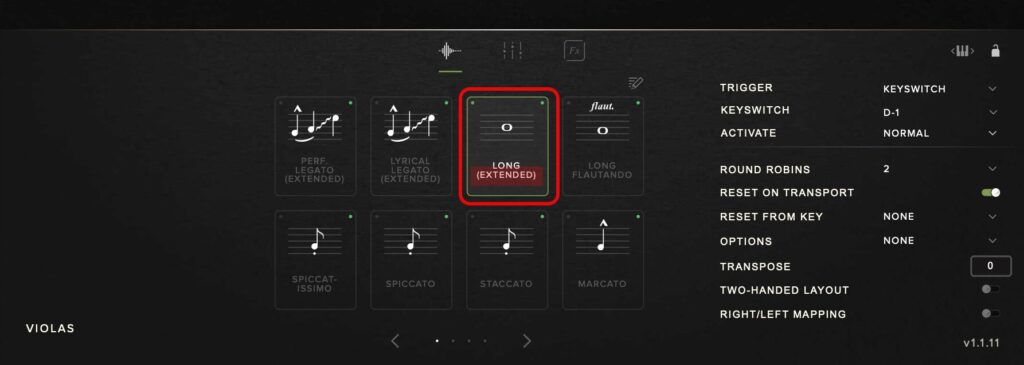
In addition, as an articulation other than legato, Long also comes with an Extended patch.
Long is an articulation basically used for sustaining notes.
This Extended patch also changes its sound according to velocity.
For example, a low velocity gives a soft tone and a high velocity gives a more powerful tone.
With velocity set to 1
With velocity set to 127
The features of the other main articulations are as follows.
- Legato Runs: legato specialized for fast passages and ornaments
- Legato Portamento: legato with an effect of sliding smoothly between notes
- Legato Detache: legato that puts a break between notes while keeping them connected
- Legato Slurred: standard legato that connects notes smoothly
- Legato Allegro: legato suited to fast-tempo playing
- Flautando: for a soft tone
- Tremolo: for rapidly repeated notes
- Spiccato: for light, short notes
- Pizzicato: for plucking the strings with the fingers
The FX (Effects) Window for Richer Sound
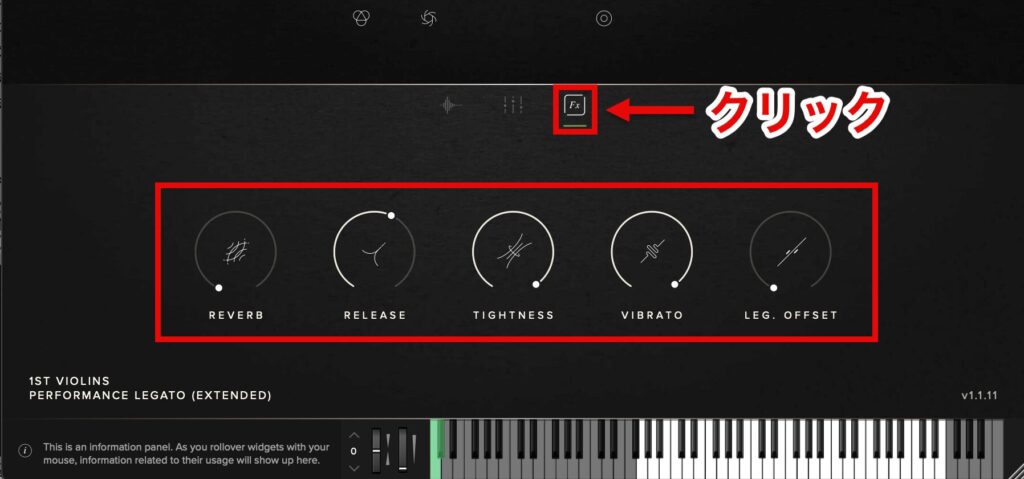
Click the "FX" button to open the FX (effects) window.
Here, the same parameters as the main control knobs are shown.
The main controls are always visible and suit real-time performance and quick adjustments, while the effects window is useful for careful sound shaping.
System Requirements and Compatibility
Mac
- OS: OS X 10.15 to macOS 14 (Intel and Apple Silicon/ARM supported)
- CPU: minimum 2.8 GHz i5 (quad-core), recommended 2.6 GHz i7 (6-core)
- RAM: 8 GB or more (16 GB recommended)
- Storage: SSD recommended
Windows
- OS: Windows 10 / 11 (64-bit)
- CPU: Intel 2.8 GHz i5 (quad-core) or equivalent AMD
- RAM: 8 GB or more (16 GB recommended)
- Storage: SSD recommended
This product uses large, detailed samples to achieve high sound quality.
This places a heavy load on your system, so please pay attention to your computer's specifications.
Edition Comparison and Prices by Instrument
First Violins

- CORE regular price: ¥36,564 (tax included)
- PRO regular price: ¥65,934 (tax included)
Second Violins

- CORE regular price: ¥30,690 (tax included)
- PRO regular price: ¥51,249 (tax included)
Violas

- CORE regular price: ¥30,690 (tax included)
- PRO regular price: ¥51,249 (tax included)
Cellos

- CORE regular price: ¥27,753 (tax included)
- PRO regular price: ¥45,375 (tax included)
Basses

- CORE regular price: ¥30,690 (tax included)
- PRO regular price: ¥51,249 (tax included)
How to Install
Finally, for those who purchase this product, here is how to install it.
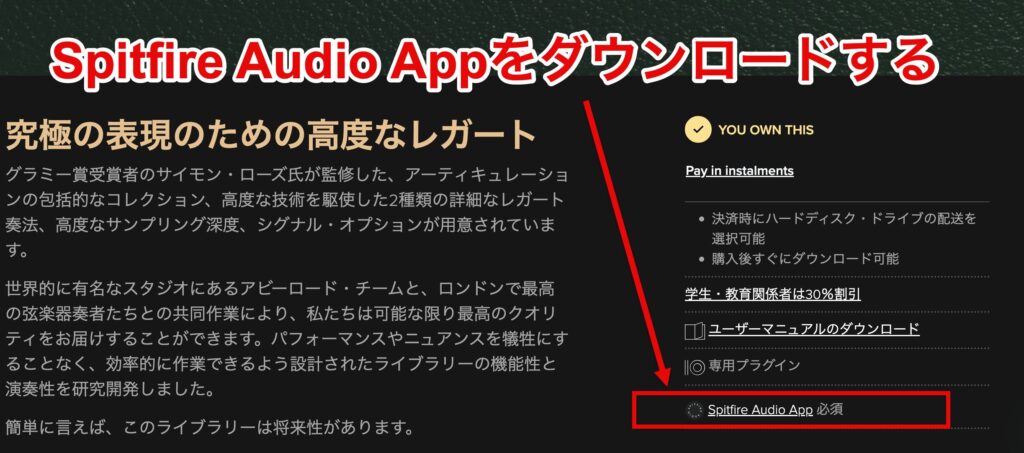
Installing Abbey Road Orchestra requires the "Spitfire Audio App".
First, download and install the Spitfire Audio App from the official Spitfire Audio website.
Spitfire Audio App download page
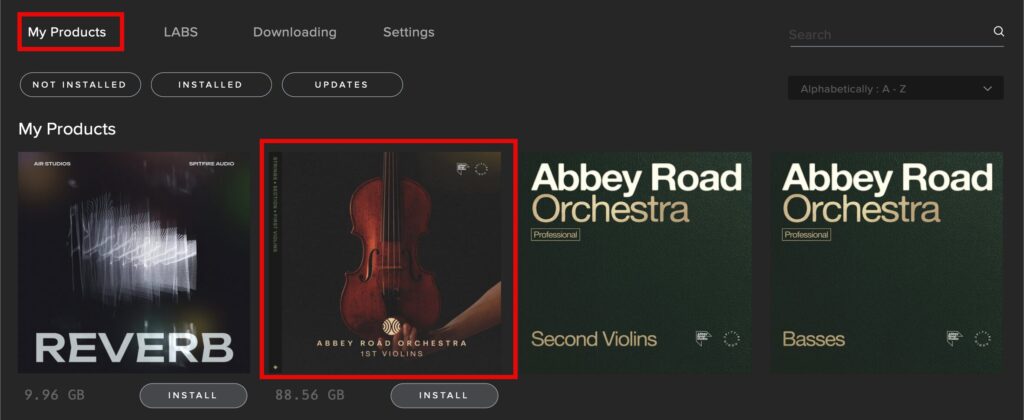
Once the Spitfire Audio App is installed, open the app and select the product from "My Products."
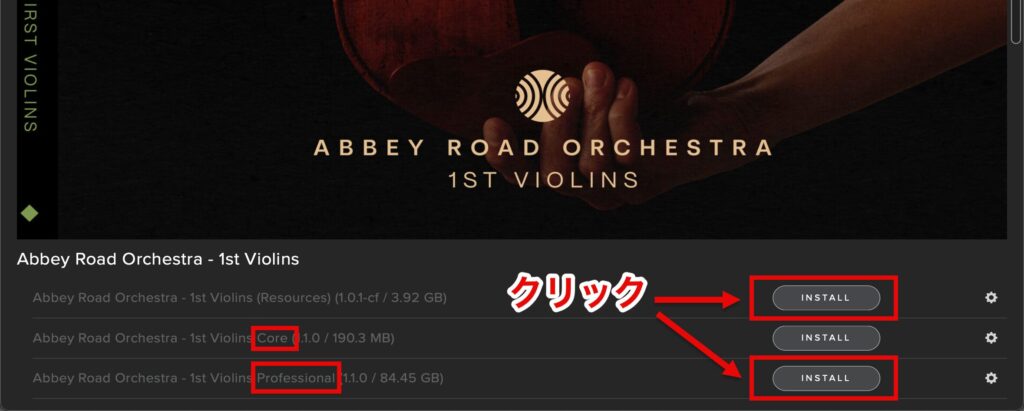
Click "INSTALL" on the product page to install it.
Even if you own the PRO edition, installing the CORE edition lets you use lighter settings and presets.
Install according to your purpose and the storage space available.

What did you think?
Abbey Road Orchestra delivers outstanding orchestral sound for a wide range of uses, from film music to classical and contemporary music.
Please bring it into your music production and experience its high-quality sound.
Spitfire Audio also offers the following products.
Be sure to check them out as well!

Frequently Asked Questions
Q1. What purchase options are available for Abbey Road Orchestra?
In addition to the strings bundle (the full instrument set), each instrument section, such as First Violins, Second Violins, Violas, Cellos and Basses, can be purchased individually. There are also two editions, CORE and PROFESSIONAL, and the PRO edition offers more mic positions and extended legato playing.
Q2. What are the main differences between the CORE and PROFESSIONAL editions?
The CORE edition includes only the MIX 1 mic position, while the PROFESSIONAL edition includes multiple mic positions (MIX, TREE, CLOSE, VINTAGE, etc.) and a rich set of articulations. The PRO edition also has "Extended" enhancements with advanced legato playing and additional articulations.
Q3. How do I switch mic positions?
In the signal mixer, turn the microphones you want to use on or off, and adjust the balance with each microphone's fader. When the ADVANCED function is off, you can also adjust the distance between the stage and the audience visually for more intuitive operation.
Q4. Can I switch articulations with key switches?
Yes, you can switch articulations with key switches in the low range of the keyboard. You can change the assigned keys with the KEYSWITCH function, and drag the keyboard icon to adjust the key switch positions.
NEW ARTICLES
Latest English Articles











