
If setting up a delay effect in DTM is giving you trouble, an analog-style approach of copying the audio to several tracks and offsetting their timing is very effective. With this method, you can see the delay repeats visually and freely adjust their timing, panning, volume, and effects, allowing finer sound shaping than a delay plug-in. You can offset waveforms slightly to adjust the groove or apply different effects to each repeat, giving you flexible expression and adding depth and dimension to your tracks.
Delay Settings Can Be Tricky
Delay is a very important effect that adds depth to a track.
It is also well known as an "echo" effect.
Normally you insert a delay on a track, but
"the repeats don't turn out the way I want"
is a very common complaint.
When that happens, try creating a delay effect with audio.
Achieve All Kinds of Effects Easily
The method is extremely simple.
(Click to enlarge)
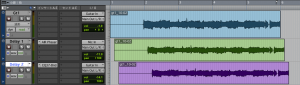
It is the primitive method of copying the same audio to other tracks and offsetting it.
But this method has a great many advantages.
You Can See the Delay Visually
Since you can see the delay repeats, you can also understand how they interact with other instruments.
Set the Echo Timing Freely
Just by offsetting the waveform, you can freely set the repeats to quarter notes, eighth notes, and so on.
You can also offset them slightly to create a groove.
Pan Freely
You can set panning freely, such as the first repeat on the right and the second on the left.
Set the Volume Freely
You can set the volume of each repeat individually.
Unusual tricks, such as making the second repeat louder than the first, are also easy.
Apply Effects to Each Repeat
You can apply effects flexibly, such as putting a phaser only on the echo
or cutting it with EQ.
Combining the points above lets you refine the sound quite far,
so be sure to give it a try.
In Our Lessons, You Can Also Learn Things Like This
- Advanced audio editing techniques
- A thorough explanation of delay concepts and knobs
- How to use delay on different tracks (advanced)
- When to use reverb versus delay
Frequently asked questions
Q1. What is the difference between audio delay and a delay plug-in?
Unlike a delay plug-in, the audio method shows the waveforms on screen, so you can check them visually. You can also process each repeat with its own effects and set panning and volume flexibly, allowing finer sound shaping.
Q2. How should I decide the delay timing?
You can adjust it freely by how far you offset the waveform. Use timing synced to the tempo, such as quarter or eighth notes, or offset it slightly to create a groove, adjusting to suit the song.
Q3. Can I apply different effects to multiple repeats?
Yes. You can apply different effects independently to each audio track, such as a phaser on the first repeat and an EQ cut on the second, making complex effects easy to achieve.
NEW ARTICLES
Latest English Articles











