

The Vertigo Sound VSC-2 Compressor is a UAD plug-in that combines the classic VCA compressor sound of its discrete "1979" VCAs with a modern mastering-grade signal path. With four VCAs and distinctive parameters, it delivers clear, musical coloration and excels in a wide range of uses, from drum buses and instrument tracks to the master bus. With advanced features such as Soft mode and a sidechain filter, it is a plug-in that recreates cutting-edge analog sound trusted by professional mastering engineers worldwide.
A Masterpiece of Modern Compressors
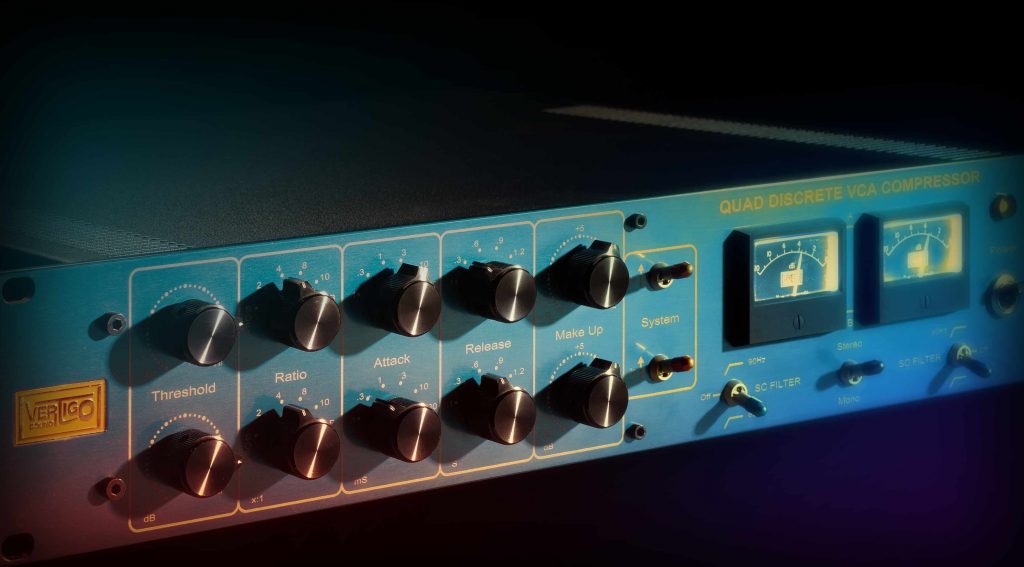
In the sixth installment of our series introducing outstanding UAD plug-ins, we cover the "Vertigo Sound VSC-2 Compressor."
You may often be unsure which compressor to use on bus or master tracks among the many options. The VSC-2 features very clear, musical coloration, gluing things together without sounding over-compressed and giving a convincing finish. Of course, you can also apply it hard for active sound shaping.
Above all, it is a processor with a superb sound that makes you want to run all kinds of sources through it, not just for mastering.
Now, let's look at it along with sound examples.
Product link: Vertigo Sound VSC-2 Compressor
Note that UAD plug-ins run on dedicated DSP accelerators (or Apollo series audio interfaces). For details, see this article.
About the Vertigo Sound VSC-2 Compressor
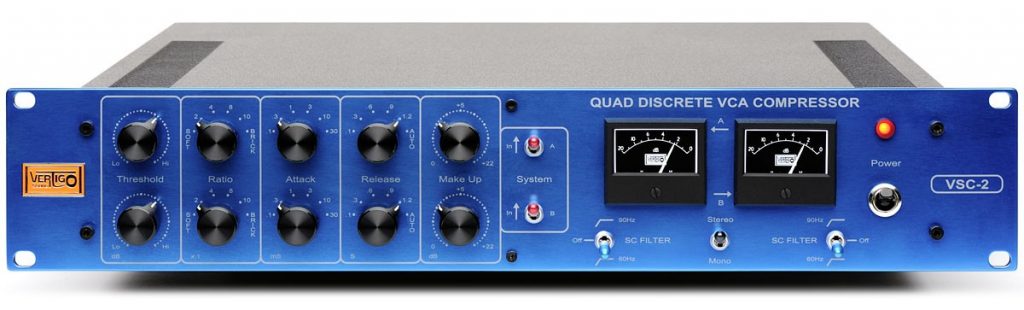
The VSC-2 is a classic called the Mercedes of VCA compressors, featuring unmatched accuracy thanks to its four VCAs. Each VCA, named "1979," uses only discrete components and achieves the finest VCA compressor sound of the '70s and '80s.
The VSC series was born by fusing a sound based on that classic sound with a modern mastering-grade signal path. It is now used in top-class studios around the world and has helped produce many hit songs.
Main Parameters of the Vertigo Sound VSC-2 Compressor
These parameters are common on typical compressors, but it also has some distinctive features, so check them out.
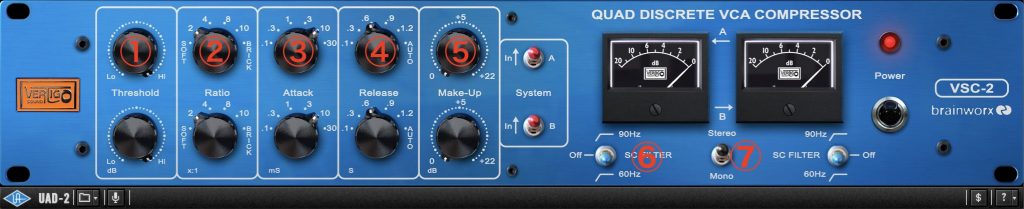
- (1) Threshold
Sets the signal peak at which compression starts. Turning it clockwise increases the value. The threshold can be set over a range of about 48 dB. - (2) Ratio
Sets the slope of the compression curve, that is, the ratio by which the output signal is compressed relative to the input signal. The higher the ratio, the stronger the compression and the more "squashed" the sound. In Soft mode, unlike a typical soft knee, the ratio changes automatically from 1:1 up to 8:1 as the input level increases. Set to Brick, the VSC-2 works as an analog limiter and cuts signals above the set level. Note, however, that it is not a so-called "brickwall limiter" that completely cuts sample peaks. - (3) Attack
Sets the time from when a signal level above the threshold is detected until the internal circuit starts compressing. It is easy to set if you first lower the threshold until you get a strong gain reduction (about 10 dB), set it for the sound you want, and then bring the threshold back for an appropriate gain reduction. - (4) Release
Sets the time from when the signal is detected falling below the threshold until the compressor stops compressing. The same setup procedure as for attack time is recommended. - (5) Make-Up
Raises the gain of the signal after the compression stage to compensate for the level reduction caused by compression. This avoids extreme volume changes compared with bypass, so you can set it up for easy comparison. - (6) SC Filter
By cutting the lows of the input signal (choose 90 Hz or 60 Hz), it prevents unnecessary compression triggered by low-frequency content. As a result, it can also emphasize the low end. - (7) Stereo Mode Switch
Selects whether compression is stereo-linked or dual mono (left and right set individually). Stereo link is basically fine, but simply switching to dual mono after setting it up can widen the stereo image slightly.
Use Case 1: Applying It to the Drum Bus
First, let's introduce a usage that changes the sound somewhat actively.
We applied it to the drum bus with the aim of adding punch.
The attack is clearly emphasized, and the sound has changed to one with a sticky sustain and a pleasant sense of compression. The density of the ambience also seems higher, and the cymbals have more presence. At the same time, there is no unnatural pumping.
The settings look like this.
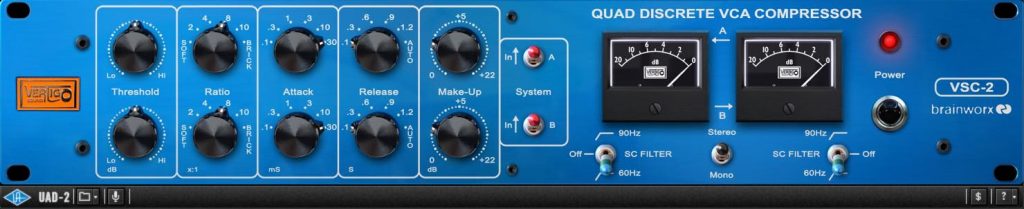
The key to this sound is the ratio setting. It is set high at 8:1, and due to the VSC-2's characteristics, a higher ratio also makes the knee harder, so the effect is clear.
Then, the slowest attack of 30 ms and the fastest release of 0.1 s create the punchy attack and sticky sustain.
Another key is the sidechain. It filters below 60 Hz so the compressor is not pulled excessively by the lows, which keeps the result natural even at a high ratio.
The threshold is adjusted so that the gain reduction peaks at about -3 dB. If you want an even more aggressive sound, you can push it a little further.
Use Case 2: Applying It to Piano
Next is an example on an instrument track rather than a bus.
We set it up to moderately even out the dynamics and help it blend into the mix.
The levels are evened out naturally without spoiling the nuances of the performance. It also seems to sound a little more sparkling.
The settings look like this.
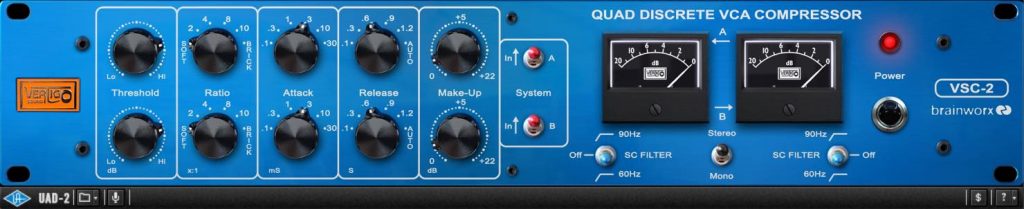
The attack of 3 ms and release of 0.6 s are somewhat fast, but rather than an unnatural change, the sustain extends naturally and thickness is added to the sound. Again, the key is the ratio: set to Soft, no compression occurs near the threshold level, and Make-Up brings the level up solidly.
The threshold is adjusted so that the gain reduction peaks at about -2 dB. Although the compression is gentle, combined with the harmonics characteristic of analog, it gives a solid presence.
Use Case 3: Applying It to the Master Bus
Finally, here is an example on the master bus, the classic use.
We set it up to glue the mix together without excessive compression.
This is also a very natural result, and it does exactly what you expect from a bus compressor. At the same time, it sounds very pleasant, adding a flavor that digital compressors cannot.
The settings look like this.
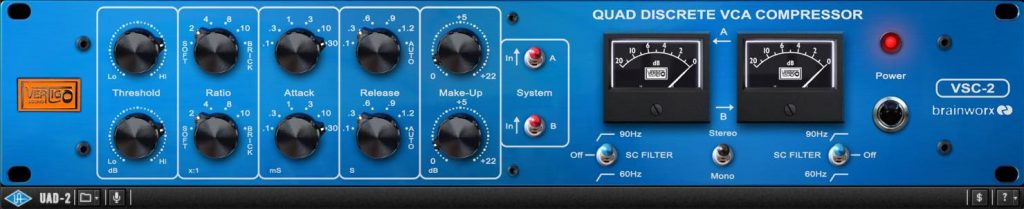
When inserting a VCA-type compressor on a bus track, the standard approach is a slower attack and faster release. Of course, nudging the values changes the nuance, so some exploration is needed. Here, the attack is 30 ms as on the drum bus, but a release of 0.3 s felt slightly tighter. I hesitated between Soft and a fixed 2:1 ratio, but chose 2:1 because it added a little more clarity to the vocal.
The sidechain filter is set below 90 Hz so the compression is not pulled by the bass and kick. The impact of the kick, which tends to get buried, also remains solid.
The threshold is set aiming for -2 dB of gain reduction. Although there is almost no compressed feel, the whole mix gains cohesion, and the added harmonics make it seem to step forward. Every effect is very natural and never unpleasant, which is the greatest feature of this compressor.
That concludes our introduction to the Vertigo Sound VSC-2 Compressor.
I have personally used this plug-in for a long time, and it is a VCA compressor I can recommend with confidence. Its transparency and exquisite compression are hard to find elsewhere. If you have tried many options but still can't find a good bus compressor, please give it a try.
Product link: Vertigo Sound VSC-2 Compressor
Frequently Asked Questions
Q1. What kind of compressor is the Vertigo Sound VSC-2?
It is a plug-in that fuses the classic sound of its "1979" VCAs with a modern mastering-grade circuit. Its four VCAs give it precise compression characteristics and clear, musical coloration, making it ideal for mastering.
Q2. What is the VSC-2's Soft mode?
Rather than a typical soft knee, it is a distinctive feature where the ratio changes automatically from 1:1 to 8:1 as the input level increases. No compression occurs near the threshold, and compression deepens as the level rises, giving natural, musical compression.
Q3. What are the tips for using the VSC-2 on a drum bus?
Set a higher ratio, a slower attack and a faster release to add punch. Cutting the lows with the sidechain filter lets you shape an aggressive sound while preventing unnatural pumping.
Q4. What do I need to use the VSC-2?
A dedicated UAD DSP accelerator or an Apollo series audio interface is required. It does not work if you buy the plug-in alone.
NEW ARTICLES
Latest English Articles











