
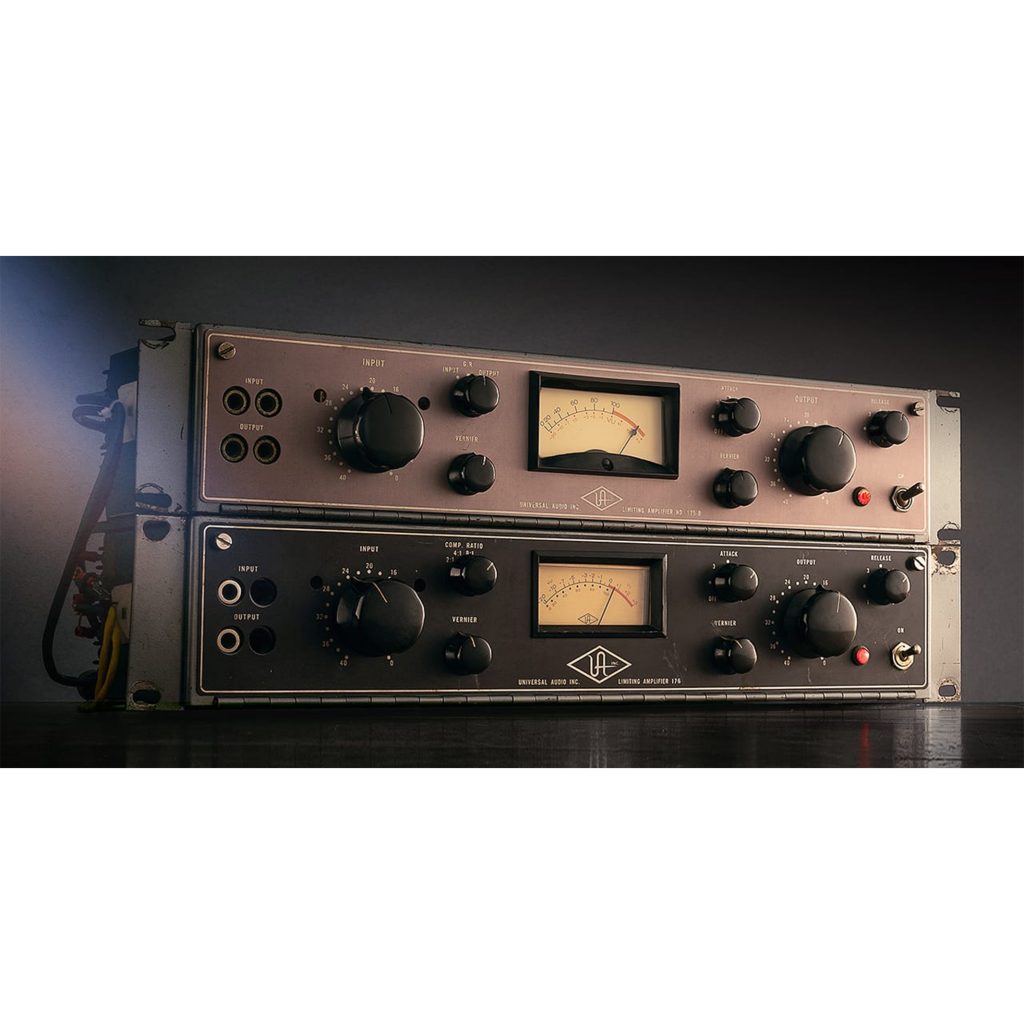
The UA 175B and 176 Tube Compressor Collection is a UAD plug-in that emulates rare tube compressors, the predecessors of the classic 1176 of the 1960s. It features the crisp brightness and unique texture characteristic of tubes and works well on every kind of track, including drums and vocals. With fast attack times and rich parameters, it gives powerful sounds on percussive sources such as kick and snare and a natural yet musical texture on vocals. A major advantage is the distinctive character it delivers, which is hard to get from a DAW's stock compressor.
A Distinctive Yet Easy-to-Use Character
In the fourth installment of our series introducing outstanding UAD plug-ins, we cover the "UA 175B and 176 Tube Compressor Collection."
Its name and look somewhat recall the "1176," but its sound has the crisp, bright impression typical of tubes and adds a unique, springy texture. It could be called a compressor with even more pronounced coloration than the 1176, yet it can be used on anything, including drums and vocals.
Now, let's check it out along with sound examples.
Product link: UA 175B and 176 Tube Compressor Collection
Note that UAD plug-ins run on dedicated DSP accelerators (or Apollo series audio interfaces). For details, see this article.

About the UA 175B/176
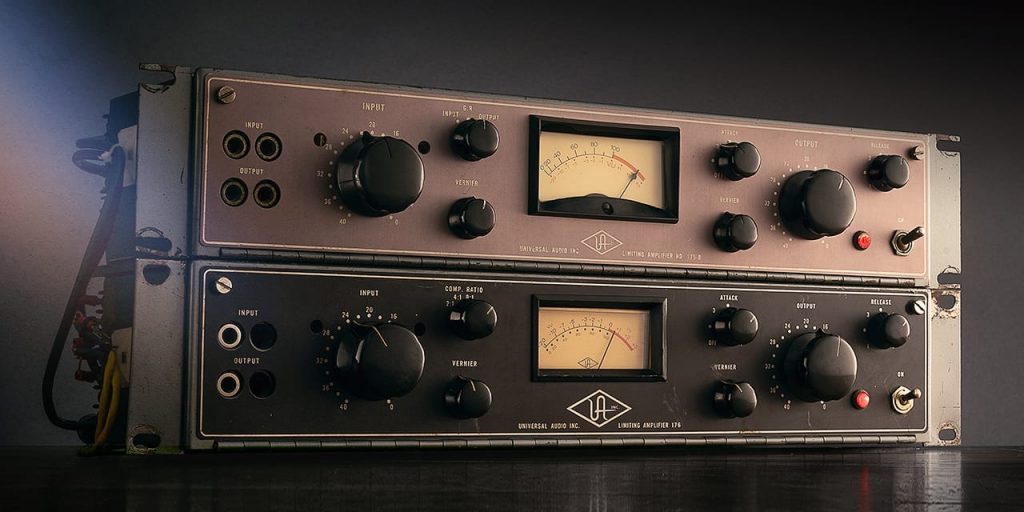
Universal Audio's 175B and 176 compressors, introduced in 1960, were the first tube limiters built for studio use. These rare units, the predecessors of the renowned 1176LN, are highly regarded for their gritty tube warmth, unique attack characteristics and excellent quality, and remain hugely popular today.
The 175B & 176 Tube Compressor Collection, exclusively for UAD-2 hardware and UA audio interfaces, emulates the full control set and circuit path of these iconic limiters in astonishing detail.
Parameters of the UA 175B and 176 Tube Compressor Collection
The 175B and 176 are exactly the same except for the upper-left knob (Gain on the 175B, Ratio on the 176).
They center on the basic parameters of a compressor, but let's go through them.
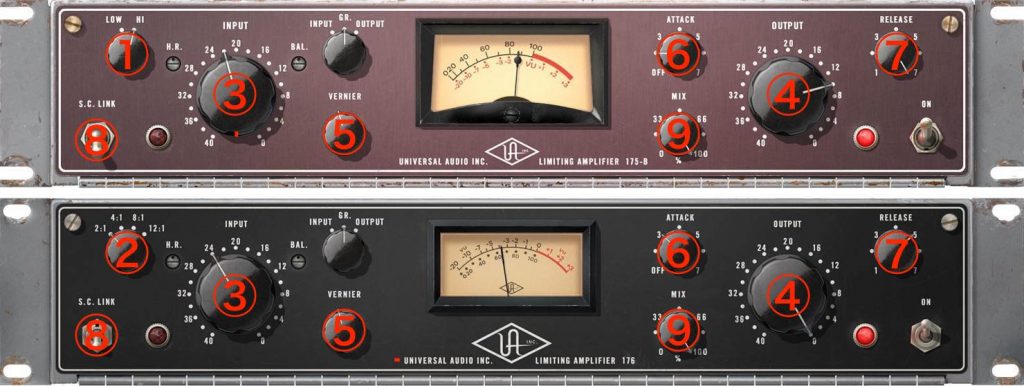
- (1) Gain (175B only)
Setting it to High increases the input volume by about 10 dB. - (2) Ratio (176 only)
Switches the ratio (compression ratio) in four steps: 2:1, 4:1, 8:1 and 12:1. - (3) Input
Adjusts the input volume, and adjusts the strength of compression by exceeding the fixed threshold. It normally adjusts in 2 dB steps, but switching Vernier (described below) makes it continuous. - (4) Output
Adjusts the final output volume. This control does not affect compression. It normally adjusts in 2 dB steps, but switching Vernier (described below) makes it continuous. - (5) Vernier
Switches the Input and Output knobs between 2 dB steps and continuous adjustment. - (6) Attack
Adjusts the attack time. The range is about 100 µs to 1000 µs, which is very fast. Clicking OFF disables compression, so you can apply only the coloration of passing the sound through the hardware. - (7) Release
Adjusts the release time. The range is 27 ms to 527 ms. - (8) S.C. Link
A switch available only when applied to a stereo track. When on, the amount of compression on the left and right channels is linked to be the same. When off, the left and right are compressed independently. - (9) MIX
Lets you mix the uncompressed dry signal with the compressed wet signal. At 100% it is wet only, and turning it left increases the proportion of dry.
Use Case 1: Applying the UA 176 to the Kick
In use, the 176 felt relatively quick to respond, so it seemed suited to sharpening transients such as drums to bring out presence. First, let's apply it to the kick.
This time, please compare a DAW's stock compressor with the UA 176.
The 176 gives a very punchy, aggressive sound. I tried hard to get close to it with the DAW's stock compressor, but could not quite achieve this feel.
The settings look like this.
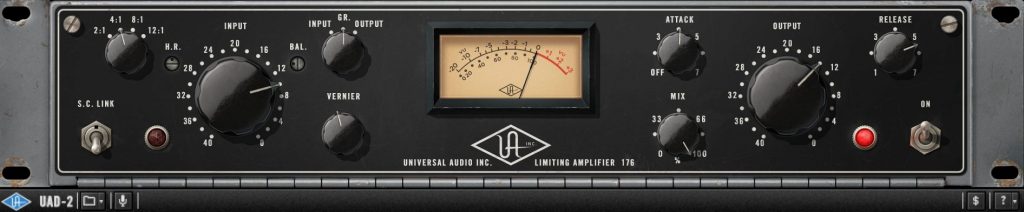
I think it is fine to operate it intuitively, relying on the sound and the gain reduction meter rather than being bound by theory. This time, the ratio is a standard 4:1, the attack a moderate 4 position and the release about the 5.5 position, adjusted so the gain reduction reaches about -6 dB.
The attack is impressively fast, catching peaks firmly and giving a punchy sound at any value, but I settled on this setting after looking for a balance where the kick neither sticks out too much nor sinks back. In the end, it is easier to judge within the whole mix.
The release is set fairly fast so it recovers rhythmically, but making it too fast prevents proper gain reduction, so adjust while watching that balance.
Use Case 2: Applying the UA 176 to the Snare
For the same reason as the kick, we applied the 176 to the snare as well.
Again, let's compare a DAW's stock compressor with the 176.
The 176's sound has a crisp, truly tube-like texture and comes through one step further. Perhaps because of its distinctive midrange, the resonance of the shell in the decay is very pleasant. The snare wires' rattle also stands out vividly, giving a musically polished feel.
The settings look like this.
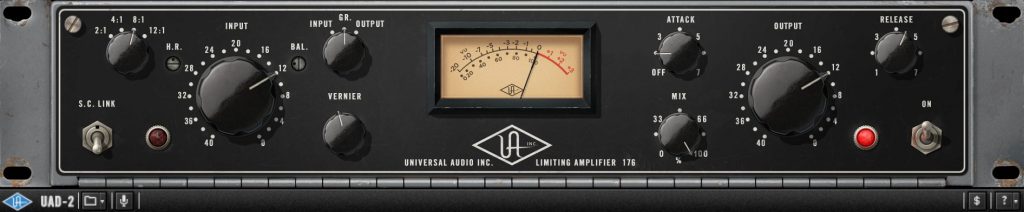
Here too, you can decide the values intuitively while moving various parameters. When aiming for a sound like this, the tendency is often a slower attack and faster release.
This time I wanted solid punch, so the ratio is 8:1, the attack at the 2 position, and the release at about the 4.5 position, so the decay does not get heavy (while following the rhythm). The amount of compression is about -6 dB of reduction, the same as the kick.
Again, checking it in the mix at the end, you will see that the 176 snare is thick and present while blending nicely into the mix.
Use Case 3: Applying the UA 175B to Vocals
Compared with the 176, the 175B felt slightly slower to respond, even with the same catalog specs, and acted more naturally. Its coloration is also more pronounced than the 176, so it seems powerful on tracks you especially want to make stand out.
So this time, we applied it to vocals.
Thickness is added to the midrange, a slightly gritty texture is added to the highs, and the vocal gains a presence that seems right in front of you. Also, the gain reduction moves quite actively within a range of up to about -6 dB, yet it does not sound compressed at all.
The settings look like this.
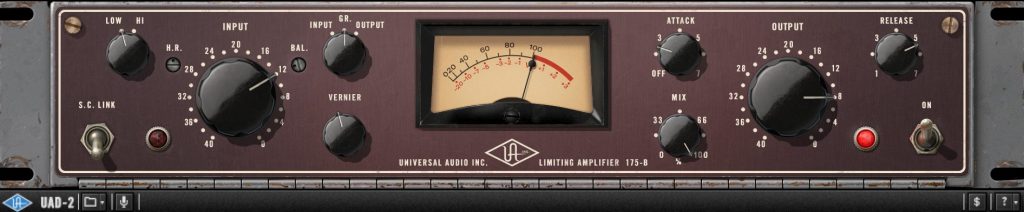
The attack should be quite fast even at this setting, but it is so natural you would not notice. For the release, I wanted it fast to push the whole vocal forward, but as mentioned, too fast makes the compression itself shallow, so I set it right at the limit before that happens.
Checking it in the whole mix, the coloration effect is enormous, and the vocal cuts through clearly without getting buried in a loud arrangement. This kind of texture cannot easily be created with ordinary EQ. If it feels like it sticks out too much, you can control it with EQ.
Finally, for reference, compare the whole mix with each compressor applied to the three tracks above.
That concludes our introduction to the UA 175B and 176 Tube Compressor Collection.
It is truly a compressor that could be called the vintage of vintage, and perhaps because it is so rare, it is not widely known. With a distinctive character different from the 1176, excellent performance as a compressor and very simple operation, it is a product you will want to try on all kinds of sources.
If you are interested, please give it a try.
Product link: UA 175B and 176 Tube Compressor Collection
Frequently Asked Questions
Q1. What is the difference between the UA 175B and the UA 176?
The upper-left parameter differs: the 175B has a Gain knob, and the 176 has a Ratio switch. The 175B responds slightly slower with natural action and pronounced coloration, while the 176 is quicker and excels at handling transients.
Q2. What equipment do I need to use this plug-in?
UAD plug-ins require a UAD-2 DSP accelerator or a Universal Audio Apollo series audio interface. They cannot be used with a DAW alone.
Q3. What settings are effective on kick and snare?
For the kick, a 4:1 ratio and moderate attack give quick punch. For the snare, an 8:1 ratio with a slower attack and faster release is common, raising presence while making use of the harmonics. About -6 dB of gain reduction is a guideline.
Q4. What is the MIX parameter useful for?
Because it blends the dry and wet signals, you can flexibly adjust how strongly the compression acts. At 100% the compression effect is at its maximum, and turning it left makes the impression more natural.
Q5. Which is better suited to vocals, the 175B or the 176?
The 175B responds more slowly and naturally yet has pronounced coloration, making it ideal when you want a musically polished vocal sound.
NEW ARTICLES
Latest English Articles











