
The UAD plug-in "Thermionic Culture Vulture" is a circuit emulation of a classic developed by the long-established British maker Thermionic Culture, enabling the control of distortion and harmonics that is essential in modern mixing. With rich parameters such as DRIVE, BIAS and DISTORTION TYPE, it allows all kinds of sound shaping, from warm tube sound to edgy distortion. Examples on drum buses, electric guitar and bass show that subtle distortion adds harmonics and greatly improves the thickness and presence of a sound.
Controlling the "Distortion" Essential to a Mix
In the fifth installment of our series introducing outstanding UAD plug-ins, we cover the "Thermionic Culture Vulture."
After EQ and compression, controlling distortion and harmonics is important in modern mixing.
Depending on the genre, you may actively add distortion, and if you want to add something to a sound that is missing a little flavor, it would be adding harmonics with subtle distortion.
The Culture Vulture focuses on that "distortion" and lets you shape sounds quickly.
Now, let's look at it along with sound examples.
Product link: Thermionic Culture Vulture
Note that UAD plug-ins run on dedicated DSP accelerators (or Apollo series audio interfaces). For details, see this article.

About the Thermionic Culture Vulture
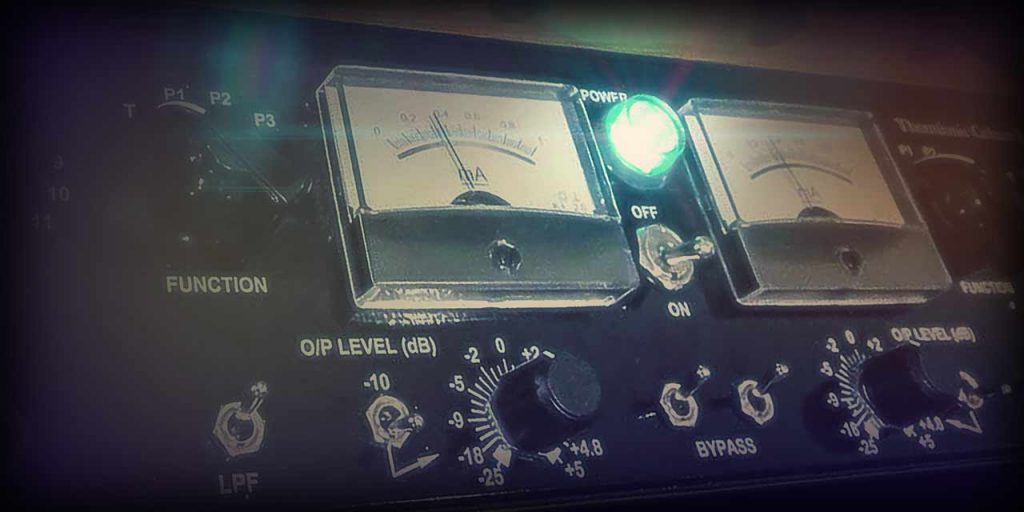
Thermionic Culture is a maker founded in the UK in 1998 by Vic Keary, who was captivated by vacuum tubes. Vacuum tubes are called "thermionic valves" in the UK and "vacuum tubes" in the US, which is where the company name comes from.
The Culture Vulture, arguably Thermionic Culture's signature product, has been used on countless recordings across genres, providing a vivid palette of distortion colors from warm tube sound to intense drive. For 15 years since its release, it has reigned as a one-of-a-kind classic tube distortion unit.
This product is a full circuit emulation of that unique piece of gear as a plug-in.
Main Parameters of the Thermionic Culture Vulture
The hardware Culture Vulture is a stereo unit, with parameters laid out symmetrically for each channel.
If you set the central switch to "LINK," operating one side controls both at the same time.

- (1) DRIVE
Controls the input gain and adjusts the strength of the distortion. The volume also changes, so adjust OUTPUT LEVEL accordingly. - (2) BIAS
Controls the current flowing through the tube and changes the character of the distortion. In a range of 0 to 1 mA, turning it right gives a weaker current and turning it left a stronger one (shown on the central meter). A weaker current gives a thinner, rougher distortion, and a stronger one gives a thicker, richer distortion. The sound changes in combination with DRIVE and DISTORTION TYPE, so try various combinations. - (3) DISTORTION TYPE
Switches between three operating modes to select the distortion character. T mode generates even-order harmonics, adding a warm tube texture without breaking the musical side of the source. P mode produces odd-order harmonics, forming an edgier, more creative distortion sound. P2 mode applies complex effects in a special way, giving somewhat tricky results. In every mode, all kinds of sound shaping are possible depending on the DRIVE and BIAS values. - (4) OUTPUT LEVEL
Adjusts the final output volume. - (5) FILTER
A 12 dB/oct low-pass filter that gently cuts the highs from 6 kHz or 9 kHz. Use it as a tool to get the distortion you want, for example when you want to tame excessive harmonics for a midrange-focused distortion. - (6) OVER DRIVE
Feeds even more input (+20 dB) to the tube for aggressive distortion. - (7) MIX
Adjusts the balance between the source sound and the effect sound. It is mainly used to restore transients squashed by heavy distortion by blending in the source sound.
Use Case 1: Applying It to the Drum Bus
When the drums are too clean for the mood of the song and do not blend in, try quickly applying the Culture Vulture to the drum bus.
Compare the difference.
It does not go as far as obvious distortion; a moderate amount of "grit" is applied, the midrange becomes fuller and the sound thicker. Meanwhile, thanks to the harmonics, the gritty presence of the cymbals adds nice flavor.
The settings look like this.
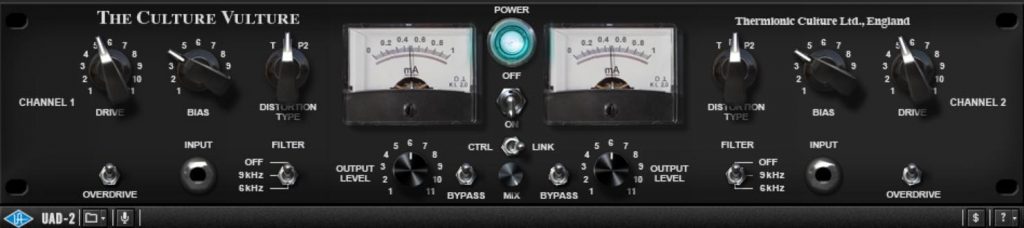
DISTORTION TYPE is set to T, DRIVE is raised to just short of too much distortion, and the quality of the distortion is adjusted with BIAS. As a guide, aim for a level where no extra harmonics land on the kick's attack.
FILTER was not used this time, but you could try it if you want a lo-fi impression.
Use Case 2: Applying It to Electric Guitar
When using an amp simulator, for example, the guitar sound may lack a little warmth or thickness. The Culture Vulture is effective in such cases too.
First, listen to the first case.
The impression of the sound has shifted to the midrange all at once, becoming hot and punchy. The harmonics are kept moderate, giving a smooth impression.
The settings look like this.
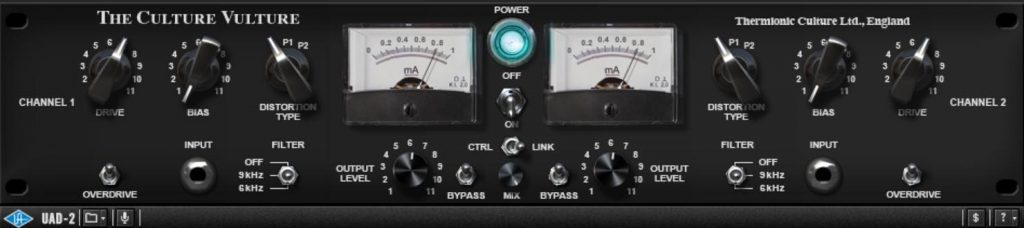
DISTORTION TYPE is T, DRIVE is raised without changing the impression of the original sound too much, and BIAS is at maximum to bring out plenty of tube character. FILTER is set to 9 kHz to remove noisy harmonics in the very high range.
Let's try one more example with guitar.
This one also has more midrange distortion, but the result keeps a little more edge than the previous guitar.
The settings look like this.
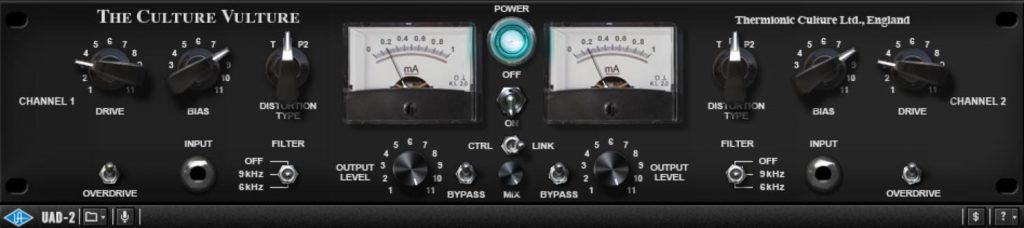
The trick is setting DISTORTION TYPE to P1, which adds odd-order harmonics and brings out the outline. However, raising DRIVE or BIAS too far here produces intense distortion, so both are kept at modest values. To finish, FILTER is set to 9 kHz to remove noisy harmonics for a smooth impression.
Use Case 3: Applying It to Bass
Finally, applying it to bass. You probably often want more presence without raising the volume.
Listen to how the Culture Vulture changes it.
This is not obvious distortion either, but moderate harmonics give it a solid impression, and at the same time the low mids become heavy and thick.
The settings look like this.
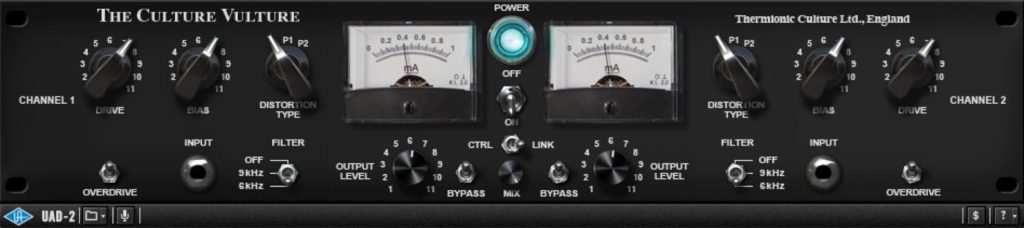
DISTORTION TYPE is T, DRIVE is raised a fair amount, and BIAS is kept somewhat restrained so the attack is not lost. FILTER goes down to 6 kHz, shifting power to the bass's sweet spot.
Distorting it further quickly fills it with harmonics and leaves a bass with no outline, but you can also make it sound like a synth bass, so I felt the range of sound design is quite wide.
Finally, for reference, let's compare the mix of the tracks above before and after applying the Culture Vulture.
That concludes our introduction to the Thermionic Culture Vulture.
Through this feature, I personally rediscovered the importance of distortion and how pleasant good-quality distortion is. The Culture Vulture's tube sound is very musical, and seems to have a magic that can turn even a somewhat bland sound emotional.
If you are interested, please give it a try.
Product link: Thermionic Culture Vulture
Frequently Asked Questions
Q1. What kind of UAD plug-in is the Thermionic Culture Vulture?
It is a plug-in dedicated to tube distortion, a circuit emulation of hardware from the long-established British maker Thermionic Culture. It can be used as a tool to control distortion and harmonics and add warmth and presence to instrument sounds.
Q2. What equipment do I need to use the Culture Vulture?
UAD plug-ins require a dedicated DSP accelerator or a UAD-compatible Apollo series audio interface. The plug-in runs through these devices.
Q3. What are the differences between the three DISTORTION TYPE modes (T, P and P2)?
T mode gives a warm texture with even-order harmonics, P mode an edgy sound with odd-order harmonics, and P2 mode produces complex special effects. You can choose according to the instrument and your sound design goal.
Q4. Can it be used on multiple instruments such as drums, guitar and bass?
Yes, it works with any instrument. The article introduces specific examples on a drum bus, electric guitar and bass, and by adjusting the parameters you can design the best sound for each instrument.
NEW ARTICLES
Latest English Articles











